

AI prompts for Chiefs of Staff
AI prompts for Chiefs of Staff: decision memos, leadership agendas, company updates and project status, plus how to save them. Works in ChatGPT and Claude.

Ask AI
 Share

The most useful AI prompts for a Chief of Staff are built around the job's recurring outputs: decision memos, leadership agendas, weekly updates, company updates and project status. A good prompt names who it's for, the sources to use, the format and what to flag, and runs inside a project holding your context file, in ChatGPT or Claude.
- Start from an output you produce every week, and spend your words on what the model can't know: how your principal reads, this week's decisions, and a real example of the standard.
- Write the standing parts once, in your project's instructions, so each prompt only needs the task and this week's material.
- Before a draft reaches your principal, check every name, number, date and commitment against the source. The model's own check only tells you where to look.
- Save a prompt you've run three times as a skill. If other people use your prompts, keep them in one shared library with an owner.
- Schedule only jobs that read and draft, and keep anything that sends, shares or deletes waiting for your approval.
Most prompt lists for Chiefs of Staff open with "Act as a world-class chief of staff". What comes back is advice that fits any company on earth. The model was told to play a role. Nobody told it about your principal (the executive you work for), this quarter, or what your leadership team decided last Tuesday.
Run each prompt below inside a project that holds your context file, which our beginner's guide to Claude sets up in about 90 minutes, including a first context file. If you're the executive and you prompt for yourself, five of these suit you as well: the options, the pre-mortem, the spreadsheet read, the rewrite and the check. Put your own title where a prompt says "I'm Chief of Staff to…", and write "me" wherever it still says [principal].
Prompts for priorities and decisions
These prompts gather what a decision needs and leave the choice with you and your principal. To write the decision up, use the memo format in our guide to briefing. Our AI guide has a prompt that drafts the memo.
Lay out the options from a messy thread
Most decisions arrive as a 40-message email chain or a Slack thread where three leaders talk past each other. Before you write anything for your principal, get the positions straight.
Prompt: Lay out the options from this thread
Below is a thread about [topic]. I'm Chief of Staff to [principal, title]. The decision sits with [principal].

[Paste thread]

Using only the thread:
1. State the decision in one sentence, phrased as a question.
2. List each option that's been proposed, including doing nothing. For each: who supports it, their main argument, and the cost or risk they've raised.
3. List the facts people disagree about, separately from the opinions.
4. List what's missing to decide: data, a person not yet consulted, a deadline.
5. Say who should own the decision, if the thread suggests it, and who only needs to be consulted.
Quote short phrases where a position matters. Don't recommend an option. Mark anything unclear as [CHECK].
Read step 5 first. I'd bet a lot of the stuck decisions in your company are stuck because nobody agreed who decides. Our guide to the Chief of Staff mandate shows how to write down the three tiers we use, Decide, Recommend and Not own.
Run a pre-mortem on a plan
A pre-mortem asks the team to imagine the plan has failed and explain why. AI is good at the first pass, because it isn't attached to the plan and won't worry about upsetting its author.
Prompt: Run a pre-mortem on this plan
I'm Chief of Staff to [principal, title]. Here's a plan we're about to commit to: [paste plan, or attach it]. Context: [company stage, the goal, the deadline, who owns delivery].

Imagine it's [date six months out] and the plan has clearly failed.
1. Write the five most likely reasons it failed, most likely first. For each, name the early warning sign we'd see in the first month.
2. Name the assumption the plan depends on most, and how we could test it in two weeks.
3. List which teams or people the plan needs that aren't named in it.
4. Suggest one change that would reduce the biggest risk without changing the goal.
Be specific to this plan. Skip generic risks like "poor communication" unless you can say where and why.
A list of failure modes from a model reads as criticism if it lands in a leadership meeting unannounced. Take the two or three that ring true to the plan's owner first, one to one.
Sort requests against the quarter
Your principal will ask for more than the quarter can hold. A weekly pass gives you a fair basis for saying no.
Prompt: Sort my principal's requests against our priorities
I'm Chief of Staff to [principal, title]. Here are the requests [principal] and the leadership team sent me this week: [list each request, who asked, and any deadline]. Use the priorities and the "off the list" section in our context file.

For each request:
1. Which priority it serves, or "none".
2. My suggested action: do it, delegate it (to whom), park it (say until when), or decline.
3. For any decline or park, a two-sentence reply I could send that names the priority it competes with.
Then list any request that conflicts with something in the "off the list" section, and anything that looks like a new priority we haven't agreed. Don't add priorities that aren't in the context file.
The last line matters most. When the same kind of request keeps arriving, it's usually a priority nobody has named. Run the sort on Friday, before you write your weekly update. Put the new priority in the update, and bring it to your next 1:1.
Prompts for running the operating rhythm
The rhythm holds only if the small jobs between meetings get done every week. These prompts take the first pass at them. The prompts for the weekly update and the leadership meeting agenda live in their own guides, next to the formats they follow.
Triage the inbox before your principal's first meeting
Email and Slack arrive addressed to you, to your principal or to both. Sort them by who has to act before you answer anything.
Prompt: Triage my inbox and Slack
I'm Chief of Staff to [principal, title]. Below are the email and Slack messages from the last [24 hours] sent to me, to [principal] or to both: [paste or attach]. Use the priorities and the "who owns what" section of our context file.

Put every message in one group:
1. Needs [principal] today: a decision or reply only they can give. For each, one line on why, and a suggested reply of two or three sentences.
2. I can handle it: a draft reply for each, under 80 words.
3. Someone else owns it: the owner from the context file and a one-line handoff note.
4. FYI: one line each.
Then list anything someone has waited on us for more than [3] days, and any message that conflicts with a decision in the context file.

Draft only. Don't send, archive or label anything. Use only the messages and the context file. If the owner or the urgency isn't clear, mark it [CHECK] instead of guessing.
I'm Chief of Staff to [principal, title]. Below are the email and Slack messages from the last [24 hours] sent to me, to [principal] or to both: [paste or attach]. Use the priorities and the "who owns what" section of our context file.

Put every message in one group:
1. Needs [principal] today: a decision or reply only they can give. For each, one line on why, and a suggested reply of two or three sentences.
2. I can handle it: a draft reply for each, under 80 words.
3. Someone else owns it: the owner from the context file and a one-line handoff note.
4. FYI: one line each.
Then list anything someone has waited on us for more than [3] days, and any message that conflicts with a decision in the context file.

Draft only. Don't send, archive or label anything. Use only the messages and the context file. If the owner or the urgency isn't clear, mark it [CHECK] instead of guessing.
Read the first group yourself before any of it reaches your principal, and move anything you can answer into the second. Run it by hand with the messages pasted in, and fix the prompt each time you correct a group. To run it every morning against your connected email, use the daily brief in our guide to building an AI chief of staff.
Find what slipped this week
A promise made in Tuesday's meeting has no owner by Thursday, and by the next leadership meeting nobody remembers who said it. Run this every Friday before you write your weekly update.
Prompt: Find what slipped this week
I'm Chief of Staff to [principal, title]. Here are this week's meeting notes and my commitments list: [paste or attach]. Today is [date].

1. Missed: every commitment due on or before today that the notes don't show as done. At risk: every open commitment due in the next [7] days with no progress in the notes. For each: who promised, to whom, what, by when, and where it was made.
2. List actions from this week's meetings that have no owner or no date.
3. List decisions that were made but not yet sent to the people affected.
4. For each missed item, draft a one-line nudge I could send the owner, friendly and specific. For each at-risk item, draft a one-line note to the person waiting.
Use only the material provided. If an item might be done but the notes don't say, put it under "check with owner" instead of "slipped". Draft the nudges only; don't send them.
Choose which nudges to send, and send them yourself. A tool that chases a senior leader on your behalf can cost you more goodwill than the slipped item was worth. If you don't keep a commitments list yet, the template is in our guide to context management.
Prepare a quarterly business review pack
A quarterly business review asks each team the same questions, and the Chief of Staff usually builds the pack. AI can draft the questions per team and check each submission before it reaches the room.
Prompt: Prepare our quarterly business review pack
I'm Chief of Staff to [principal, title]. We run a quarterly business review on [date] for [teams]. Attached: last quarter's plan for each team, their current metrics, our priorities for next quarter from the context file, our pre-read template and [the pre-reads received so far].

1. For each team, draft six review questions: two on results against plan, one on the biggest miss, one on what they need from other teams, one on next quarter's priorities, and one on what they need to start or stop now to be ready two quarters out.
2. For each team, list the data I should ask for before the review, with the metric and the period.
3. Flag any team whose metrics and stated delivery don't match (for example, "Delivered: Yes" or "on track" next to a metric below target or a falling trend).
4. For each pre-read already in, list what's missing against our pre-read template and any commitment from last quarter's plan it doesn't report on.
Use only the attached material. Mark missing data as [CHECK]. Don't rate the teams; raise each mismatch as a question.
Step 3 matters most. "On track" next to a falling number is the conversation the review exists for, so find it early and raise it with the team lead privately first. The pre-read template is in our guide to the operating rhythm.
Prompts for communication up and down
90% of the senior leaders in our AI Readiness Diagnostic had used AI to draft internal communications in the past 30 days. A company that gets five AI-drafted updates a week learns to skim them.
Three things keep an update sounding like your principal: real examples of their writing, the company's principles, and you editing the draft. Our guide to communications covers writing in your principal's voice and stress-testing a hard announcement.
Turn this week's decisions into a company update
Abhishek Vora, then Chief of Staff to the CEO at LaunchDarkly, told us company updates often took him ten hours. He had to get the right inputs from the right people, then match the message to the company's operating principles and the CEO's tone.
Giving AI a few examples of that tone plus the operating principles cut it to a first draft in seconds. Run this on the afternoon of the leadership meeting, while the decisions are fresh. The "what we tell the company" notes come from the last item on the agenda in our guide to leadership meetings.
Prompt: Turn leadership decisions into a company update
I'm Chief of Staff to [principal, title]. Here are this week's leadership meeting decisions and the "what we tell the company" notes: [paste]. Attached: three recent company updates from [principal] and our operating principles.

Draft a company update from [principal]:
1. Open with the one change people will notice most, and why.
2. Cover each decision we agreed to share, in plain words: what changes, for whom, from when, and who to ask.
3. Link each decision to an operating principle or priority where it honestly fits. Don't force it.
4. Leave out anything not marked for sharing.
Match the tone, length and sign-off of the attached updates. Under 350 words. Then list any decision where the reason given in the notes is thin, so I can ask [principal] before this goes out.
Don't drop the last instruction. An update that announces a decision without a reason invites the hallway version, and AI will invent a plausible reason if you don't stop it. Take a thin reason to your principal as a question.
Prepare for the hard all-hands questions
When an all-hands goes wrong, it's usually in the Q&A, when someone asks the question the leadership team hoped to avoid. Your principal can rehearse the talk alone; the questions need someone to play the room.
Prompt: Prepare my principal for the all-hands Q&A
I'm Chief of Staff to [principal, title]. [Principal] is presenting [topic] at the all-hands on [date]. Attached: the slides or talking points, and recent context (team changes, results, anything people are worried about).

1. List the 10 questions employees are most likely to ask, including the uncomfortable ones. For each, say which group is most likely to ask it.
2. For each question, draft a short, honest answer using only the attached material. Where the material doesn't support an answer, write "we don't know yet" and suggest what we can commit to instead.
3. Flag any talking point that could be read as a promise we can't keep.
Plain language. No spin.
Go through the uncomfortable questions with your principal. The value is in hearing which ones they'd rather not take.
Rewrite a message for a different reader
The same decision goes to the board, the leadership team and the company in different shapes, and each version has to say the same thing.
Prompt: Rewrite this for a different reader
I'm Chief of Staff to [principal, title]. Here's a message written for [original audience]: [paste]. Rewrite it for [new audience, e.g. the board / a frontline team / a partner company].

Keep every fact and commitment exactly as written. Change what this reader needs: the order, the level of detail, the jargon, and what they're being asked to do. Tell me in a short list what you cut, what you added and why. Don't add new claims.
The "keep every fact" line stops the rewrite from softening a commitment on its way from the board note to the team update.
Prompts for cross-functional projects
AI helps on cross-team work because it reads five teams' documents in the time it takes you to open them, and it doesn't skip the badly written one.
Research and competitor scans have their own prompts in our guide to research, and stakeholder maps in our stakeholder map guide.
Build one status view from every team's notes
A cross-team project status is only useful if every team is measured the same way. Ask for that explicitly, or the model will repeat each team's own optimism.
Prompt: Build one project status from every team's notes
I'm Chief of Staff to [principal, title]. Project: [name]. Goal: [one line]. Deadline: [date]. Attached: this week's notes or updates from [teams].

1. Make a table: team, what they committed to this period, what's done, what's late, status (on track, at risk, off track) by your reading of the facts. Where a team's own status differs from yours, show both.
2. List dependencies between teams that are late or unclear, and who needs to talk to whom.
3. List decisions the project needs from [principal] or the leadership team, with a date for each.
4. Write a three-line summary for [principal]: overall status, the biggest risk, the one ask.
Use only the attached notes. Mark anything you inferred as [INFERRED]. Don't copy a team's own status as your reading.
A team that reports "on track" with half its commitments late needs a conversation, and it's better that you have it than the CEO.
Read a spreadsheet before the leadership meeting
Finance, hiring and pipeline spreadsheets arrive the night before a meeting. Know what changed before you walk in.
Prompt: Read this spreadsheet before the leadership meeting
I'm Chief of Staff to [principal, title]. Attached is [the spreadsheet] for [meeting] on [date]. [Last period's version is attached too. Delete this line if you don't have it.]

1. What changed since last period? List the five biggest changes with the numbers.
2. What looks wrong or inconsistent (totals that don't add up, a number that moved without explanation, a missing month)? Show your calculation for each.
3. What are the three questions the leadership team is most likely to ask about it?
4. One line I could open the discussion with.
Show every calculation so I can check it. Don't round unless I ask.
Check every number it flags yourself before you raise it. A model that misreads a column flags a problem with the same confidence as a real one, and a false alarm in front of the CFO costs you the credibility you'll need for a real one.
Draft a job description for another team's role
Michael Finkbeiner, then Chief of Staff at Vertosa, started his job descriptions from what the model already knows. It doesn't know your company, but it knows a lot about what a sales account executive generally does, so start there and add what's specific to you.
Prompt: Draft a job description for another team's role
I'm Chief of Staff to [principal, title]. I need a first draft of a job description for a [role] on our [team]. The hiring manager is [name, title].

Step 1: Describe what this role usually does at a company like ours ([stage, size, industry]): typical responsibilities, the skills that matter, and how success is usually measured in the first year.
Step 2: Now adapt it using what's specific to us: [what the team needs, the problems this hire solves, who they work with, the level, location, and anything the hiring manager told me].
Step 3: Write the job description: summary, the three outcomes for the first year, responsibilities, must-have and nice-to-have skills.
Then list the five questions I should ask the hiring manager before this is posted. Don't invent pay, benefits or facts about our company that I haven't given you.
The questions at the end matter most, because the hiring manager's corrections tell you what the role is. For a Chief of Staff role itself, use our job description guide.
How do you check AI output before it reaches your principal?
Check every name, number, date, quote and commitment against the source, then read the draft once as the person receiving it. Ask the model for a first pass, and treat its check as a list of places to look.
AI's errors don't look like errors. A wrong total sits in a clean table, and a misattributed quote sounds exactly like the person. Our AI guide lists the real mistakes one Chief of Staff's system made in its first months: a task assigned straight to his boss, one colleague's update credited to another, notes prepared on someone who had already left.
Once your principal notices one AI error in something you sent, they'll reread everything you send for a month. Run this on anything that will reach your principal, the leadership team or the board.
Prompt: Check this draft before I send it
I'm Chief of Staff to [principal, title]. Here's a draft I'm about to send to [reader]: [paste draft]. Here are the sources it was based on: [paste or attach notes, data, documents].

1. List every factual claim in the draft (names, numbers, dates, quotes, commitments) and mark each as: matches the source, differs from the source (quote both), or not in the sources.
2. List anything about a named person that could be read as a judgment of them.
3. List any sentence that commits [principal] or the company to something.
4. Read it as [reader]: what's the first question they'll ask, and is it answered?
Don't rewrite the draft. Just give me the lists.
Then do your own pass on the first two lists, against the source, every time. Anything about a person stays a draft until you've verified it yourself, whatever the model says.
If you're the executive, run the same check on your own drafts before they go to your board or the company. Put that audience where the prompt says [reader], and check the first two lists against the sources yourself. The model's check only shows you where to look.
What a check looks like on real work
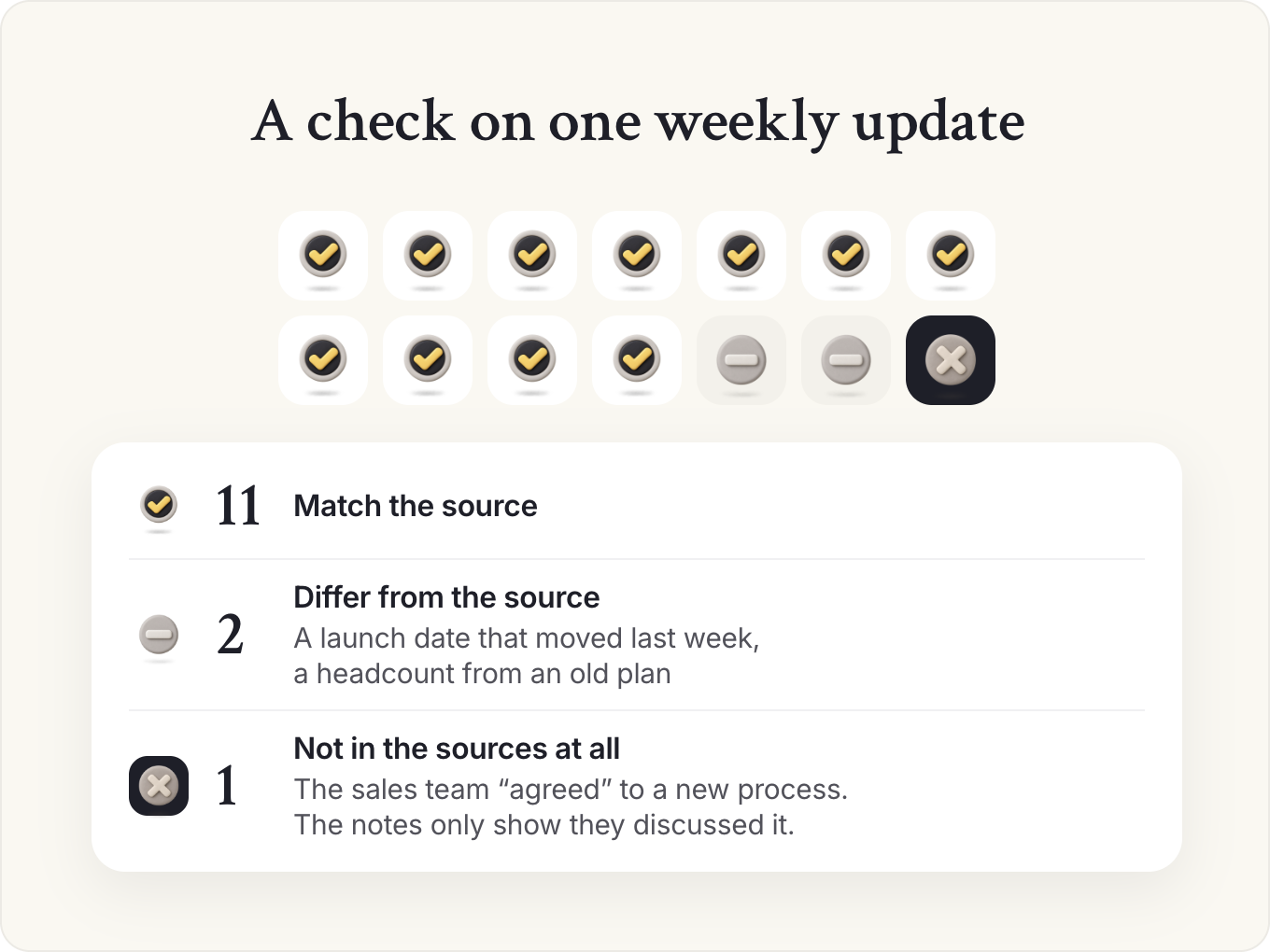
On a weekly update, a check looks like this (illustration). It lists fourteen claims, and eleven match the source. Two differ: a launch date that moved last week, and a headcount from an old plan.
The fourteenth isn't in the sources at all: a sentence saying the sales team "agreed" to a new process, when the notes only show they discussed it. You fix the date and the number in a minute. The invented agreement matters more, because it commits a team to something it never agreed, and people remember that kind of error.
How much checking each draft needs
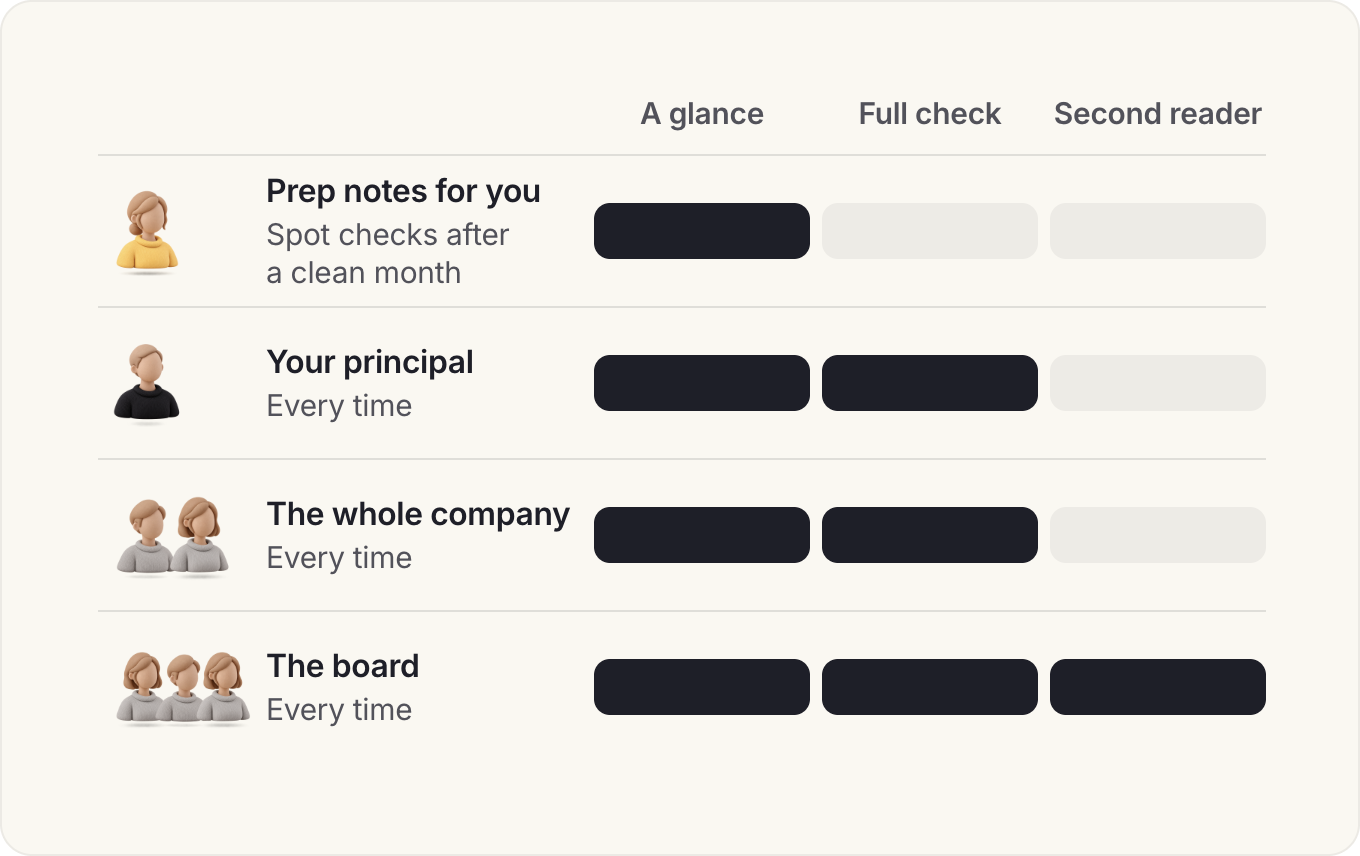
Check in proportion to who reads it and what it commits. Anything for your principal, the board or the whole company gets the full check, every time. Prep notes only you will read need a glance at the names and numbers you'll say out loud. Board material also gets a second reader. By the time you've built a deck, you can't see its errors.
Keep a short log of what the checks catch. After a month it shows where your setup is weak: wrong dates usually mean a stale context file, and invented agreements usually mean the prompt lacks the "only use the sources" rule. Fix the cause in the project or the skill. Once a job has run cleanly for a month, prep notes for you alone can move to spot checks on names and numbers. Anything that goes upward keeps the full check.
This week, run the check on the next draft you send upward, and note how many claims it marked as "not in the sources".
What makes a good AI prompt for a Chief of Staff?
A good prompt for this job has six parts: who you are and who the output is for, the job and the decision it serves, the sources it may use, the format, the standard it must meet, and what to check. Most of the words go on context. The instruction itself is usually one line.
A model already knows how to write a memo. It can't know that your CEO reads only the first two lines, that the pricing decision was made last week, or that one VP will object to anything that touches her budget. Each part closes one of those gaps, and the sources rule stops the model filling the rest with plausible guesses.
In our AI Readiness Diagnostic, 54% of the senior leaders we surveyed write detailed prompts and iterate on what comes back, so almost half don't. When we asked companies for our Chief of AI Report what they'd learned, one respondent named the two skills this guide teaches: proper prompting and source checking.
The six parts of a Chief of Staff prompt
| Part | Weak | Strong |
|---|---|---|
| Role and reader | "Act as a chief of staff" | "I'm Chief of Staff to our CEO, who reads the first two lines and skips the rest" |
| The job | "Summarize this" | "Pull out the decisions, owners and dates for the leadership meeting follow-up" |
| Sources | (none) | "Use only these notes and the context file. Mark gaps as [CHECK]" |
| Format | (none) | "Recommendation first, one page, numbers in a table" |
| Standard | "Make it good" | "Match the tone of the three CEO emails attached" |
| Checks | (none) | "List what you assumed and anything about a person I should verify" |
A weak prompt, rebuilt step by step
Take "Summarize these notes" after a leadership meeting, and add the six parts one at a time (illustration).
- The weak version returns a tidy page of everything discussed, in the order it was discussed. Your principal reads the first two lines, which are about start time and attendance.
- Add the role, reader and job: "I'm Chief of Staff to our CEO, who reads two lines. Pull out the decisions, owners and dates for the follow-up." Now the page leads with decisions, but it lists a debate about pricing as a decision.
- Add the sources rule: "Use only these notes. Mark anything unclear as [CHECK]." The pricing item now reads "[CHECK] discussed, no decision recorded", which is true and useful.
- Add the format and standard: "A table of decision, owner, date, then three bullets on open questions. Match the follow-up I sent last week," with that email attached.
- Add the check: "List what you assumed, and any action with no owner." It flags two actions nobody took.
Each step fixed one failure with something you knew and the model didn't. The judgment calls are the reader and the sources rule. People overcorrect by pasting forty pages of history. The model then weighs a two-year-old plan the same as this week's decision. Give it the context file and this task's material only.
The other overcorrection is asking the model to recommend before you've decided what you think. For anything with judgment in it, write your own view in one line and ask the model to build or attack it.
The reader changes the prompt more than the task does. A board member needs context they don't have, a team lead needs only their actions, and a principal reading on a phone needs the decisions first. If you support a functional leader, put the function's vocabulary in the context file, or the model will translate "the migration" into something vague.
Split a big job into a chain of prompts
A single prompt for a big job, such as redesigning the operating rhythm, asks the model to diagnose, design and plan in one pass, and you can't correct the diagnosis before the design is built on it. One of our member playbooks runs that job as three prompts in one conversation: diagnose what's broken, design the target state, then plan the rollout, pasting each answer into the next prompt. Its first prompt also asks which problems a better rhythm can fix and which are strategy or people problems in disguise. Check each answer before the next prompt builds on it.
Let the model interview you for a new prompt
For a job this library doesn't cover, let the model ask the questions. You know your principal's habits too well to think of writing them down, and a direct question brings them out.
Prompt: Turn a job I repeat into a reusable prompt
I'm Chief of Staff to [principal, title]. I want a reusable prompt for a job I do every [week / month]: [describe the job in a few lines, and paste one recent example of the finished output].

Before you write anything, ask me questions one at a time until you know:
- who reads the output, and how they read it (on a phone, the first two lines only, a full pre-read);
- the decision or action it serves;
- the sources the prompt may use, and any it must never use;
- the format, the length and what good looks like;
- what usually goes wrong with this job.
Ask no more than eight questions.

Then write the prompt in six parts: role and reader, the job, sources, format, standard, checks. Put anything that changes each time in [brackets]. End it with a step that lists what the model assumed and anything about a person I should verify. Don't add instructions I didn't give you.
I'm Chief of Staff to [principal, title]. I want a reusable prompt for a job I do every [week / month]: [describe the job in a few lines, and paste one recent example of the finished output].

Before you write anything, ask me questions one at a time until you know:
- who reads the output, and how they read it (on a phone, the first two lines only, a full pre-read);
- the decision or action it serves;
- the sources the prompt may use, and any it must never use;
- the format, the length and what good looks like;
- what usually goes wrong with this job.
Ask no more than eight questions.

Then write the prompt in six parts: role and reader, the job, sources, format, standard, checks. Put anything that changes each time in [brackets]. End it with a step that lists what the model assumed and anything about a person I should verify. Don't add instructions I didn't give you.
Run the result on last week's real material before you save it, and compare the output with what you actually sent. Each difference points to something only you knew. Add it to the prompt, then save the prompt in your project's instructions or as a skill.
How do you save and share prompts so you stop retyping them?
Put recurring context in a project, turn any prompt you've run three times into a skill, and keep a short shared library with an owner for the prompts your team uses.
Project instructions hold how you work for one principal. A skill holds how to do one job, in any chat. Our guide to Claude for Chiefs of Staff has both ready to copy, with the install steps, and the instructions work in ChatGPT projects too.
Claude
- For one principal: paste the standing parts (role, reader, format, checks) into the project's instructions. Each new chat in the project starts with them.
- For a recurring job: turn the prompt into a skill, a SKILL.md file with a name and a one-line description of when to use it.
- For a scheduled job: schedule it from Cowork or from any chat, on a paid plan. Keep it to reading and drafting, and set it to Manual, so a step that needs your approval waits for you or the task finishes without it.
ChatGPT
- For one principal: add the standing parts to the project's instructions; they apply only inside that project.
- For a recurring job: on Business, Enterprise and Edu plans, turn it into a skill where your admin allows it. Or save it as a plugin, which combines reusable instructions with connected apps.
- For a scheduled job: ask for a scheduled task in a chat, and keep it to reading and drafting.
A team library that stays useful
If an EA, a chief of staff team or the leaders you support use your prompts, keep them in one shared document. Give each a title that names the output, one line on when to use it, the date it was last tested and an owner. Remove any prompt nobody has used in a quarter, because a long library of stale prompts teaches people to distrust all of it.
Shared prompts also make outputs consistent: when every EA and Chief of Staff who supports the leadership team uses the same meeting summary prompt, leaders read the summaries faster.
This week, find the prompt you've typed most often and save it as a skill or in your project instructions.
Asked to lead AI adoption beyond your own prompts? The Chief of AI Fellowship covers AI strategy, use cases and rollout, and ends with an AI roadmap you present to your CEO or board.
Join the waitlist for the next cohortThe full library: every prompt in our guides
Our other guides hold 39 more prompts, plus the two templates that set up a Claude project and skill. They're listed here by job.
Each one lives on one page, next to the job it serves, Open the guide on its row to copy it.
Prompts in our other guides
| Job | Prompt | Where it lives |
|---|---|---|
| Priorities and decisions | Draft a decision memo | AI and the Chief of Staff |
| Priorities and decisions | Pressure-test my decision memo | Briefing |
| Priorities and decisions | Predict the board's questions | Board meetings |
| Running the operating rhythm | Design my operating rhythm | Operating cadence |
| Running the operating rhythm | Daily brief for a Chief of Staff | Building an AI chief of staff |
| Running the operating rhythm | Meeting prep pack | Building an AI chief of staff |
| Running the operating rhythm | Draft a meeting brief from my notes | Briefing |
| Running the operating rhythm | Draft next week's leadership meeting agenda | Leadership meetings |
| Running the operating rhythm | Turn this meeting transcript into decisions and actions | Leadership meetings |
| Running the operating rhythm | Draft my weekly update from these notes | Weekly update |
| Running the operating rhythm | Plan next week from my principal's priorities | A day in the life |
| Running the operating rhythm | First pass of a calendar audit | Calendar management |
| Running the operating rhythm | Check next week against the time budget | Calendar management |
| Running the operating rhythm | Turn this week's notes into context updates | Context management |
| Running the operating rhythm | Weekly stakeholder summary from meeting notes | AI and the Chief of Staff |
| Communication up and down | Draft a message in my principal's voice | Communications |
| Communication up and down | Stress-test a hard announcement | Communications |
| Communication up and down | Draft the monthly investor update | Board meetings |
| Communication up and down | Prepare for a conversation with a skeptical stakeholder | Stakeholder map |
| Communication up and down | Update my stakeholder map from this week's notes | Stakeholder map |
| Cross-functional projects | Deep research brief | Research |
| Cross-functional projects | Competitor scan from public sources | Research |
| Your role and career | Find the real level of a Chief of Staff role | What a Chief of Staff does |
| Your role and career | Is this offer an EA role or a Chief of Staff role? | Chief of Staff vs EA |
| Your role and career | Map my background to a Chief of Staff role | How to become a Chief of Staff |
| Your role and career | Build my 90-day Chief of Staff skills plan | Skills |
| Your role and career | Benchmark my Chief of Staff offer | Salary |
| Your role and career | Build my first 90 days as a Chief of Staff | First 90 days |
| Your role and career | Draft my Chief of Staff mandate from my notes | Mandate |
| Your role and career | Draft my handover note from my context file | Context management |
| Your role and career | Package my fractional Chief of Staff offer | Fractional Chief of Staff |
| Hiring a Chief of Staff | Turn my notes into a Chief of Staff job description | Job description |
| Hiring a Chief of Staff | Review my Chief of Staff job description for red flags | Job description |
| Hiring a Chief of Staff | Draft my Chief of Staff mandate and interview plan | Hiring a Chief of Staff |
| Hiring a Chief of Staff | Do I need a COO or a Chief of Staff? | Chief of Staff vs COO |
| Your AI setup | Test what Claude knows about my principal | Claude for Chiefs of Staff |
| Your AI setup | Audit my AI tools | AI tools |
| Your AI setup | Friday scan for the next job | Building an AI chief of staff |
| Your AI setup | Turn three of my documents into a template | Toolkit |
| Your AI setup | Template: Project instructions for a Chief of Staff | Claude for Chiefs of Staff |
| Your AI setup | Template: Chief of Staff skill (SKILL.md) | Claude for Chiefs of Staff |
For a job that isn't on this page, use the interview prompt above to build your own, and test it on last week's material before you save it.
Keep reading
- Claude for Chiefs of Staff: a beginner's guideAI and the CoS
 AI chief of staff: how AI is changing the role, and what it can't doAI and the CoS
- AI tools for Chiefs of Staff: what to use, buy or buildAI and the CoS
AI and the CoS
Take this guide with you
The full guide as a PDF: every section, template and chart, ready to print or share with your team.
Your PDF is ready.
Download the PDFFree. We may email you new guides; unsubscribe anytime.
Frequently asked questions
What are the best AI prompts for a Chief of Staff?
The most useful ones produce the job's recurring outputs: decision memos, meeting briefs, leadership agendas, weekly updates, company updates and project status. A good prompt names who you are and who it's for, the sources to use, the format and what to check. This library has 14 prompts of its own and an index of 39 more from our other guides, all free to copy.
Is there one chief of staff prompt I can paste into Claude or ChatGPT?
Yes, in two parts: standing instructions you paste into your project once, and a short prompt for each job. Put who you are, who you serve, the format and the checks in the instructions, then take each job's prompt from this library. Our guide to Claude for Chiefs of Staff has project instructions and a chief of staff skill ready to copy, and the instructions work in ChatGPT projects too. To run jobs on a schedule with your calendar and email connected, our guide to building an AI chief of staff sets it up in about a week.
Do these prompts work in both ChatGPT and Claude?
Yes. They're written in plain language with no tool-specific features, and each has an Ask AI button that opens it in either. They work best inside a project that holds your context file and your principal's writing samples, which both tools support.
How do I write a prompt that doesn't sound generic?
Give it what only you know: your principal's priorities, this week's decisions and three real examples of their writing. Tell it which sources it may use, and to mark gaps as [CHECK]. The six parts of a good prompt, above, show where each piece goes.
Should I save prompts as a project, a skill or a plugin?
Put standing context for one principal in a project. Turn a prompt you've run three times into a skill, which works across projects in Claude and, where switched on, in ChatGPT. In ChatGPT, a plugin can also hold reusable instructions together with the apps it connects to. OpenAI is retiring custom GPTs from December 11, 2026, and lets you migrate them to plugins, so don't start a new one.
Can I use AI prompts with confidential company information?
Only on a plan your company has approved, and within its AI policy. Most companies keep people matters, legal work, customer personal data and unfinished board material out of AI tools, or allow them only under tighter rules. Ask IT what's approved before you paste anything sensitive.
- AI Readiness Diagnostic, Chief of Staff Network, 2026 (1,200+ senior leaders, drawn from Chiefs of Staff and senior operators).
- Chief of AI Report, Chief of Staff Network, 2025.
- Chief of Staff Network podcast: Abhishek Vora, Michael Finkbeiner.
- AI Companion: Building Your Operating Cadence, Chief of Staff Network member library, 2026.
- Vendor help centers: Claude, OpenAI (checked November 11, 2026).
Learn the job with people who do it
Membership gets you the Power Skills program, member events and a private community of working Chiefs of Staff.
Land your first Chief of Staff role
Launchpad helps you prepare, position yourself and interview for the role.
Starting out in the role?
The Fundamentals email course walks you through scoping the mandate, setting the cadence and earning trust.
Lead AI adoption from the Chief of Staff seat
The Chief of AI Fellowship is for operators turning AI into how the company runs.
Hiring a Chief of Staff?
Post the role on the Chief of Staff job board, or browse open roles.
Get your resume ready for the role
Get feedback on your Chief of Staff resume before you apply.
Let the right roles find you
Join the talent network and hear about Chief of Staff roles first.
The Chief of Staff newsletter
What Chiefs of Staff are reading, hiring for and building.
Get the full report
Every chart and cut from our latest salary research, sent to your inbox.
Using AI with sensitive data?
Learn the legal side of using AI at work.
Keep going in this series