


Executive calendar management and inbox triage
Executive calendar management for Chiefs of Staff and EAs: a 4-week calendar audit, a time budget template, booking rules, focus time and inbox triage.

Ask AI
 Share

Executive calendar management is deciding where a leader's time goes and running the schedule to match. The strategy half is a time budget by priority, booking rules and a quarterly calendar audit, and a Chief of Staff usually owns it. The logistics half is scheduling, travel and meeting prep, usually run by an executive assistant inside those rules.
- Audit the last four weeks of the executive's calendar against their priorities before you change any meeting. The gap is what the time budget has to fix.
- Turn that gap into a written time budget and booking rules that your principal, the executive you work for, agrees to. Review both every quarter.
- Split the work: the Chief of Staff writes the rules and calls the trade-offs, and the executive assistant runs the calendar inside them. In a hybrid role you do both, so write the rules down anyway.
- Book focus time first and name it for the work it protects, or it will be gone within a month.
- Agree written inbox rules: what you handle, what you draft for approval and what your principal must see the same day. Send nothing in their name without approval until they've written down which kinds of email you may send alone.
Pull up your principal's calendar for the last four weeks. It is the only honest record of where their time went. Ask one question: if a stranger read only those four weeks, what would they think the company's priorities are? For most leaders the answer is uncomfortable: recruiting, a customer escalation, three vendor calls and a lot of internal meetings nobody remembers asking for, with last quarter's priorities somewhere in the gaps. Read the calendar before you change anything. Then write the priorities down, because an assistant can only defend priorities that are written down.
If it's your calendar, your part is short. Agree the time budget, approve the booking rules, decide which time is protected, and keep the final say when two meetings clash. Your Chief of Staff, and your assistant if you have one, run the rest inside those rules. Tell them in writing which kinds of email can go out in your name without your approval.
How do you run an executive calendar audit?
Take the last four weeks of your principal's calendar, tag every meeting by the company priority it served, and compare the totals with the share of time your principal wants each priority to get. The gap is what the time budget and booking rules have to close. Set aside about two hours.
One week is too easy to explain away, and a quarter is too much to tag by hand. Use the company's current priorities as categories, then add four more: running the company, people, external and "none of the above". The size of that last category is usually the finding.
A first audit usually has no written budget, so fill the Budget % column with the share your principal says each priority should get. Export four weeks of the calendar and load it into a spreadsheet. Google Calendar exports .ics files, so you may need a converter, or an AI assistant, to turn them into rows. Check one week of the export against the live calendar before you tag it, because recurring series don't always export cleanly.
Template: Calendar audit worksheet
Calendar audit: [principal] · [dates, 4 weeks]
1. Categories
- Priority 1: [name]
- Priority 2: [name]
- Priority 3: [name]
- Running the company: leadership meeting, 1:1s with direct reports
- People: hiring, development, culture
- External: customers, investors, board, partners
- None of the above
2. Totals (hours over 4 weeks)
| Category | Hours | % of working time | Budget % | Gap |
|---|---|---|---|---|
| Priority 1 | ||||
| Priority 2 | ||||
| Priority 3 | ||||
| Running the company | ||||
| People | ||||
| External | ||||
| None of the above | ||||
| Focus time (protected, used) |
3. Patterns
- Meetings with no agenda: [count]
- Recurring meetings, each marked keep, fix or cut (flag any not reviewed in 6 months): [list]
- Meetings moved two or more times: [list]
- Meetings where [principal] wasn't needed: [list]
- Longest stretch without a meeting, by week: [hours]
4. Recommendations (max 5)
- Stop:
- Shorten:
- Delegate to:
- Protect:
- Add:
# Calendar audit: [principal] · [dates, 4 weeks]

## 1. Categories
- Priority 1: [name]
- Priority 2: [name]
- Priority 3: [name]
- Running the company: leadership meeting, 1:1s with direct reports
- People: hiring, development, culture
- External: customers, investors, board, partners
- None of the above

## 2. Totals (hours over 4 weeks)
| Category | Hours | % of working time | Budget % | Gap |
| --- | --- | --- | --- | --- |
| Priority 1 | | | | |
| Priority 2 | | | | |
| Priority 3 | | | | |
| Running the company | | | | |
| People | | | | |
| External | | | | |
| None of the above | | | | |
| Focus time (protected, used) | | | | |

## 3. Patterns
- Meetings with no agenda: [count]
- Recurring meetings, each marked keep, fix or cut (flag any not reviewed in 6 months): [list]
- Meetings moved two or more times: [list]
- Meetings where [principal] wasn't needed: [list]
- Longest stretch without a meeting, by week: [hours]

## 4. Recommendations (max 5)
1. Stop:
2. Shorten:
3. Delegate to:
4. Protect:
5. Add:
Bring the totals to your principal before your recommendations. Leaders argue with advice about their time, but they rarely argue with their own calendar, and once they react to the numbers the recommendations become their idea.
Calendars drift for structural reasons. Recurring meetings get added when a problem appears and rarely removed when it's solved. Delegation that never finished shows up as attendance: if the head of partnerships owns a relationship, the CEO shouldn't be on every call about it. Itamar Melamed, Chief of Staff at Empathy, told our podcast he reads his CEO's calendar for patterns and asks about anything that repeats. He also uses it to plan ahead: a recovery day after a big trip, booked before the CEO thinks to ask.
A worked example: reading the totals (illustration)
The audit of your CEO's last four weeks shows 128 meeting hours. The top priority, which the CEO wanted at 15% of working time, got 9%. "None of the above" was 22%. Of 14 recurring meetings, five haven't been reviewed in six months, and partnership calls took 11 hours with the head of partnerships in every one.
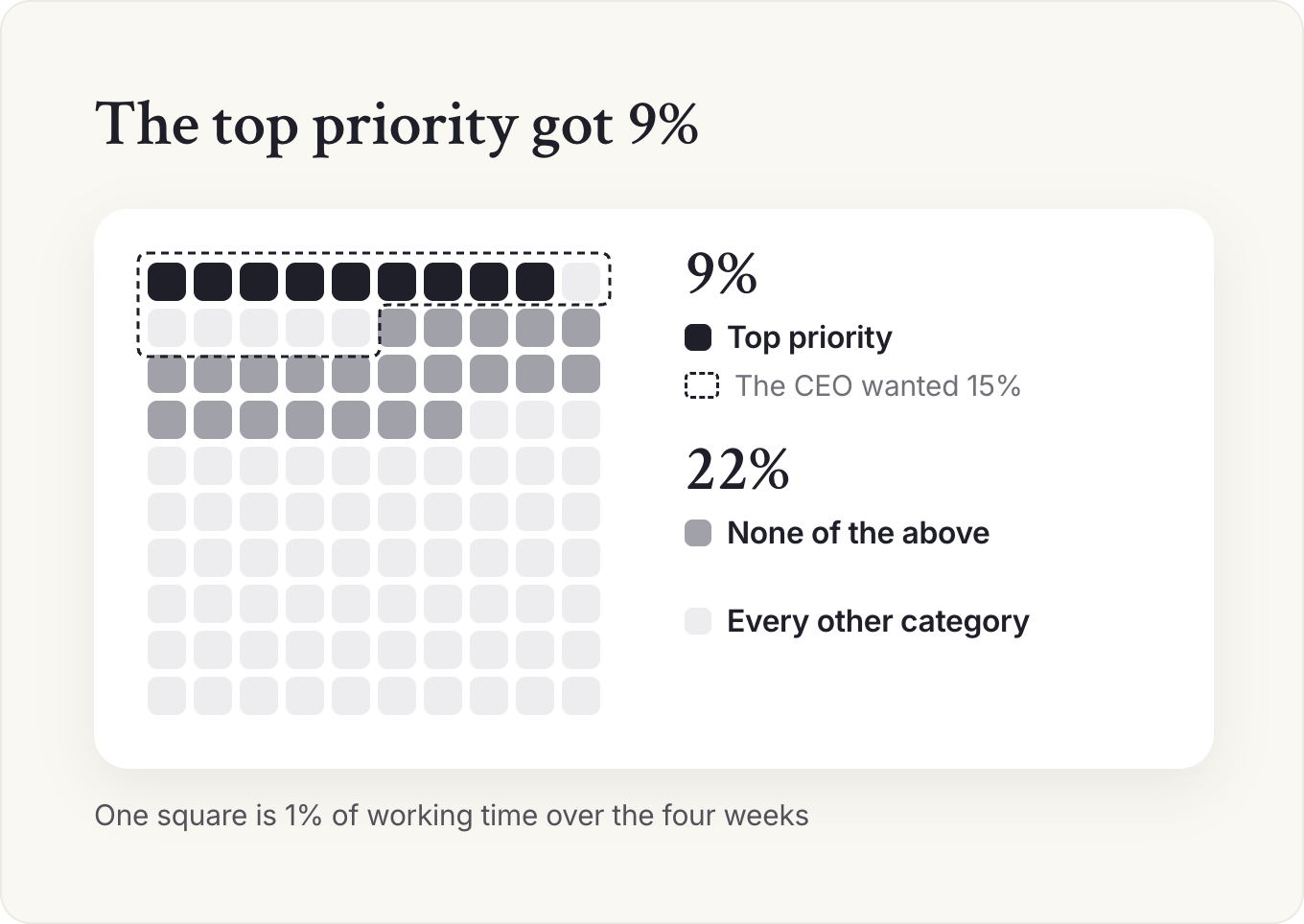
Three of your five recommendations follow from those lines, and two come from your own read of the calendar. Stop three of the unreviewed recurring meetings, or move them to written updates. Shorten the weekly product review from 60 to 25 minutes. Delegate the partnership calls, with a monthly summary. Protect two named blocks a week for the top priority. Add two customer calls a week. You bring the table first, and the CEO spots the 9% before you mention it.
Judgment calls after the audit
Leave room for some "none of the above". A coffee with a new manager or an hour at a team event may serve no listed priority and still be time well spent, so I'd keep a small allowance for it. When a recurring meeting is cut, the explanation should come from your principal. Around month three the calendar drifts back toward its old shape, so put the next audit on the calendar now.
Cut first the meetings nobody will defend, and talk to the owner of every other recurring meeting before it goes. Our operating rhythm guide covers the same reset across the whole leadership team.
If your company allows it, an AI assistant can do the first pass of tagging from a calendar export. Remove private event titles first, and check every tag, because it can't know that "coffee with Sam" was a hiring conversation.
Prompt: First pass of a calendar audit
You are helping a Chief of Staff audit an executive's calendar.

Below is a 4-week calendar export (title, date, length, attendees), with private items removed: [paste]

Our priorities this quarter: [list 3]
Other categories: running the company, people, external, none of the above.

1. Tag each meeting with one category. If you can't tell, tag it "unclear" and say why.
2. Total the hours by category and as a share of working time (meetings plus focus blocks).
3. List recurring meetings, with total hours each over the 4 weeks.
4. List meetings with more than 8 attendees.
Do not recommend changes yet. I'll review the tags first.
Read the "unclear" list first: it shows the meetings nobody can explain, including you. This week, export four weeks of your principal's calendar and tag it, and don't recommend anything until your principal has seen the totals.
How do you set a time budget and booking rules?
Agree with your principal what share of their time each priority and each kind of work should get this quarter, then write a short set of booking rules that make the budget happen: who can book them, for how long, on which days, and what needs a reason. Draft the budget from the audit's totals, and review it each quarter.
Without a budget, the calendar fills in the order requests arrive. A request is concrete, has a person attached and wants an answer today, while a priority never asks for a meeting. A budget gives every request something to be weighed against: yes to this meeting means less of priority two.
Booking rules make the time budget happen
Review the budget each quarter and audit the calendar against it.
Who can book
Direct reports book directly, for 1:1s and urgent items. Everyone else asks through the EA, the Chief of Staff or a form.
For how long
Default to 25 or 50 minutes, and 15 for a quick decision.
On which days
Set meeting days, for example internal meetings Monday to Wednesday and external ones on Thursday.
What needs a reason
Every meeting needs a purpose line and what your principal must decide or do.

Template: Time budget and booking rules
[Principal]'s time: budget and booking rules · [quarter]
Budget (share of working time)
| Category | Target % | Notes |
|---|---|---|
| Priority 1: [name] | ||
| Priority 2: [name] | ||
| Priority 3: [name] | ||
| Running the company | Leadership meeting, 1:1s | |
| People | Hiring, development | |
| External | Customers, investors, board | |
| None of the above | Time held for what comes up | |
| Focus time | Focus blocks for work outside the three priorities. Blocks for a priority count in that priority's row. |
Booking rules
- Who can book directly: [e.g. direct reports, for 1:1s and urgent items]
- Who requests through [EA / CoS / form]: everyone else
- Default lengths: [25 / 50 min]; 15 min for a quick decision
- Every meeting needs: a purpose line and what [principal] must decide or do
- Meeting days: [e.g. internal meetings Mon to Wed, external Thu]
- No meetings: [e.g. before 9:30, Friday afternoon]
- Recurring meetings: reviewed every quarter; no review, no renewal
When rules conflict
- Priority work beats internal meetings
- [Principal]'s commitments to their family and health are not negotiable
- The Chief of Staff decides within these rules and tells [principal] after
# [Principal]'s time: budget and booking rules · [quarter]

## Budget (share of working time)
| Category | Target % | Notes |
| --- | --- | --- |
| Priority 1: [name] | | |
| Priority 2: [name] | | |
| Priority 3: [name] | | |
| Running the company | | Leadership meeting, 1:1s |
| People | | Hiring, development |
| External | | Customers, investors, board |
| None of the above | | Time held for what comes up |
| Focus time | | Focus blocks for work outside the three priorities. Blocks for a priority count in that priority's row. |

## Booking rules
- Who can book directly: [e.g. direct reports, for 1:1s and urgent items]
- Who requests through [EA / CoS / form]: everyone else
- Default lengths: [25 / 50 min]; 15 min for a quick decision
- Every meeting needs: a purpose line and what [principal] must decide or do
- Meeting days: [e.g. internal meetings Mon to Wed, external Thu]
- No meetings: [e.g. before 9:30, Friday afternoon]
- Recurring meetings: reviewed every quarter; no review, no renewal

## When rules conflict
- Priority work beats internal meetings
- [Principal]'s commitments to their family and health are not negotiable
- The Chief of Staff decides within these rules and tells [principal] after
Example: Time budget for the CEO of a 120-person company (illustration)
CEO's time: budget and booking rules · Q3
Budget (share of working time)
| Category | Target % | Notes |
|---|---|---|
| Priority 1: Pricing project | 15 | Two named morning blocks a week |
| Priority 2: Customers | 15 | Two calls a week, on Thursdays |
| Running the company | 25 | Leadership meeting and 1:1s |
| People | 10 | Hiring, mostly final interviews |
| External | 10 | Investors and board |
| None of the above | 15 | Time held for what comes up |
| Focus time | 10 | Focus blocks for work outside the three priorities. Blocks for a priority count in that priority's row. |
Booking rules
- Book directly: direct reports, for 1:1s and urgent decisions
- Everyone else: request through the executive assistant
- Default lengths: 25 and 50 min; 15 min for a quick decision
- Every meeting needs a purpose line and what the CEO must decide or do
- Customer calls: Thursdays, booked by sales through the assistant
- 1:1s with direct reports: 25 min weekly, plus one 50-minute session a month
- No meetings: before 9:30, or on Friday afternoons
When rules conflict
- Pricing blocks beat internal meetings
- Family and health commitments are not negotiable
- The Chief of Staff decides within these rules and tells the CEO after
# CEO's time: budget and booking rules · Q3

## Budget (share of working time)
| Category | Target % | Notes |
| --- | --- | --- |
| Priority 1: Pricing project | 15 | Two named morning blocks a week |
| Priority 2: Customers | 15 | Two calls a week, on Thursdays |
| Running the company | 25 | Leadership meeting and 1:1s |
| People | 10 | Hiring, mostly final interviews |
| External | 10 | Investors and board |
| None of the above | 15 | Time held for what comes up |
| Focus time | 10 | Focus blocks for work outside the three priorities. Blocks for a priority count in that priority's row. |

## Booking rules
- Book directly: direct reports, for 1:1s and urgent decisions
- Everyone else: request through the executive assistant
- Default lengths: 25 and 50 min; 15 min for a quick decision
- Every meeting needs a purpose line and what the CEO must decide or do
- Customer calls: Thursdays, booked by sales through the assistant
- 1:1s with direct reports: 25 min weekly, plus one 50-minute session a month
- No meetings: before 9:30, or on Friday afternoons

## When rules conflict
- Pricing blocks beat internal meetings
- Family and health commitments are not negotiable
- The Chief of Staff decides within these rules and tells the CEO after
There's no split that works for every leader, and I'd be wary of anyone who gives you one. The budget follows the priorities and the stage of the company. Put the audit's totals next to your draft and ask your principal to change the numbers, so the budget is theirs before the next audit.
A worked example: from a wish to rules (illustration)
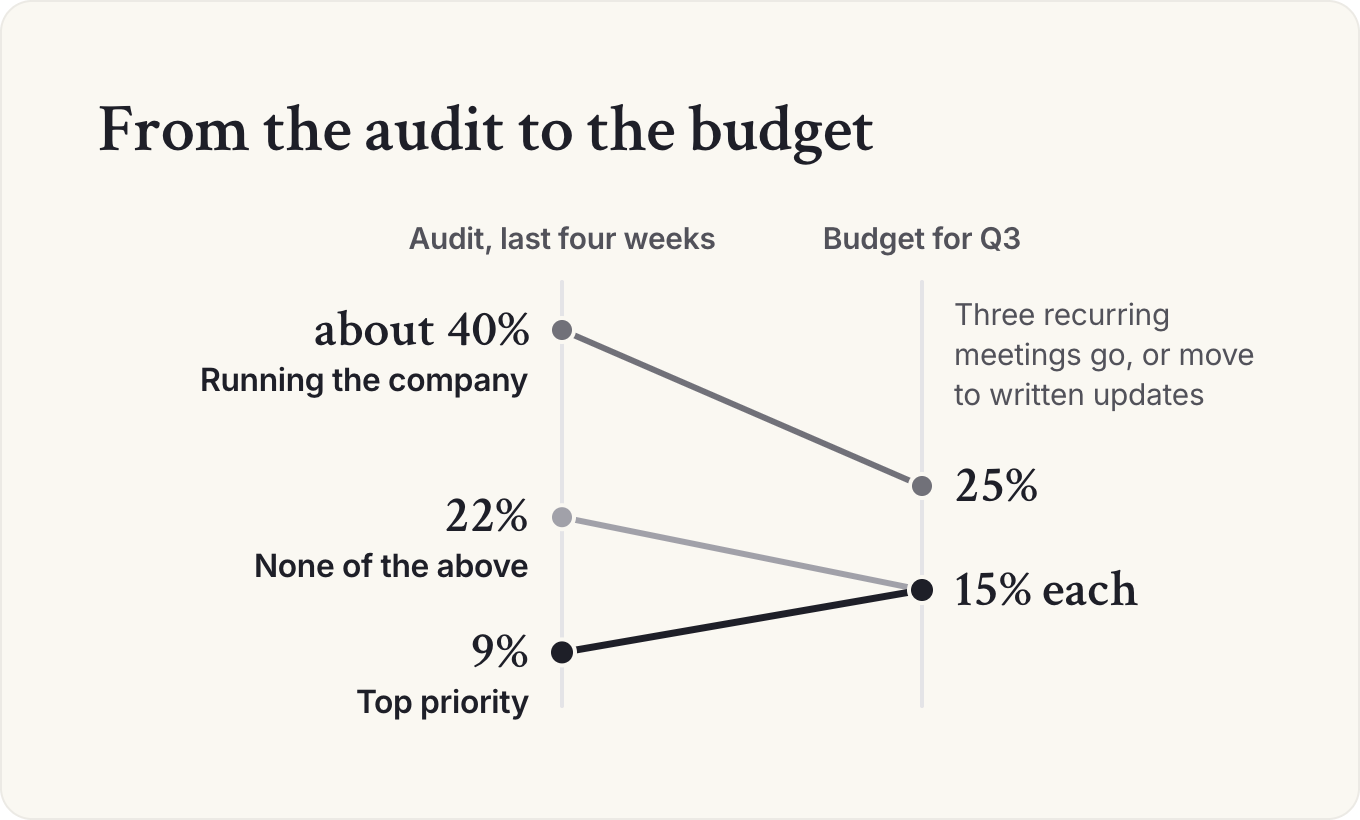
Take the same CEO. She runs a 120-person company and says she wants "more time with customers and on the pricing project". Your first draft, built from the audit's totals, gives hiring 15% and "none of the above" 10%. She moves hiring down to 10% and "none of the above" up to 15%, and now the budget is hers. The filled example above is where it ends up.
In the rules, direct-report 1:1s drop from 50 minutes to 25 each week, and the arithmetic forces one hard call: running the company was taking about 40% of her time, so the three recurring meetings the audit flagged have to go or move to written updates.
Judgment calls on the budget
When your principal breaks their own budget, ask whether the budget was wrong or the week was unusual, and change one or the other. A budget the leader ignores every week teaches everyone the rules are optional. I'd give exceptions to direct reports who need a decision this week and to the board, and to almost nobody else. A founder raising money may spend half their time with investors for six weeks, so write a seasonal budget with an end date.
The shape shifts with the principal. A VC partner's budget splits by deals, portfolio and network. A functional leader's leans internal, with a share for the CEO's priorities, and across time zones booking rules need meeting windows as well as days.
When Sofia Badalamenti was Chief of Staff to Nihal Mehta at Eniac Ventures, they ran their calendars on two rules, as they told our podcast. They set a high bar for in-person meetings and moved almost everything else to email. And each Monday they put an all-day invite on the calendar with the week's priorities by focus area (deals, the portfolio, the network and, when it was on, fundraising), so the week's plan sat where both of them saw it every day.
Should a Chief of Staff manage the CEO's calendar?
Usually the Chief of Staff owns the rules for the CEO's calendar and an executive assistant does the scheduling. You decide, with your principal, what their time goes to, who can book them and which time is protected. An executive assistant, if there is one, runs the calendar inside those rules: booking, moving, travel and logistics. The rest of the split between the two roles is in our guide to the Chief of Staff vs executive assistant.
Few postings ask a Chief of Staff to guard the calendar: only 20% of Chief of Staff postings mention guarding the executive's time. That can mean deciding who gets the leader's time, or doing the scheduling too. A posting that also wants the scheduling describes a hybrid role.
Who owns what on an executive's calendar
| Work | Principal | Chief of Staff | Executive assistant |
|---|---|---|---|
| Time budget by priority | Agrees | Proposes and reviews quarterly | Uses it to schedule |
| Booking rules (who, how long, which days) | Approves | Writes | Applies every day |
| Protected time (focus, family, travel) | Decides | Defends in trade-offs | Blocks and holds |
| Scheduling, moves, travel | Rarely touches | Escalation only | Owns |
| Which meeting wins a conflict | Final say | Calls it within the rules | Flags it |
| Calendar audit | Reviews findings | Runs it | Supplies the data |
In a hybrid role, or when there's no assistant, you do all three columns. Write the rules down anyway, because rules on paper are how you hand the scheduling to someone else later. If your principal has an assistant, book thirty minutes with them to agree the table.
Owning the rules makes you the person who says no, and a department head who can't get thirty minutes with the CEO will blame you. I'd make the rules visible to the leadership team, so the no comes from the rules and everyone can see they apply to everyone. Many requests then sort themselves out before they reach you.
The daily, weekly and quarterly routine
Once the rules exist, the calendar runs on three loops. In the UK the scheduling half is often called diary management, and the assistant may be titled PA.
- Daily, the assistant, by early afternoon: check tomorrow while there's still time to move things. Confirm outside meetings, add travel time and the time zone to anything remote, and put a purpose line and the pre-read in each invite.
- Weekly, the look-ahead: a 30-minute sync between the Chief of Staff and the assistant (our recommendation) on the next two weeks against the time budget, every exception to the booking rules and every focus block that moved. In a hybrid role, make it a standing item in your 1:1 or your weekly update instead.
- Quarterly, the Chief of Staff: the four-week audit, a new budget, and a keep, fix or cut decision on every recurring meeting.
Give edit access only to the people who schedule, and make sure each of them has read the booking rules. Mark personal and confidential entries private, so anyone with view access sees only that the time is busy. In Google Calendar, anyone you let make changes and see event details still sees a private entry's details, so keep anything the scheduler shouldn't read off the shared calendar.
In your Monday 1:1 with your principal, open with a four-line calendar snapshot: the heaviest day, the meeting that needs the most prep, one thing you'll take off your principal's plate and one meeting you'll attend in their place. The last line is the one an assistant can't fill, because sending you takes a meeting off the leader's calendar without cancelling it.
New to the role? Our Fundamentals email course has 15 short lessons on working with your principal, leading without authority and setting the operating rhythm.
Start the courseHow do you protect a leader's focus time?
Book it first, name it for the work it's for, and decide in advance which meetings are allowed to move it. Focus time that's booked last, labeled "hold" and moved for any request will be gone within a month.
Blank space on a calendar reads as available, and anyone with booking access will fill it in good faith. A block named "Q1 plan: draft pricing memo" is harder to take than one named "focus", because whoever moves it can see what they're displacing.
Melinda Munroe, then Chief of Staff at Nexla, told our podcast she blocks time for her own project work and lets people schedule over it when a call really needs her. The blocks still show her the week at a glance. I'd copy that middle ground, because rigid blocks get resented and resented blocks get ignored.
Lauren Stein, then Chief of Staff at GrowthLoop, described on our tools episode how her 75-person company used a tool that moved internal meetings to open longer focus blocks. It worked because everyone in the company was on it. A tool like that helps most once the rules say which meetings can move.
Four rules that keep focus time alive
- Book it before the quarter starts, at the times your principal actually thinks best.
- Name it for the specific work: the memo, the plan, the hiring decision.
- Set the bar for moving it, for example only the board, a key customer or an emergency, and never twice in the same week.
- Check it in the weekly look-ahead. If a block was moved, rebook it the same week.
A leader with protected time is slower to reach on some days. Say so to the leadership team so nobody reads it as being ignored. Before the week is out, rename every focus block on your principal's calendar for the next two weeks with the work it's for.
How do you manage an executive's inbox?
Agree written triage rules with your principal: which emails you or the assistant handle, which you draft for them, which they must see, and how fast each kind gets an answer. Then sort the inbox into those groups every day. Never send in your principal's name without their approval until they've told you, in writing, which kinds of email you can send alone.
Inbox access is the most trust-heavy thing a principal gives you: compensation, board conversations, personal matters and people they're worried about. Read what you need for the job, act only within the rules, and flag anything that needs a sensitive judgment. A leader whose inbox has been sorted reads only the emails that matter, and the hours saved go back to work only they can do.
Template: Inbox triage rules
Inbox rules: [principal] · agreed [date]
Handle and file (no need to show [principal])
- Scheduling requests: apply the booking rules
- Newsletters, notifications, vendor pitches: file or decline
- Internal FYIs with no ask: summarize in the daily digest
Draft for [principal] to approve
- Replies to direct reports on decisions already made
- Thank-you and follow-up notes
- Introductions [principal] has agreed to
[Principal] must see (flag same day)
- Board, investors, key customers: [names or domains]
- Anything about a person's pay, performance or health
- Legal, press, regulators
- Anything you're not sure about
Response times
- Flagged: same day
- Drafts: within 24 hours
- Everything else: within 2 working days, or decline
Sending
- [Principal] approves every email sent in their name, except: [list agreed categories]
- After-hours sends are scheduled for [8:00] the next working morning
# Inbox rules: [principal] · agreed [date]

## Handle and file (no need to show [principal])
- Scheduling requests: apply the booking rules
- Newsletters, notifications, vendor pitches: file or decline
- Internal FYIs with no ask: summarize in the daily digest

## Draft for [principal] to approve
- Replies to direct reports on decisions already made
- Thank-you and follow-up notes
- Introductions [principal] has agreed to

## [Principal] must see (flag same day)
- Board, investors, key customers: [names or domains]
- Anything about a person's pay, performance or health
- Legal, press, regulators
- Anything you're not sure about

## Response times
- Flagged: same day
- Drafts: within 24 hours
- Everything else: within 2 working days, or decline

## Sending
- [Principal] approves every email sent in their name, except: [list agreed categories]
- After-hours sends are scheduled for [8:00] the next working morning
Nihal Mehta, co-founder of Eniac Ventures, said on the same episode that he answers email in the evening but schedules it to arrive at 8 a.m., so his team isn't answering email after hours just because he is.
If your principal has an executive assistant, they usually own the triage and you own the rules and the drafts that need judgment; agree it before you both start reading the same inbox.
How do you manage your own time as a Chief of Staff?
Give your own week the same treatment as your principal's, and book your thinking and writing time before anyone else books you. If operational firefighting fills more of your week than you and your principal agreed, that's a conversation about your mandate, and better time management won't fix it. Our guide to a Chief of Staff's day has a weekly calendar template and a coverage plan for time off. In that plan, name who applies your principal's calendar and inbox rules while you're away.
What can AI do with a calendar and inbox today?
An AI assistant connected to a calendar and inbox can brief your principal on tomorrow's meetings, tag a calendar for an audit, check next week against the time budget, pull asks and commitments out of email threads and draft replies. The decisions about whose time comes first and what gets sent stay with people.
A daily brief you used to build yourself becomes one you only check, and the weekly look-ahead happens every week because nobody assembles it by hand. The risks are an AI assistant that sends in your principal's name, or one that reads private calendar entries and repeats them where they don't belong.
I'd start with Claude. Claude and ChatGPT both connect to the common calendar and email suites once your admin turns the connections on. Connect the calendar first, with read access, and keep email on read and draft for at least the first month. Our AI setup guide walks through the connections and how to agree all this with an executive assistant. The weekly look-ahead is the best first job.
Prompt: Check next week against the time budget
You are helping a Chief of Staff plan an executive's week.

Read [principal]'s calendar for next week. Use the time budget and booking rules below.

[paste budget and rules]

1. Total next week's meeting hours by budget category and compare with the targets.
2. List meetings that break a booking rule (no purpose line, wrong day, too long, no decision needed from [principal]).
3. List focus blocks and say whether each is named for specific work.
4. Suggest up to 3 changes, each with the reason from the rules.
Do not move, cancel or accept anything. I'll decide.
Keep the last line in every calendar prompt. An AI assistant that can read the calendar should still leave every change to you or the person who owns the scheduling.
Keep reading
 Context management for Chiefs of StaffToolkit
- The Chief of Staff toolkit: tools and templates for the daily workToolkit
 A day in the life of a Chief of StaffBasics
Toolkit
- The Chief of Staff toolkit: tools and templates for the daily work
- How to brief your principal: briefing memos, decision memos and pre-reads
- Executive communications for Chiefs of Staff: writing for the CEO and running internal comms
- Leadership team meeting agenda: how to run the meeting, take notes and follow up
- Executive calendar management: how a Chief of Staff runs the calendar and inbox
- Context management for Chiefs of Staff
- Stakeholder management for Chiefs of Staff: how to map and track the people your principal depends on
- How Chiefs of Staff research decisions, with and without AI
- How a Chief of Staff runs board meetings and investor relations
Take this guide with you
The full guide as a PDF: every section, template and chart, ready to print or share with your team.
Your PDF is ready.
Download the PDFFree. We may email you new guides; unsubscribe anytime.
Frequently asked questions
How do I manage my boss's calendar?
Start with an hour together to write down their preferences: when they think best, default meeting lengths, gaps between meetings, who can book them directly, what stays private and which meetings need prep time. Then check tomorrow each afternoon, look at the next two weeks each week, and audit the last four weeks each quarter.
How do you manage calendars as an executive assistant?
Get the booking rules in writing from your executive or their Chief of Staff, then run three loops. Each afternoon, check tomorrow: confirm outside meetings, add travel time and time zones, and put a purpose line and the pre-read in each invite. Each week, review the next two weeks against the time budget. Each quarter, supply the data for the calendar audit.
How should a CEO spend their time?
There's no split that fits every CEO. The right budget follows the company's priorities and stage. Write the budget down, agree it with the CEO each quarter, and check the calendar against it every week.
What is the best tool for managing an executive's calendar?
Use the calendar your company already runs, Google Calendar or Outlook, and send a booking link only to outside requests that pass the booking rules. Add a tool that moves meetings to open focus time last, once the rules say which meetings can move. Such a tool can rearrange only the meetings it manages, and some only suggest new times for you to approve.
Can AI manage an executive's calendar?
AI assistants connected to a calendar can brief, tag, total and suggest changes, and they're good at a weekly look-ahead against a time budget. Keep the decisions with people: which meeting wins and what gets sent. Start with read access to the calendar and read-and-draft access to email.
- 2026 Chief of Staff Pathways Report, Chief of Staff Network, 2026 (1,819 job postings).
- Itamar Melamed, Chief of Staff Network podcast.
- Sofia Badalamenti and Nihal Mehta, Chief of Staff Network podcast.
- Melinda Munroe, Chief of Staff Network podcast.
- Lauren Stein, Toolbox Talk episode, Chief of Staff Network podcast.
- CEO Weekly Debrief and 1:1 Agenda Template, and Building Your Operating Cadence, member library, Chief of Staff Network (members only).
- Templates, booking rules, the ownership table and the routine: Chief of Staff Network recommendations.
Learn the job with people who do it
Membership gets you the Power Skills program, member events and a private community of working Chiefs of Staff.
Land your first Chief of Staff role
Launchpad helps you prepare, position yourself and interview for the role.
Starting out in the role?
The Fundamentals email course walks you through scoping the mandate, setting the cadence and earning trust.
Lead AI adoption from the Chief of Staff seat
The Chief of AI Fellowship is for operators turning AI into how the company runs.
Hiring a Chief of Staff?
Post the role on the Chief of Staff job board, or browse open roles.
Get your resume ready for the role
Get feedback on your Chief of Staff resume before you apply.
Let the right roles find you
Join the talent network and hear about Chief of Staff roles first.
The Chief of Staff newsletter
What Chiefs of Staff are reading, hiring for and building.
Get the full report
Every chart and cut from our latest salary research, sent to your inbox.
Using AI with sensitive data?
Learn the legal side of using AI at work.
Keep going in this series