

What is an AI Chief of Staff?
86% of Chiefs of Staff and senior operators use AI daily, and 5.2% run agents. What an AI chief of staff is, what AI takes over, and what stays human.

Ask AI
 Share

An AI chief of staff is software: an assistant connected to a leader's email, calendar and meeting notes that writes briefings, tracks follow-ups and drafts replies. It takes the drafting and tracking. Priorities, trust and the decisions behind them stay with a person. For a human Chief of Staff, AI also brings new work: leading how the company uses it.
- Hand AI the notes, summaries, status drafts and follow-up tracking. Keep every choice that changes what your principal does next, such as what to raise, in what order and what to leave out.
- When a CEO asks for "an AI chief of staff", name the problem first. Follow-ups and meeting prep need an assistant you can set up in a week, and decisions and projects nobody owns need a person.
- Before you accept "own AI", write down the budget line, the decisions you can make alone and the date you'll report one result to your principal.
- Write a one-page AI policy before an incident forces one: approved tools, the data that never goes in, and what always gets a human check.
- Measure what changed in the work from the first week, such as days of board prep, because about a third of companies haven't measured AI's impact.
Most Chiefs of Staff and senior operators use AI every day, and few have changed how the work gets done. In our AI Readiness Diagnostic of 1,200+ senior leaders, 86% use AI daily, 12.5% connect it to their other tools and 5.2% have agents running parts of their workflow.
The job is changing in that gap. Drafting and tracking move to software, and the judgment calls stay with you. Getting everyone else to use AI usually lands on you too. AI is only as good as the context it's given, and a Chief of Staff holds more of that context than anyone.
What is an AI chief of staff?
An AI chief of staff is software: an assistant connected to a leader's email, calendar and meeting notes that writes briefings, tracks follow-ups and drafts replies. People also use the phrase for a job, a human Chief of Staff hired to lead AI adoption, and for any Chief of Staff who works through AI. Mix them up and you buy or hire the wrong thing.
Three things people mean by "AI chief of staff"
| AI chief of staff software | "AI Chief of Staff" job | A Chief of Staff who uses AI | |
|---|---|---|---|
| What it is | An assistant connected to one leader's inbox, calendar and notes | A human role that owns AI strategy, rollout and governance for a leader or company | Any Chief of Staff who runs part of their work through AI |
| What it does well | Morning briefs, meeting prep, follow-up tracking, first drafts | Picks use cases, runs pilots, writes policy, measures impact | Faster drafts, better prep, more done per hour |
| What it can't do | Decide priorities, read a room, carry trust, own a result | Succeed without a clear mandate and budget | Replace judgment the person never had |
| Who buys it | Founders and executives without a Chief of Staff, or Chiefs of Staff for themselves | Companies moving past the pilot stage | The Chief of Staff, often with their own budget |
The job in the middle column is what we call a Chief of AI, covered below.
Good assistant software keeps every follow-up in view, and it turns a leader's morning scramble through email into a short read. What it can't do is decide which of twelve open threads should reach the CEO today, or tell the head of sales that her number isn't credible.
Compare them on what each returns before you compare price. Software gives back minutes on follow-ups and drafts. Alex Craig, Chief of Staff at PortSwigger, puts his own setup at about $50 a day at full use, on a usage-billed enterprise plan. Across 250 working days, that comes to about $12,500 a year. A Chief of Staff gives back executive hours, gets decisions made sooner and ships cross-functional projects. In our 2025 Salary Report, a Chief of Staff averages $167,954 in base salary.
If you're an executive asking whether you need an AI chief of staff, name the problem you want gone first. Follow-ups and meeting prep need an assistant, which you can set up in a week. Decisions, alignment and projects nobody owns need a person, and our guide to hiring a Chief of Staff is the place to start. If software could replace everything your Chief of Staff did, the role was designed as admin, and our guide to what a Chief of Staff actually does is the better fix.
Can AI be your chief of staff?
Partly. AI will replace the parts of the Chief of Staff's week that never needed a Chief of Staff, such as the meeting notes, the status deck and the first draft of the board update. It won't replace the role, because what remains is judgment, trust and the context behind both.
A general-purpose assistant with a one-page context file, written rules and access to your calendar, meeting notes and email can write a daily brief, prepare meeting packs, track follow-ups and draft replies. Use the assistant you prefer, or the one your company has approved. Our guide to building an AI chief of staff has the setup, and our guide to AI tools for Chiefs of Staff compares the products.
What it can't do is own a result, hold a leader's trust or settle a disagreement between two of your VPs. That takes knowing that the CFO will push back on the hiring plan because of a conversation last Tuesday, and that the CEO says "growth" but means one enterprise deal. That knowledge sits in one person's head, next to the leader, where no AI system can read it.
Sawyer Middeleer, who was the first hire and Chief of Staff at the AI software company Aomni, was blunt about AI chief of staff products.
An AI cannot be a chief of staff.
Sawyer Middeleer, founder, Revi Systems, former Chief of Staff, Aomni · Listen on the podcast
His reason: leaders see what goes into a task and what comes out, and assume a bot can do the middle cheaply. Sawyer's example was a support ticket: a request arrives, a reply goes out, the ticket closes. The person answering it carries context and a sense of what a good reply looks like, and from the outside nobody sees either. Automate before you've mapped that middle and you get faster, worse work.
A Chief of Staff's week is that problem at its most extreme. The board update starts as metrics and ends as a deck, and in between sit the calls: which bad news leads, which director's number gets questioned first, what the CEO promised last quarter that this deck has to answer for. Sawyer also noted that the line between what AI should and shouldn't do keeps moving, so I'd redraw it every quarter, task by task.
What should a Chief of Staff hand to AI, and what stays human?
Hand AI the work where the output is the point: notes, summaries, status drafts, first drafts and follow-up tracking. Keep the work where the choice is the point: what to raise with your principal, in what order, what to leave out, and every conversation that depends on trust.
The work that moves, and the work that gets harder
Alex Craig built himself an AI system that prepares his mornings, his one-to-ones and much of his board prep. His morning context rebuild went from about 30 minutes to a 5-minute read, and his prep for a one-to-one from about 15 minutes to 2.
Then he told us on our podcast that AI made his job harder. The routine work it took away was the restful part of the day, and what's left is decisions, conversations and judgment calls, back to back.
Sorting your own week
Here's an illustrative week for a Chief of Staff to a CEO.
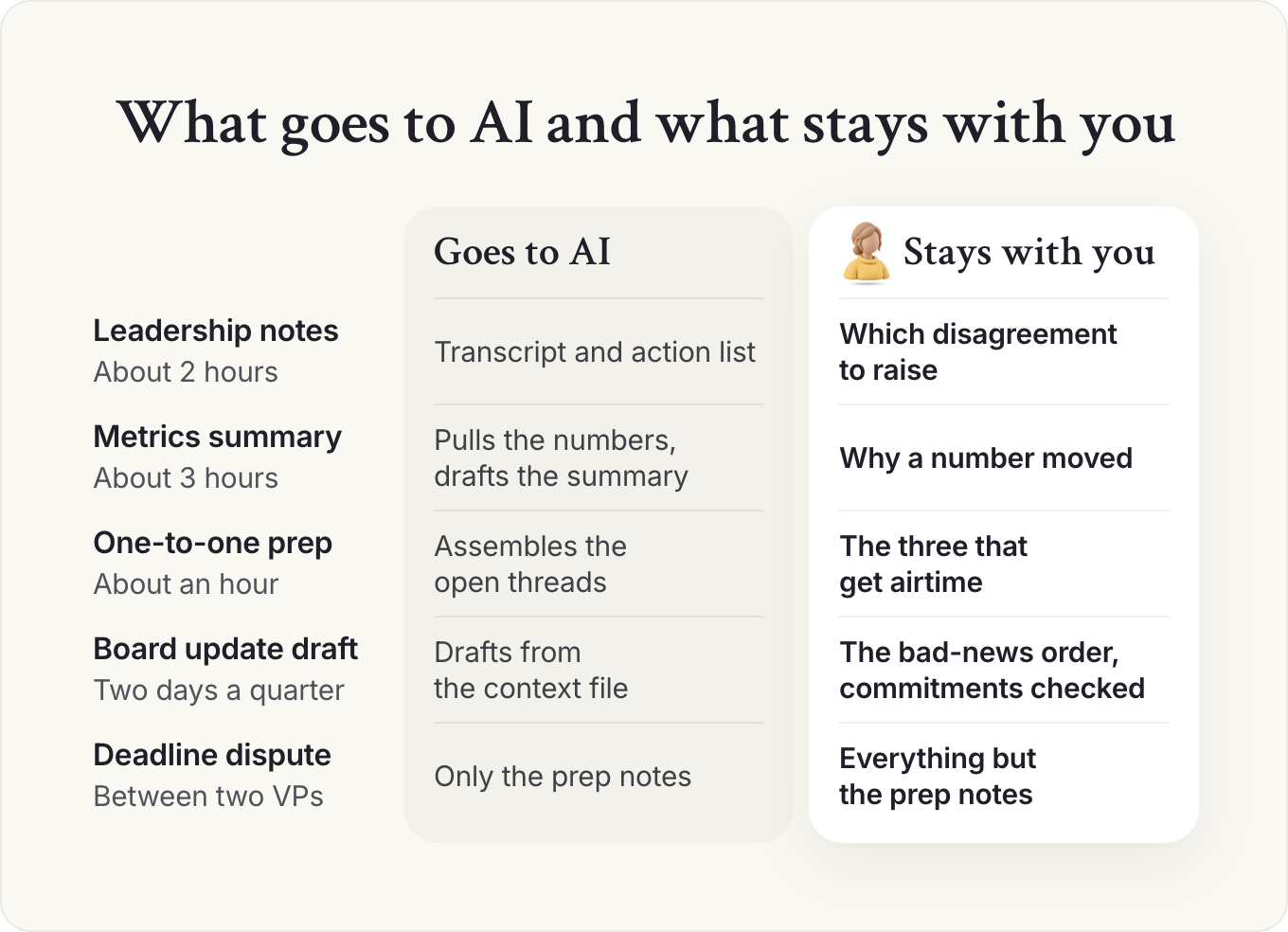
- Leadership meeting notes, about 2 hours. The transcript and action list go to AI. You keep the ten minutes deciding which unresolved disagreement to raise with your principal.
- Weekly metrics summary, about 3 hours. AI pulls the numbers and drafts the summary. You keep the paragraph on why a number moved, which needs a conversation with its owner.
- One-to-one prep with your principal, about an hour. AI assembles the open threads. You choose the three that get airtime.
- Board update first draft, two days a quarter. AI drafts from the context file. You set the order of bad news and check every commitment.
- A deadline dispute between two VPs. Only the prep notes go to AI.
Close to a day a week of drafting moves to AI, and none of the five decisions do. The test for the sort: if your principal would act differently because of a choice you made inside the document, that choice is yours. If they read an output and change nothing, it was admin, and it should go, however visible it makes you.
Our member templates run the same sort before every one-to-one with a principal. Each item on your list gets three questions. Can I decide this without them? Then decide it and take it off the agenda. Do they need to know but not decide? Send it in writing. Does it need their voice, judgment or relationship? Bring it to the meeting. AI can draft the list and the written updates, and the three answers stay yours.
The opposite mistake is quieter. For many Chiefs of Staff, writing the meeting notes is how they stay across everything, so hand that to a notetaker and you lose the moment you absorbed what happened. I'd replace it on purpose with fifteen minutes a day on the summaries and the decision log.
What happens after the admin goes
Once the morning brief arrives on its own, it stops counting as your work, and by month three your principal will ask what you did with the hours. Have an answer that names a project shipped or a decision unblocked. Other leaders get the same tools, so keep capturing what never reaches a transcript: the hallway conversation, the direct message, the reason behind a decision.
Elisa Resnick, a fractional COO, framed this as visibility in a workshop for our members. The hours AI frees help your career only if leadership sees what you did with them, such as a stalled decision you pushed to a close, two teams you got working toward the same goal, or the trade-offs you laid out for a hard call.
At a startup under 50 people, the Chief of Staff often carries operations admin too, so more of the week moves at once and the role can look thin within a quarter. Plan the replacement work before you automate. Reporting roll-ups for a functional leader move first. For a Chief of Staff to the CEO, the board draft moves, and the board calls and the trust work stay.
This week, list every recurring output you produce, with the hours each takes, and mark the ones a new analyst could do with a good brief. Those are AI's. Everything else is your job, and it's the part to grow.
How do you get useful output from AI as a Chief of Staff?
You get useful output by giving AI your context, then checking what comes back. We call that context management: keeping the context only you hold (priorities, decisions and why, commitments, relationships, history) captured, current and shared, so your principal, your team and AI tools can act on it. It runs in four steps: capture, curate, direct, check.
Alex Craig uses a test at PortSwigger. When someone shows him AI-assisted work, he asks whether he could have produced the same thing in a fresh, incognito chat with no history. If he could, the person added nothing: their knowledge of the company and their preferences are missing, and the output is the generic answer anyone would get.
Context management in four steps
| Step | What you do | What it produces | What goes wrong if you skip it |
|---|---|---|---|
| Capture | Get decisions, commitments and priorities out of meetings and heads into writing | Meeting notes with owners and dates, a decision log | AI works from stale or partial information |
| Curate | Keep one living context file per leader or team: priorities, owners, history, vocabulary | A context file AI tools can read | Every prompt starts from zero, and outputs stay generic |
| Direct | Give AI a specific job, the context it needs and the standard it must meet | Drafts, briefs, analyses, summaries | Polished output that answers the wrong question |
| Check | Verify against the source, especially anything about people, numbers or commitments | Corrected output, plus a new rule for next time | Confident errors reach your principal with your name on them |
Curate is the step most people skip, and it decides the quality of everything after it. Alex's system runs on one folder holding about six months of decisions, corrections and role context, which he treats as its most valuable part. Our guide to context management has the template.
Direct means a request that reads like a brief to a sharp new analyst. "Summarize this" gets a summary; "Draft a one-page memo for the CEO choosing between these two vendors, recommendation first" gets something you can use. Our prompt library has tested versions for the jobs a Chief of Staff repeats.
Check, because AI's mistakes look as polished as its correct work. Alex's system assigned a task directly to his boss without telling him, credited one colleague's update to another, and kept preparing notes on someone who had already left.
Check any AI output about a person, a number or a commitment against the source before it leaves your hands, and add each correction to the context file.
How does a Chief of Staff use AI across the four core responsibilities?
In each of the four core responsibilities (priorities and decisions, running the operating rhythm, communication up and down, and cross-functional projects), AI takes the drafting and sorting, and the Chief of Staff keeps the call. Every request starts from the context file.
Priorities: decide faster with better memos
AI is good at preparing a decision: pulling facts together, laying out options, stress-testing a recommendation. It's bad at knowing which decision matters most this week. The highest-value use is the decision memo, decision first and options in a table; with the context file, a first draft takes minutes, and your time goes into whether the recommendation is right.
Prompt: Draft a decision memo
You are helping me, the Chief of Staff to [principal, title], prepare a decision memo.

Context file: [paste or attach]
Decision needed: [one sentence]
Deadline for the decision: [date]
Options we're considering: [list]
Inputs: [paste notes, data, emails from the people involved]

Write a one-page memo:
1. The decision needed and the recommendation, in the first two sentences.
2. A table comparing the options on cost, time, risk and fit with this quarter's priorities from the context file.
3. What we're giving up with the recommended option.
4. Who disagrees and why, using only what's in the inputs.
5. The next step and owner if approved, and any earlier commitment this decision affects.

Rules: use only facts from the inputs and context file. Mark anything you're unsure of as [CHECK]. Don't soften disagreements. Keep it under 400 words.
Then ask the model to argue against its own recommendation, and learn before the meeting whether the counterargument is stronger than you expected.
Rhythm: run the operating rhythm with less admin
The operating rhythm is where AI saves the most raw time: agendas built from last week's open actions, condensed pre-reads, notes turned into owners and dates within the hour. Eric Nehrlich, former Chief of Staff for Google Search Ads, told us that spending five months on an annual plan no longer makes sense, because the whole ecosystem can change in five months. AI makes a faster weekly and quarterly rhythm affordable, because review prep no longer takes a day.
Our guide to building an operating rhythm covers the meetings themselves, and our OKR vs KPI guide has a weekly KPI scorecard you can copy.
Communication: hear what's going on
A Chief of Staff tracking forty stakeholders can't hold every open thread in their head. With meetings recorded on approved tools, AI can read a week of notes, tell you where things stand with each person, and catch what the room missed, such as three leaders raising the same concern in separate meetings. The output feeds your weekly update to your principal.
Prompt: Weekly stakeholder summary from meeting notes
You are helping me, the Chief of Staff to [principal], prepare my weekly stakeholder review.

Context file: [paste or attach]
Meeting notes or transcripts from this week: [paste or attach]
People I track: [list names and roles]

For each person, in a table:
- Where things stand on the work we share
- Open commitments: what I owe them and what they owe us, with dates
- Concerns or objections they raised, in their own words where possible, with the meeting it came from
- Anything that contradicts what they said in a group setting

Then list:
1. Concerns raised by two or more people, even in different words
2. Commitments due in the next 7 days
3. Anything my principal should hear this week, ranked

Rules: only use what is in the notes. Never guess at motives or feelings. Mark anything uncertain as [CHECK]. This summary is for me only.
A summary of what people said is useful. A guess at why they said it is gossip with a confident tone, so keep anything about a person's motives, performance or conflicts out of shared tools.
Projects: build the first version yourself
Cross-functional projects are the important work no team owns. AI changes this responsibility the most, because a Chief of Staff can now build a working first version where they used to write a proposal, and show it to leadership before asking for budget.
How far have Chiefs of Staff taken AI?
Most have gone as far as a chat assistant and no further. In our AI Readiness Diagnostic, 90% had drafted internal communications with AI in the past 30 days, and 7.3% scored as AI-native, with AI running continuously and managing parts of their work.
Think of the tools in three layers: a general-purpose assistant for thinking and drafting, AI inside your meeting, document and knowledge tools, and an integration layer that connects tools and chains steps together. The top half of the chart is the first layer. The bottom half is the third, where almost nobody is yet. Keep any scheduled job to reading and drafting, such as a morning brief or a pre-read, and send anything outward yourself.
At our San Francisco Connect, Tom Guthrie, our president, heard the whole range: a Chief of Staff at a healthcare company whose leaders had barely deployed AI, and others running whole teams of agents. His takeaway from the room: at a company not founded in the last 18 to 24 months, it's hard for a Chief of Staff to become AI-native without "broad support from the principal, from the rest of the executive team." Ask your principal for that support before you build the third layer.
Get very good at one assistant before you add anything. We compare AI tools for Chiefs of Staff and cover Claude in depth, and our AI setup guide walks through building your own system, which took Alex Craig a few hours a week for two months.
Why does AI adoption land on the Chief of Staff?
AI adoption lands on the Chief of Staff because it's new, it crosses every team, and nobody else owns it. The CEO wants it done, the CTO owns the technical fit, and the Chief of Staff ends up running the work in between: choosing use cases, buying tools, writing the rules and getting people to use them.
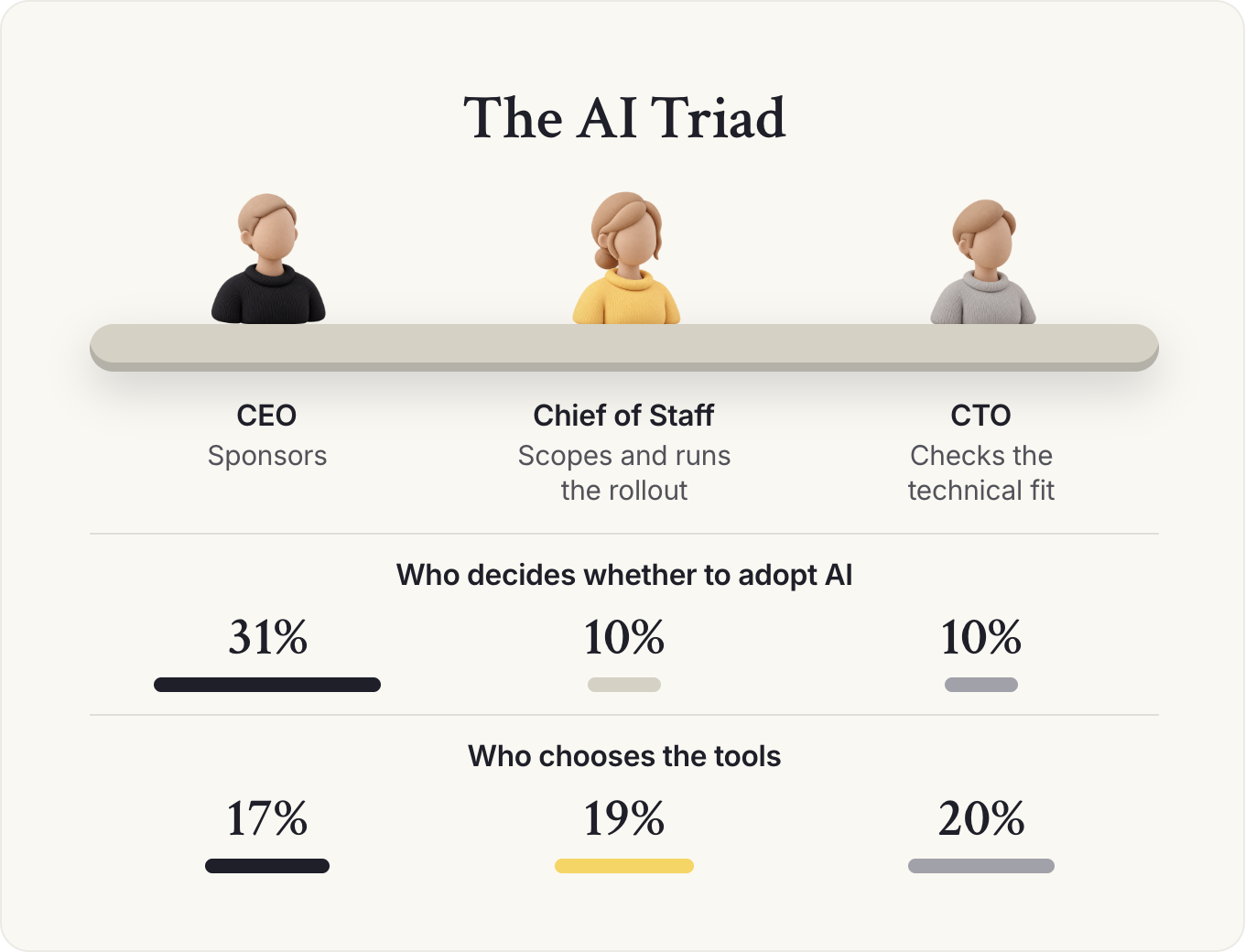
When companies decided whether to adopt AI, the CEO was the primary decision maker 31% of the time, with the Chief of Staff and the CTO tied next at 10% each. On choosing the tools, respondents named the Chief of Staff as the decision maker almost as often as the CTO: 19% against 20%, with the CEO at 17%. We call that group the AI Triad: the three roles that decide on AI. The CEO sponsors, the Chief of Staff scopes and runs the rollout, and the CTO checks the technical fit.
Abhishek Vora, then Chief of Staff to the CEO at LaunchDarkly, explained in his episode on Chiefs of Staff leading AI adoption that cross-company work with no owner is what Chiefs of Staff pick up. Kanika Choudhary, Chief of Staff at People IX, describes the same default in her episode on mapping work before buying AI tools: the work rolls downhill to whoever has cross-functional context and can't say no.
What's the difference between a Chief of AI and a Chief AI Officer?
A CEO reads about AI assistants, hears that peers are hiring a Chief AI Officer, and asks their Chief of Staff to "own AI". Those are three different purchases with three different costs.
A Chief AI Officer is a C-level executive who owns a company's AI strategy, investment and risk. A Chief of AI is an operator who leads AI adoption across the company. It's usually a Chief of Staff, or another senior operator, who takes it on alongside the rest of the job.
Chief AI Officer vs Chief of AI
| Chief AI Officer | Chief of AI | |
|---|---|---|
| What it is | A C-level executive role | A portfolio held by a Chief of Staff or senior operator |
| Who it reports to | Often the CEO | The Chief of Staff's principal, often the CEO |
| What it owns | AI strategy, investment, risk, often an AI team | Use cases, tools, rules, training and advice to the CEO |
| Pay signal | The nearest posted group: AI leadership roles post a $213k median (US postings that list pay) | The seat that usually holds it: Chief of Staff roles post a $180k median (US postings that list pay) |
Source: Pathways Report 2026
My take: a company under a few hundred people needs someone with cross-functional context to pick the first real use cases, write the rules and measure what changed, well before it needs a Chief AI Officer. That's a Chief of AI, and it's often the Chief of Staff. A Chief AI Officer earns the title when AI becomes a product line, a large budget or a regulated risk. If your CEO is weighing that hire, write down the three AI decisions they expect the person to make in six months, and if you could make them with a clear mandate and budget, make the case for doing it yourself first.
Frame the mandate, then pick a first project worth the risk
A mandate that arrives as "do more AI" has no budget, no authority and no definition of done. Kanika's advice is to answer it with questions: what's the point, what's the budget, and what can you decide alone? Most companies haven't settled the budget: 27% funded AI from no specific budget, another 27% from the general software budget, and only 20% had a dedicated AI budget.
My take: say yes to owning AI, but only after you've written down what owning it means. A pilot nobody measures never technically fails, which makes this one of the easiest projects to fail at without anyone noticing.
The first project decides whether you get a second. Kanika sees Chiefs of Staff pick the process they can't possibly mess up; leadership sees no difference and decides AI doesn't work. I pushed back that small wins prove the tools work, and her answer was that it depends on what a win costs. Where a change takes three months and four signatures, spending that approval on a small fix burns credibility, so build a bare-bones prototype of the bigger idea, with no company data in it, and show leadership that.
Count the approvals to tell which situation you're in. If you can switch on an approved tool for one team this week, take the small, visible win and make it touch at least two teams. If every change needs security review, procurement and legal, spend that queue on a process leadership already complains about.
Company size changes the mandate too. Companies under 500 people leaned more on "no specific budget", and up to 19% left AI tool choices to individual employees, so your first job there is getting AI onto a budget line. In larger companies the triad repeats inside departments, such as the general counsel, head of legal operations and a senior engineer in legal, and a Chief of Staff to a functional leader sits in that department's middle seat.
This week, write a one-paragraph AI mandate and send it to your principal: the return you expect, the budget line, the decisions you can make alone, the ones that need them, and the date you'll report back with one result, such as "board prep down from five days to three by the end of the quarter". Our guide to the Chief of Staff mandate has the one-page template, and if the role is being hired for AI, the same fields belong in the job description.
How should a Chief of Staff handle AI governance and data privacy?
A Chief of Staff should write the company's AI rules before an incident forces them: which tools are approved, what data can go into them, what always needs a human check, and who decides when the rules change. Security, compliance and ethical concerns are the most common obstacle to AI adoption, at about 41% of survey responses, ahead of adoption and change management at about 38%.
The risks are concrete: a leadership meeting recorded by a notetaker nobody approved, board materials pasted into a personal account, a summary guessing at a colleague's motives saved in a shared folder. Each one only takes a busy person and no rules.
Delong Lu, Chief of Staff at Proton, had to adopt AI quickly at a company whose whole promise is privacy. In his episode on steering AI at a privacy-first company, he described getting leadership to agree on values first and letting those decide the tool questions, then writing explicit rules for how engineering uses AI. A policy that contradicts the company's values gets called out by its own people immediately.
Write the policy on one page and make the approved path the easiest one, because people route around rules that make their job harder. Adapt this version with your legal and security leads.
Template: AI use policy for a leadership team (one page)
How we use AI: [Company] leadership team
Owner: [Chief of Staff] · Approved by: [CEO], [legal/security lead] · Review date: [quarterly]
Why we use AI
To spend less time on preparation and more on decisions, customers and people. AI drafts; people decide.
Approved tools
| Tool category | Approved tool | Account type | Approved for |
|---|---|---|---|
| General assistant | [Tool] | Company account only | Drafting, analysis, research |
| Meeting notes | [Tool] | Company account only | Internal meetings with consent |
| Documents and slides | [Tool] | Company account only | Internal documents |
Anything not on this list needs approval from [owner] before use with company data.
Data rules
- Never put into any AI tool: customer personal data, employee health or performance records, passwords or keys, unreleased financials outside approved tools, anything under NDA unless the contract allows it.
- Board and investor materials: approved tools only, company accounts only.
- Notes about individuals (performance, conflicts, motives) stay out of AI tools and shared folders.
- Personal AI accounts are never used for company work.
Meetings
- Say when a meeting is recorded or transcribed. Anyone can ask to turn it off.
- Meetings that are never recorded: [the list your leadership team agrees].
Human check required before anything goes out
- Every number, name, date and commitment
- Anything external: customers, investors, board, press
- Anything about a person
- Nothing is sent in a leader's name without that leader or their Chief of Staff approving it
Disclosure
- Say when a document is substantially AI-drafted if the reader would reasonably want to know.
- The person who sends it owns it. "The AI wrote it" is never an explanation.
Questions and exceptions
Ask [Chief of Staff]. Exceptions are approved by [owner] and logged.
How this changes
We review this page every quarter and after any incident. Proposals go to [Chief of Staff].
# How we use AI: [Company] leadership team
Owner: [Chief of Staff] · Approved by: [CEO], [legal/security lead] · Review date: [quarterly]

## Why we use AI
To spend less time on preparation and more on decisions, customers and people. AI drafts; people decide.

## Approved tools
| Tool category | Approved tool | Account type | Approved for |
| --- | --- | --- | --- |
| General assistant | [Tool] | Company account only | Drafting, analysis, research |
| Meeting notes | [Tool] | Company account only | Internal meetings with consent |
| Documents and slides | [Tool] | Company account only | Internal documents |

Anything not on this list needs approval from [owner] before use with company data.

## Data rules
- Never put into any AI tool: customer personal data, employee health or performance records, passwords or keys, unreleased financials outside approved tools, anything under NDA unless the contract allows it.
- Board and investor materials: approved tools only, company accounts only.
- Notes about individuals (performance, conflicts, motives) stay out of AI tools and shared folders.
- Personal AI accounts are never used for company work.

## Meetings
- Say when a meeting is recorded or transcribed. Anyone can ask to turn it off.
- Meetings that are never recorded: [the list your leadership team agrees].

## Human check required before anything goes out
- Every number, name, date and commitment
- Anything external: customers, investors, board, press
- Anything about a person
- Nothing is sent in a leader's name without that leader or their Chief of Staff approving it

## Disclosure
- Say when a document is substantially AI-drafted if the reader would reasonably want to know.
- The person who sends it owns it. "The AI wrote it" is never an explanation.

## Questions and exceptions
Ask [Chief of Staff]. Exceptions are approved by [owner] and logged.

## How this changes
We review this page every quarter and after any incident. Proposals go to [Chief of Staff].
Treat this as an operating policy for your legal and security leads to sign off, and expect a regulated company to need more. In the UK and EU, an AI tool that handles customer or employee personal data falls under GDPR (the UK GDPR in Britain), so bring your data protection lead in before a notetaker or connected assistant goes live. A policy also works only if the approved tools are good enough that people prefer them to the one they use at home.
This week, find out which AI tools your leadership team actually uses, and compare them with the approved list. The difference between the two lists is your policy's first job.
How do you lead AI adoption across a company?
You lead AI adoption by getting a few people to a real result in their own work, turning them into champions who teach their teams, and then adding structure: shared tools, shared context and a way to measure what changed. Most companies are stuck between buying licenses and changing how they work.
Stage one: create a few real wins
Zen Foo leads AI adoption across Aspire, the Singapore finance company. On our podcast he described three stages: hype, a chaotic middle where usage spreads faster than anyone can organize it, and governance, where shared tools, knowledge and rules catch up. Early on, people adopt AI the first time it does something real in their own job, which a training deck rarely achieves.
So his workshops keep the same basics for every team and change the first exercise. For the product team, he arrived with ready-made skills that write a product spec in one pass, so the moment happens on the team's own work in the first hour. He's one person, so Aspire's champions program finds at least one excited person per team, builds a first workflow or agent with them, and then steps back while they teach their teams.
Decide where you're going before you pick anyone. Diane Stawski Joseph, co-founder of Clarinet, has worked with more than 70 organizations on AI adoption. In a workshop for our members, she said the first mistake she sees is forming the champions team before the company has agreed what should run differently and by when. Write that down first, in two or three sentences your CEO signs off.
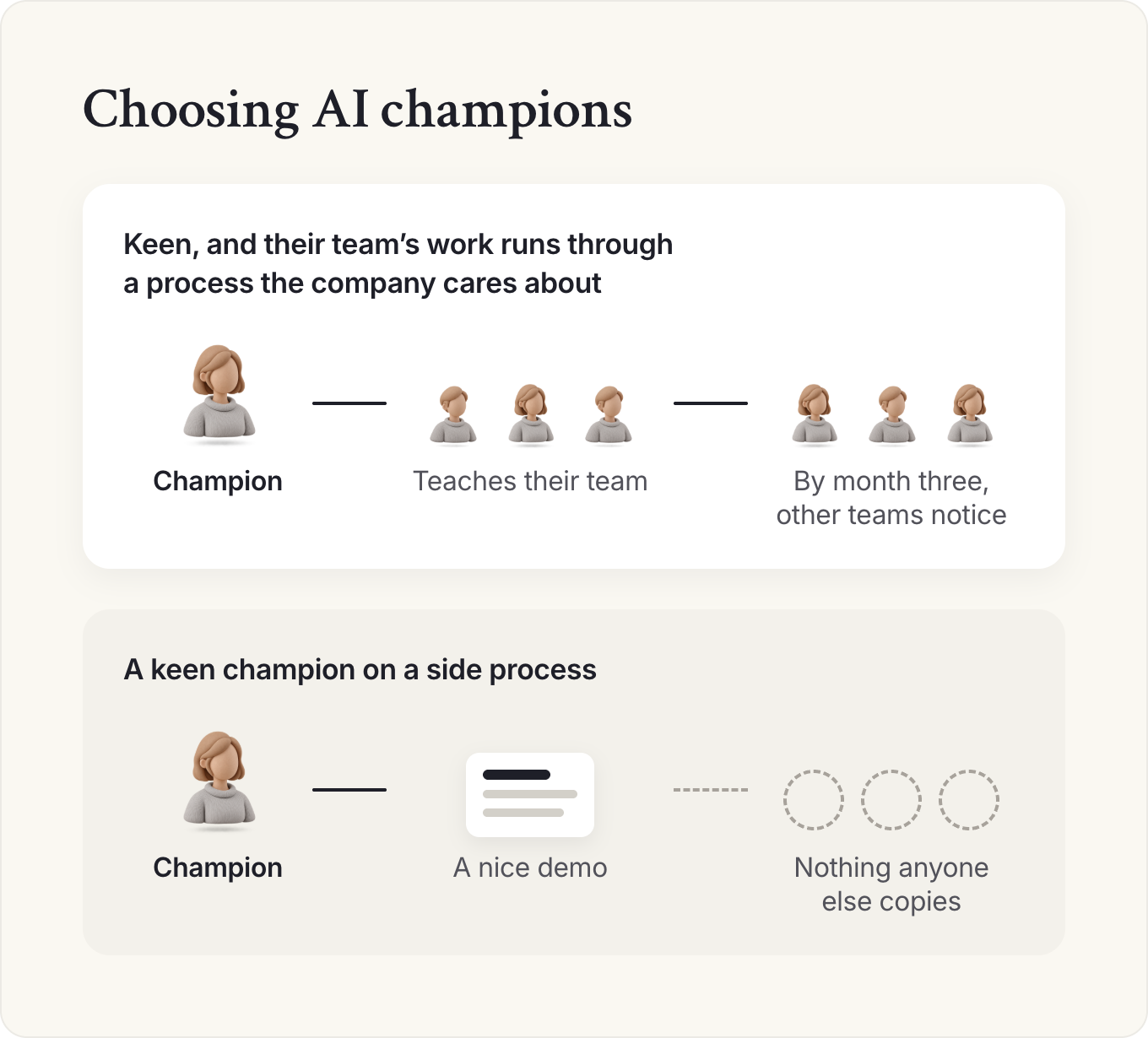
I'd spend most of the first month with the champions, chosen by two tests: they're keen, and their team's work runs through a process the company cares about. A keen champion on a side process produces a nice demo and nothing anyone else copies.
Stage two: manage the people as well as the plan
The second most common obstacle, at about 38% of responses, was adoption and change management: people who had the tools and didn't use them. Dominique Lear, Chief of Staff at the consulting firm Incandescent, argued in her episode on fear and AI transformations that transformations fall short because leaders plan the skills and structure and skip the fear, including their own.
Leaders have to sit with their own fears first and admit how much nobody knows yet, then make room for candid conversations where people say what feels hardest. She described the moment a colleague hears someone else name the worry and says, in effect, "wait, you feel that too?" I'd trust that moment over another training session.
54% of companies named efficiency as their main reason for adopting AI. One Chief of Staff at a midsized fintech put the goal plainly: "My goal is to scale teams without adding headcount OR save $ on headcount but achieve the same results." That's exactly the sentence an employee imagines when they hear "efficiency", so say in the launch note what the time saved will go to, whether headcount plans change, and who to ask.
Stage three: measure what changed
After the excitement comes what Zen called beautiful chaos: non-engineers building apps and agents, and nobody able to say what's being built. His next step was tracking every AI project and setting goals that point teams in a direction, without the trap of a rule like "everyone builds one AI app a quarter", which produces apps nobody needed.
A third of companies (32%) hadn't measured AI's impact at all. The most common measure was time saved (40%), well ahead of financial impact (16%) and quality gains (13%). Measure from the start what changed in the work, because "Board prep went from five days to three" is a line your CEO can repeat to the board.
A 30-minute weekly review keeps this honest: update the context file with the week's decisions and corrections, check every external number against its source, note one use case that worked and one place people routed around the approved tools, and log the hours saved on three outputs you're tracking.
By month three, the champions' teams pull ahead and other teams notice, which is the moment for a second round of champions. Tools multiply, so start a register of AI projects and tools with an owner and purpose for each before two teams buy different answers to the same problem. At a company of 1 to 50 people, you can get the leadership team onto one assistant in a month. At a large one, your job is the register, the rules and the measures.
Is Chief of AI a career path, and how do you build the skills?
Chief of AI is a career path for Chiefs of Staff who can show a result: a before-and-after your principal can repeat. We describe the Chief of AI in three parts: a mindset that treats AI as a change in how work gets done, capabilities that go past prompting into systems and agents, and a portfolio, owning the AI direction for your principal with a point of view. Our guide to Chief of Staff skills covers the eight competencies in our Leveling Framework.
One in four Chief of Staff postings in our Pathways Report ask for AI skills, yet those postings don't advertise higher pay on their own. In our 2025 Salary Report, Chiefs of Staff who rated themselves AI-first averaged about $40,000 more in base pay than self-rated AI novices. The report doesn't test whether AI skill causes the higher pay, so lead with a result you can point to. Our salary guide has the breakdown.
A month is enough to get past the power-user stage. Week one, map one process end to end before touching a tool, because, as Kanika Choudhary put it, "you cannot automate what you can't see." Week two, build the context file. Week three, automate one recurring output, such as the morning brief, and in week four measure it and show your principal the before and after.
Working out what AI changes in your role? Membership includes the Power Skills program, member events and a private community of working Chiefs of Staff.
See membershipKeep reading
 How to build an AI chief of staff: a setup guideAI and the CoS
- AI tools for Chiefs of Staff: what to use, buy or buildAI and the CoS
- Claude for Chiefs of Staff: a beginner's guideAI and the CoS
AI and the CoS
Take this guide with you
The full guide as a PDF: every section, template and chart, ready to print or share with your team.
Your PDF is ready.
Download the PDFFree. We may email you new guides; unsubscribe anytime.
Frequently asked questions
How much does an AI chief of staff cost compared with a human one?
AI chief of staff software is a subscription or a usage bill. Alex Craig, Chief of Staff at PortSwigger, puts his own setup at about $50 a day at full use, on a usage-billed enterprise plan. Across 250 working days, that comes to about $12,500 a year. A human Chief of Staff averages $167,954 in base salary in our 2025 Salary Report, before bonus and equity (about $176,000 in North America and $134,000 in Europe). Compare what each returns: software handles follow-up and drafting, while a person owns priorities, alignment and the cross-team work that decides where the company's time and money go.
What's the difference between an AI chief of staff and an executive assistant?
An AI chief of staff is software that drafts, summarizes and prepares: the inbox, the calendar, follow-ups and meeting packs. A human executive assistant owns the leader's time and logistics, a Chief of Staff owns their priorities and decisions, and both carry the relationships and the accountability for what reaches the leader. See how to build an AI chief of staff and how a Chief of Staff differs from an executive assistant.
What AI tools do Chiefs of Staff use?
Most use a general-purpose AI assistant for drafting and analysis, plus meeting notetakers and document tools with AI built in. In our AI Readiness Diagnostic of 1,200+ senior leaders, 86% use AI daily but only 12.5% connect it to their other tools. Our guide to AI tools for Chiefs of Staff compares the categories. If you want one that works with email, check that it runs on approved accounts and needs your approval before anything is sent.
Is it safe to put company information into AI tools?
It is if you use company-approved tools on company accounts and follow clear rules on what data can go in. Keep customer personal data, employee records and notes about individuals out unless your legal and security leads have approved it. Security and compliance concerns were the top obstacle to AI adoption in our Chief of AI Report, at about 41% of responses.
Do AI skills increase a Chief of Staff's salary?
Pay rises with AI maturity, though the data doesn't show that AI skill causes it. Chiefs of Staff who rate themselves AI-first average $189,128 in base salary against $148,999 for self-rated AI novices in our 2025 Salary Report. In our Pathways Report, job postings that ask for AI skills don't advertise more pay on their own. So lead with what you've built or changed with AI.
Should the Chief of Staff own AI adoption?
Usually, yes, because AI adoption crosses every team and the Chief of Staff already works across all of them. In our Chief of AI Report, respondents named the Chief of Staff as the decision maker for AI tool selection 19% of the time, second only to the CTO at 20%. Agree on the goal, budget and decision rights with your principal before you start.
- AI Readiness Diagnostic, Chief of Staff Network, 2026. 1,200+ senior leaders, drawn from Chiefs of Staff and senior operators.
- Chief of AI Report, Part 1 and Part 2, Chief of Staff Network, 2025.
- 2025 Salary Report, Chief of Staff Network (n=479).
- Pathways Report 2026, Chief of Staff Network. 1,819 job postings, June to October 2026.
- The Chief of Staff Podcast: Sawyer Middeleer, Alex Craig, Eric Nehrlich, Abhishek Vora, Kanika Choudhary, Delong Lu, Zen Foo, Dominique Lear, and Tom Guthrie on Chief of Staff Connect San Francisco.
- I'm a Chief of Staff. So I built myself one, Alex Craig, Chief of Staff Network.
- Member workshops (members only): Diane Stawski Joseph of Clarinet on AI champions; Elisa Resnick on visibility. Member templates: the one-to-one triage questions.
Learn the job with people who do it
Membership gets you the Power Skills program, member events and a private community of working Chiefs of Staff.
Land your first Chief of Staff role
Launchpad helps you prepare, position yourself and interview for the role.
Starting out in the role?
The Fundamentals email course walks you through scoping the mandate, setting the cadence and earning trust.
Lead AI adoption from the Chief of Staff seat
The Chief of AI Fellowship is for operators turning AI into how the company runs.
Hiring a Chief of Staff?
Post the role on the Chief of Staff job board, or browse open roles.
Get your resume ready for the role
Get feedback on your Chief of Staff resume before you apply.
Let the right roles find you
Join the talent network and hear about Chief of Staff roles first.
The Chief of Staff newsletter
What Chiefs of Staff are reading, hiring for and building.
Get the full report
Every chart and cut from our latest salary research, sent to your inbox.
Using AI with sensitive data?
Learn the legal side of using AI at work.
Keep going in this series