

How to use Claude as a Chief of Staff
How a Chief of Staff uses Claude: a free chief of staff skill, one project per principal, a first week of real work, and when to connect email.

Ask AI
 Share

For a Chief of Staff, Claude is most useful on recurring written work: the weekly update, meeting briefs, decision memos and meeting summaries. Set up a chief of staff skill for those jobs, then one project for each principal (the executive you work for) with your context file. Connectors and scheduled tasks come later. You write no code.
- Write the skill on day one. It holds only your procedure, so you can write it before IT approves a plan, and it works in every chat.
- Put company work only on the plan your company approved. Give each principal one project, with your context file, three to five samples of their writing, and memory kept inside the project.
- Spend week one on one real job a day and note the edits each draft needs. Every Friday, add those edits to the skill.
- Connect the calendar first, then meeting notes, then email (read and draft only), one a week. Keep approval on for anything that sends, shares or deletes.
- Before you ask for any draft that carries judgment, write your recommendation in one sentence.
A new chat with Claude doesn't know your principal's priorities, the people around them or the format they read. For a Chief of Staff, whose job is mostly context, that means explaining it all again every time and getting drafts that sound like nobody in particular. Most senior operators use AI every day, but only about half give it detailed instructions. A chief of staff skill and one project per principal give Claude your context once, in about 90 minutes, including a first context file.
Use this to set Claude up for your own work. Hand Claude the recurring jobs: the weekly update, meeting briefs, decision memos, summaries from notes or transcripts, a hard email in two tones and a first read of a spreadsheet. Keep the recommendation, anything about a person's performance or pay, and the final say on what goes out in your principal's name.
If you're the executive and you want Claude doing this for you, use the same setup with a few changes. Write the context file about your priorities and your team. In the skill and the project instructions, put your name, your title, and your company in the brackets. Where a line says [principal], write "me". Where it says "principal's", write "my". Change the skill description from "Chief of Staff work for [principal]" to "my own prep". Delete the first rule, the one about writing in the principal's voice. Claude can do the prep. You still make the recommendation, and you still decide anything about a person. Our guide to building an AI chief of staff adds a daily brief and the rules for what it can do on its own.
How do you build a chief of staff skill in Claude?
To build a chief of staff skill in Claude, write a SKILL.md file with a name, a one-line description of when to use it, and your instructions for each recurring job. Then zip its folder and upload it under Skills.
Claude loads the skill whenever a task matches its description. A chief of staff skill holds how you do the weekly update, the meeting brief and the decision memo, so you never explain them again. Because it is only written instructions, the same file works with any assistant.
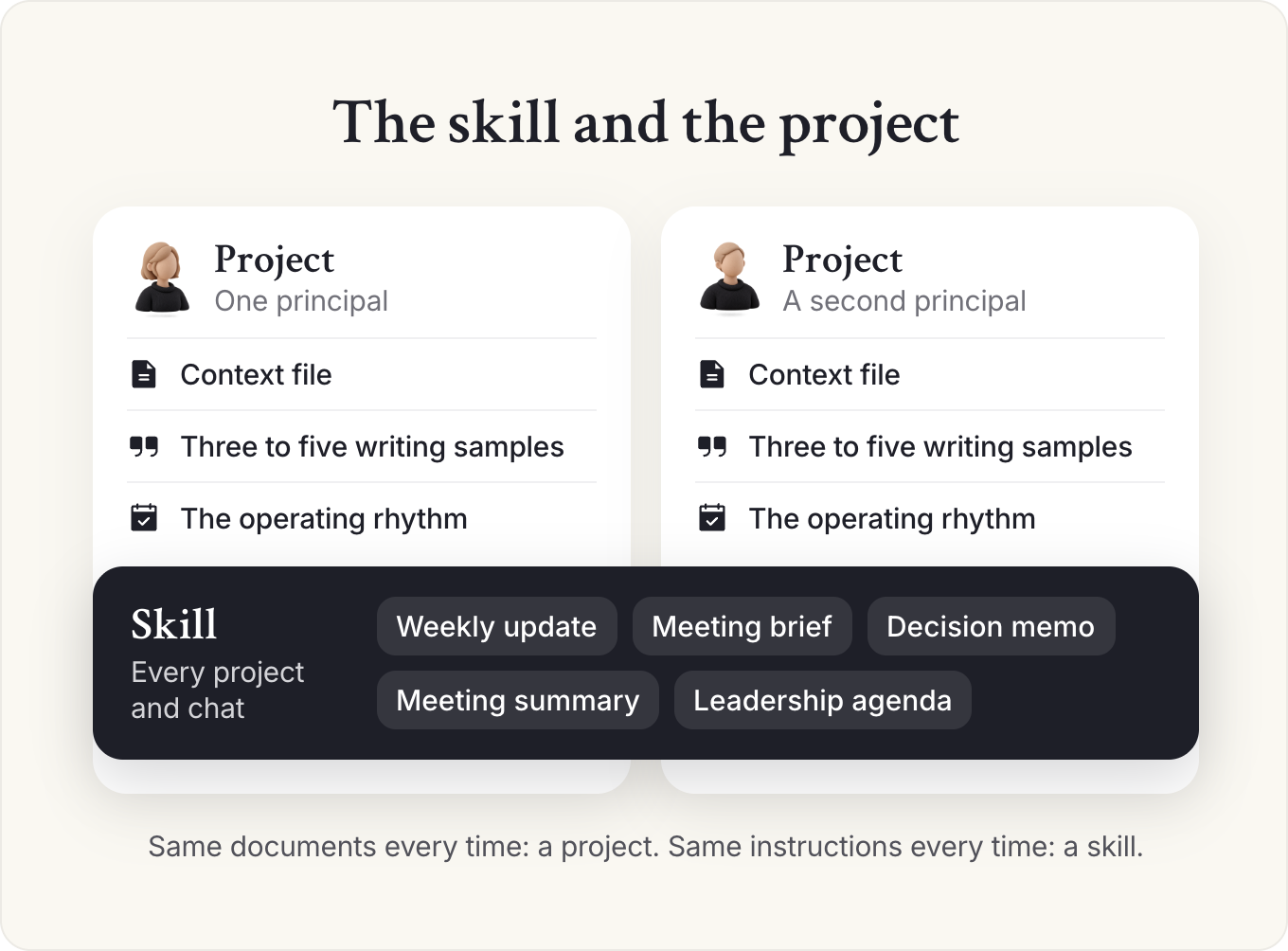
The project holds what Claude should know about one principal, and the skill holds how you do a job, in every project and chat. Tara Nouveau, who leads AI learning products at Clarinet and ran our members' AI workspace workshops, has a test for which is which: if you keep attaching the same documents, they belong in a project; if you keep typing the same instructions, they belong in a skill.
Template: Chief of Staff skill (SKILL.md)
---
name: chief-of-staff
description: Chief of Staff work for [principal]: weekly updates, meeting briefs, decision memos, meeting summaries and leadership agendas. Use when asked to prep, draft or summarize for [principal].
---
Chief of Staff skill
You help [name], Chief of Staff to [principal, title] at [company].
Before any task
- Read the context file in the current project, if there is one. If there isn't, ask me for this quarter's priorities before you start.
- Check the request against those priorities. If it conflicts, say so in one line at the top.
- Use only facts from my message, attached files and sources I name. Mark every gap as [CHECK]. Never invent a number, name, date or quote.
Weekly update to [principal]
Four parts, in this order, under 400 words:
- Decisions I need from you: each with my recommendation and the date I need it.
- What moved: outcomes since last week, tied to the priorities.
- What's coming: the next 2 to 4 weeks, with risks.
- One topic for our 1:1.
Meeting brief
For each meeting: why it matters to this quarter's priorities, who's in the room and what each wants, what was decided last time, the decision or outcome we need, and one question I should ask. Half a page per meeting at most.
Decision memo
Recommendation in the first two lines. Then why now, the options (including doing nothing), trade-offs, who has been consulted, and what happens after the decision. One page.
Meeting summary from notes or a transcript
Decisions (with who decided), actions (owner and date for each), open questions, and "what we tell the company". Leave out who said what unless I ask. Flag anything that sounds like a decision but has no owner.
Leadership meeting agenda
Pull from: open decisions, items that missed their date, requests leaders sent in, and next week's priorities. Each item gets an owner, a time and the outcome needed (decide, discuss or inform). Decisions first.
Rules
- Write in [principal]'s voice only when I ask for a draft in their name, and follow the writing samples in the project.
- Anything about a named person is a draft for me to verify, never a fact.
- Nothing is sent, scheduled or shared without my explicit approval.
- End every output with: what you assumed, and what I should check.
---
name: chief-of-staff
description: Chief of Staff work for [principal]: weekly updates, meeting briefs, decision memos, meeting summaries and leadership agendas. Use when asked to prep, draft or summarize for [principal].
---

# Chief of Staff skill

You help [name], Chief of Staff to [principal, title] at [company].

## Before any task
1. Read the context file in the current project, if there is one. If there isn't, ask me for this quarter's priorities before you start.
2. Check the request against those priorities. If it conflicts, say so in one line at the top.
3. Use only facts from my message, attached files and sources I name. Mark every gap as [CHECK]. Never invent a number, name, date or quote.

## Weekly update to [principal]
Four parts, in this order, under 400 words:
1. Decisions I need from you: each with my recommendation and the date I need it.
2. What moved: outcomes since last week, tied to the priorities.
3. What's coming: the next 2 to 4 weeks, with risks.
4. One topic for our 1:1.

## Meeting brief
For each meeting: why it matters to this quarter's priorities, who's in the room and what each wants, what was decided last time, the decision or outcome we need, and one question I should ask. Half a page per meeting at most.

## Decision memo
Recommendation in the first two lines. Then why now, the options (including doing nothing), trade-offs, who has been consulted, and what happens after the decision. One page.

## Meeting summary from notes or a transcript
Decisions (with who decided), actions (owner and date for each), open questions, and "what we tell the company". Leave out who said what unless I ask. Flag anything that sounds like a decision but has no owner.

## Leadership meeting agenda
Pull from: open decisions, items that missed their date, requests leaders sent in, and next week's priorities. Each item gets an owner, a time and the outcome needed (decide, discuss or inform). Decisions first.

## Rules
- Write in [principal]'s voice only when I ask for a draft in their name, and follow the writing samples in the project.
- Anything about a named person is a draft for me to verify, never a fact.
- Nothing is sent, scheduled or shared without my explicit approval.
- End every output with: what you assumed, and what I should check.
Example: Weekly update this skill writes for a Series B CEO (illustration)
Weekly update to the CEO · Friday, Nov 7
Decisions I need from you
- Approve the VP Engineering offer at the top of the band. I recommend yes, because she has a competing offer. Needed by Tuesday. The ask: reply "approve" or call me.
- Pick the board's discussion topic: pricing or the enterprise launch. I recommend pricing. Needed by Nov 14.
What moved
- Series B (priority 1): four partner meetings; two firms asked for data room access
- Enterprise tier (priority 2): second design partner signed
- VP Engineering search (priority 3) and platform migration: on track
What's coming
- Nov 14: board pre-read goes to directors; finance numbers due Nov 12 [CHECK: close date]
- Risk: the new pricing page needs legal review, and nobody has booked it
For our 1:1
- The head of sales wants to reopen the Europe decision. How do you want to handle it?
What I assumed: the board meeting is still Nov 21. What to check: the partner meeting count, against your calendar.
# Weekly update to the CEO · Friday, Nov 7

## Decisions I need from you
1. Approve the VP Engineering offer at the top of the band. I recommend yes, because she has a competing offer. Needed by Tuesday. The ask: reply "approve" or call me.
2. Pick the board's discussion topic: pricing or the enterprise launch. I recommend pricing. Needed by Nov 14.

## What moved
- Series B (priority 1): four partner meetings; two firms asked for data room access
- Enterprise tier (priority 2): second design partner signed
- VP Engineering search (priority 3) and platform migration: on track

## What's coming
- Nov 14: board pre-read goes to directors; finance numbers due Nov 12 [CHECK: close date]
- Risk: the new pricing page needs legal review, and nobody has booked it

## For our 1:1
- The head of sales wants to reopen the Europe decision. How do you want to handle it?

What I assumed: the board meeting is still Nov 21. What to check: the partner meeting count, against your calendar.
The description decides when Claude uses the skill, so it names the jobs in the words you'd type: prep, draft, summarize. The last rule makes every draft end with its own assumptions, which turns checking from a reread into a short list.
Edit the five formats to match how you work today. If your principal wants the weekly update as three bullets on Slack, write that; a skill written around an ideal rhythm gets dropped by the second week.
Install it
Replace the bracketed names first and save the text as a file called SKILL.md.
Claude
- Skills need code execution switched on: on a personal plan, turn it on under Settings, then Capabilities, and on a company plan your admin controls it.
- Put SKILL.md in a folder named chief-of-staff and zip the folder, so the folder itself sits at the top of the ZIP. Keep the description under 200 characters, so use your principal's first name.
- Open your skills list in Claude. Select +, then Create skill, then Upload a skill, and switch the skill on.
- Test it: paste a set of notes and ask for your weekly update. Use real company notes only on the plan your company approved (next section), and once your principal's project exists, run it there. To call it directly, name it: "Use my chief-of-staff skill to draft this week's update."
If a menu doesn't match these steps, search Claude's help center for "skills". If you install someone else's skill instead, read it first: a skill can tell Claude to install other software, and Anthropic names prompt injection and data leaks as the main risks.
Make it yours in three runs
In a workshop for our members, Tara Nouveau put a new skill's first version at about 70% right, with feedback doing the rest. She writes a skill in four parts: define the job, give it context, capture the judgment, then train it with feedback. People skip the third part because it's made of small decisions they don't notice making. Her fix is to write those calls down: in her inbox triage skill, a line says that messages from one named colleague are usually escalations.
Run the weekly update three Fridays in a row and note every edit (illustration):
- Week one. You move the hiring decision from the bottom to the top, because your principal reads the first two lines and stops. The skill gets: "Decisions I need come first, each with the date I need them."
- Week two. Your principal replies, "What do you actually need from me here?" The skill gets: "Each decision ends with the ask in one sentence."
- Week three. You cut a paragraph on a project that's on track. The skill gets: "Workstreams on track get one line between them. Only what's at risk gets detail."
Those three lines are your principal's reading habits written down. Split a job into its own skill when someone else, such as your principal's EA, needs it. Anything about a person's performance, pay or employment never becomes a skill, because a saved procedure makes it too easy to run without thinking.
A job that runs once a month or once a quarter, such as the board pre-read, trains slowly, because each run gives you one round of edits. Put two or three worked examples in the file from the start.
A good default is to add the week's edits to the skill every Friday. After the first month, your principal relies on the format, so agree any change with them before you make it. If you share the file, keep one owner and a date at the top.
Which Claude plan should a Chief of Staff use, and is company data safe?
Use the plan your company has approved for work, which usually means a Team or Enterprise plan that IT administers. Keep company data off personal accounts, because the rules for your data, the admin controls and the contract all change with the plan.
On personal plans, you choose in your privacy settings whether your chats train future models. Team and Enterprise run under commercial terms, with no training on your content by default, and an owner controls connectors, approvals and memory, which are the controls your security team will ask about.
I'd take a Team seat your company pays for over any personal plan, because the commercial data terms and admin controls come with it.
Security and compliance are the barriers companies name most often, and one respondent's CTO stopped AI use in internal strategy meetings over privacy worries.
If your company hasn't approved a plan, learn on public material and your own writing, and take IT the ready-made request in our setup guide.
What to keep out, even on an approved plan
Keep four things out, or use them only under tighter rules:
- Anything about a named person's performance, pay, health or employment.
- Legal matters and anything under privilege.
- Customer personal data, unless your policy covers it.
- Board and investor materials before they're final, unless your principal agrees.
If your company's AI policy doesn't say this yet, the template in our guide to AI and the Chief of Staff is a fair starting point to bring to legal.
A project saves its own memory but also draws on your account memory, and what it learns can surface in chats outside the project. Turn off "Use account memory" on each principal's project page, and once a month read what Claude has saved and delete what shouldn't be there.
Ask IT which AI plan is approved for company data, then open your privacy settings and check the training choice and memory on whatever account you use today.
How do you set up a Claude project for your principal?
Create one project per principal, give it a short set of instructions, and add your context file and a few samples of how your principal writes. From then on, do all of that principal's work inside the project, so every chat starts from the same facts.
A project has instructions, which tell Claude how to behave, and knowledge: the files it reads before it answers.
What goes in the knowledge
Three files cover most of what Claude needs for a principal.
- Your context file. One page: this quarter's priorities in order, what's off the list, who owns what, the decisions that shape everything else and how your principal wants information. The template, and the Friday routine that keeps it current, are in our guide to context management.
- Three to five samples of your principal's writing. A company update, a hard email and a board note work well. Claude learns tone faster from examples than from adjectives like "direct" or "warm": real writing shows how your principal opens, gives bad news and which words they never use.
- The current operating rhythm. The leadership meeting agenda format, your weekly update template, the board calendar. If you don't have these written down, our guides to leadership meetings, the weekly update and board meetings have them.
Leave out anything your company's rules keep out of AI tools, and anything about a person that you wouldn't read aloud to them.
If your principal rarely writes, use meeting transcripts, but only where recording is approved and people were told.
The instructions
Paste this into the project's instructions and fill in the brackets.
Template: Project instructions for a Chief of Staff
You are working with me, [name], Chief of Staff to [principal, title] at [company].

How to work
- Read the context file in this project before every task. If my request conflicts with this quarter's priorities, say so first.
- Write for [principal]: [e.g. decision first, one page, numbers in a table, plain words].
- Match the tone of the writing samples in this project when you draft anything in [principal]'s name.
- Use only facts from my message, the files in this project and any source I name. Mark every gap as [CHECK]. Never invent a number, name, date or quote.
- Treat anything about a named person as a draft for me to verify.

Recurring jobs
- For the weekly update, meeting briefs, decision memos and summaries, follow my chief-of-staff skill.

Before you finish
- List anything you assumed.
- Tell me which parts I should check against the source.
You are working with me, [name], Chief of Staff to [principal, title] at [company].
How to work
- Read the context file in this project before every task. If my request conflicts with this quarter's priorities, say so first.
- Write for [principal]: [e.g. decision first, one page, numbers in a table, plain words].
- Match the tone of the writing samples in this project when you draft anything in [principal]'s name.
- Use only facts from my message, the files in this project and any source I name. Mark every gap as [CHECK]. Never invent a number, name, date or quote.
- Treat anything about a named person as a draft for me to verify.
Recurring jobs
- For the weekly update, meeting briefs, decision memos and summaries, follow my chief-of-staff skill.
Before you finish
- List anything you assumed.
- Tell me which parts I should check against the source.
One project per principal, kept current
Tara sizes a project around one role you play, one goal or one recurring deliverable, and suggests one project per OKR. I'd start with one per principal, because the pricing decision affects the board pre-read, which affects the all-hands, and a project per goal sees only part of that chain. If you support two leaders, make two projects.
A context file three weeks stale gives you confident drafts built on old priorities, so spend ten minutes on it right after your Friday update. When you replace a document, delete the old one the same day, and once a quarter empty the project except for the context file and samples.
Before you share the project with an EA or a deputy, read it as they would; if it holds anything your principal hasn't announced, build them a separate project from the shareable parts.
What should you do in your first week with Claude?
Spend the first week doing real work, one job a day, inside your principal's project. By Friday you should know which jobs Claude does well for you, how much editing each draft needs, and which edits belong in the skill.
Pick tasks you'd do anyway this week, so the comparison with your usual way is honest.
- Monday, set up and test. Create the project and run the test prompt below; its answer shows what your context file is missing.
- Tuesday, meeting prep. For tomorrow's three most important meetings, ask for why each matters to this quarter's priorities, what was decided last time and one question you should ask. Check every fact against your notes.
- Wednesday, a hard piece of writing. A decision memo, a tricky email to a peer, a message about a change people won't like. Ask for two versions with different tones and pick from them.
- Thursday, numbers. Upload a sheet you already use, such as a hiring plan, and ask what changed, what looks wrong and what the leadership team will ask. Have it show every calculation.
- Friday, your weekly update. Give Claude the week's notes and ask for a first draft in your usual format.
Prompt: Test what Claude knows about my principal
Using only the files and instructions in this project, answer in under 300 words:
1. What do you think [principal]'s top three priorities are this quarter, in order? Quote the line in the context file each one comes from.
2. Who owns each priority?
3. If I asked you for my weekly update to [principal] right now, what would you need from me that isn't here?
4. List anything in the files that looks out of date or contradicts something else.
Don't guess. If the files don't say, write "not in the files".
Draft, react, redraft
Ashlea Holt treats AI as an analyst that gives her something to react to, "first draft, third draft", and if the second draft still isn't clear, she takes it as a sign her own thinking isn't there yet. Claude rarely nails a hard memo on the first pass, and it gets you to a version you can argue with much sooner than a blank page.
Aria Finger, then Chief of Staff to Reid Hoffman, told our podcast she uses her assistant constantly in voice mode on her phone, because talking gives it more context than typing. If your requests come out thin, try saying them out loud.
Note the edits each job needed, and run the job with the most edits again next week. Once your principal sees faster turnarounds they'll ask for more, so decide now which work stays slow on purpose, such as anything about people.
Swap prompts, skills and project setups with Chiefs of Staff who use AI every day. Join the Chief of Staff Network for peer groups, events and the Power Skills program.
See membershipWhen should you connect Claude to your calendar, email and documents?
Connect your calendar, read only, as soon as IT approves an assistant for company data, then meeting notes. Add email only when the project and skill produce drafts you trust, usually two to four weeks in, because earlier it lets Claude make confident mistakes with more data.
Calendar first, email last
I'd connect the calendar first, because an error there costs little and the payoff is daily: meeting prep that knows who's in the room. Meeting notes come next, once the people in those meetings know. Email comes third, read-and-draft only for at least a month, because an inbox holds the most sensitive material you touch, and shared documents can follow. Our guide to AI tools covers what to add around Claude, such as a notetaker.
Always allow reading, because a read can't change anything. Set every action that sends, shares or deletes to ask for your approval first. On most plans, Claude starts on Auto, where it decides on those actions itself, so switch Claude to Manual before you connect anything.
Tell your principal what you plan to connect before you connect it, and tell the leadership team before Claude reads transcripts of their meetings.
A wrong calendar invite reaches a leader, so add one connection at a time and run it for a week before the next. Before Claude runs jobs on its own, write down what it may do alone.
Which Claude feature should a Chief of Staff use for which job?
Do your principal's work inside their project. Ask for everything in the same conversation, from a quick question to a multi-step job across your files and apps. Pick the feature by the job: a skill for a procedure you repeat, connectors for your calendar and email, a scheduled task for the Monday brief, and Research for the outside facts a decision memo needs.
Cowork is Claude's agent for knowledge work. It now shares one conversation with chat, so there's no mode to pick. If you still see Chat and Cowork as separate options, run the multi-step jobs in Cowork.
What to use for which job
| Feature | Use it for |
|---|---|
| Project | Everything for one principal: your context file, writing samples and how they like information |
| Skill | A procedure you repeat: the weekly update, the meeting brief, the decision memo |
| Connectors | Meeting prep from your calendar, finding the thread, drafting replies |
| Cowork | A multi-step job that comes back finished: the weekly 1:1 prep, a first draft of the board pack |
| Scheduled tasks | A Monday brief, a Friday list of open commitments |
| Research | The outside facts for a decision memo, from searches that build on each other |
The approval setting covers the whole conversation, so check that it's on Manual before you hand over a job that can send, share or delete. A job that uses files or apps on your computer needs the desktop app open.
In our member sessions, people prove a job in a project first, then build it as its own app, for example in Claude Code, once the use case is settled. Before you build your own, weigh the four costs in our guide to AI tools. Have an engineer review anything the company will rely on.
What do Chiefs of Staff run through Claude and its connected tools?
Once the project, the skill and a connection or two work, Chiefs of Staff in our member sessions add four jobs: the weekly 1:1 with their principal, inbox triage, a Monday priorities brief and a strategy check on new ideas.
The weekly 1:1, before and after
One of our member playbooks runs the weekly CEO 1:1 as a single Cowork session, with Slack, Drive, the calendar and meeting transcripts connected. The day before, Claude reads the week's signals and drafts a short pre-read. Afterwards it turns your tagged notes into a follow-up for you to send within two hours, and our weekly update guide has the agenda.
Inbox triage
The triage skill from the first of our AI workspace workshops sorts each message four ways: respond, route, escalate or no action. It names the owner and the next step, drafts a reply only when one helps, and never sends, deletes, archives or promises anything. Because it only reads and drafts, it fits the first month of email access, and it can run each morning as a scheduled task.
A Monday priorities brief
A Monday brief built from your calendar and the context file is a good first scheduled task. You describe the job and how often it runs, and Claude runs it and reports back, even while your computer is asleep, as long as it needs only your connectors and the files saved to your Claude account.
In our member build sessions, one instructor has her priorities brief read her quarterly goals with her inbox. From the inbox alone, it lists only reactive work. When it ranked duplicate calendar invites as a top priority, she had it move them to a separate list of things to resolve soon and rewrite its own instructions.
Schedule only jobs that read and draft. When a step needs your approval, the run may wait for you or finish without that step. Read every run for two weeks before you trust it, and delete any task whose output you've stopped reading.
A strategy check on new ideas
Tara recommends one more project for a Chief of Staff, a strategy source of truth: the plan, the OKRs, the operating principles and recent board updates, with instructions to cite the document it draws on and never fill a gap. Pair it with a skill that checks each new initiative against the strategy and gives you the questions to ask its sponsor. A general chat answers the same question from whatever it finds, which may be out of date. Our prompt library has a pre-mortem prompt to run in the same project.
What goes wrong in a Chief of Staff's first month with Claude?
Most early problems come from five habits: one endless chat, trusting numbers, work on a personal account, drafts that drift from your principal's voice, and handing over the thinking.
Five first-month mistakes and the fix
| Mistake | What happens | The fix |
|---|---|---|
| One long chat for everything | Older details crowd out new ones and answers drift | A new chat per task, inside the principal's project |
| Trusting numbers | A wrong total looks as polished as a right one | Ask Claude to show every calculation; check totals against the source |
| Company work on a personal account | Company data sits outside company controls | Approved plan only; personal accounts for public material |
| Voice drift | Drafts in your principal's name sound like a chatbot | Writing samples in the project; your principal approves anything sent as them |
| Handing over the thinking | Memos look complete but argue nothing | Write your recommendation in one line before you ask for the draft |
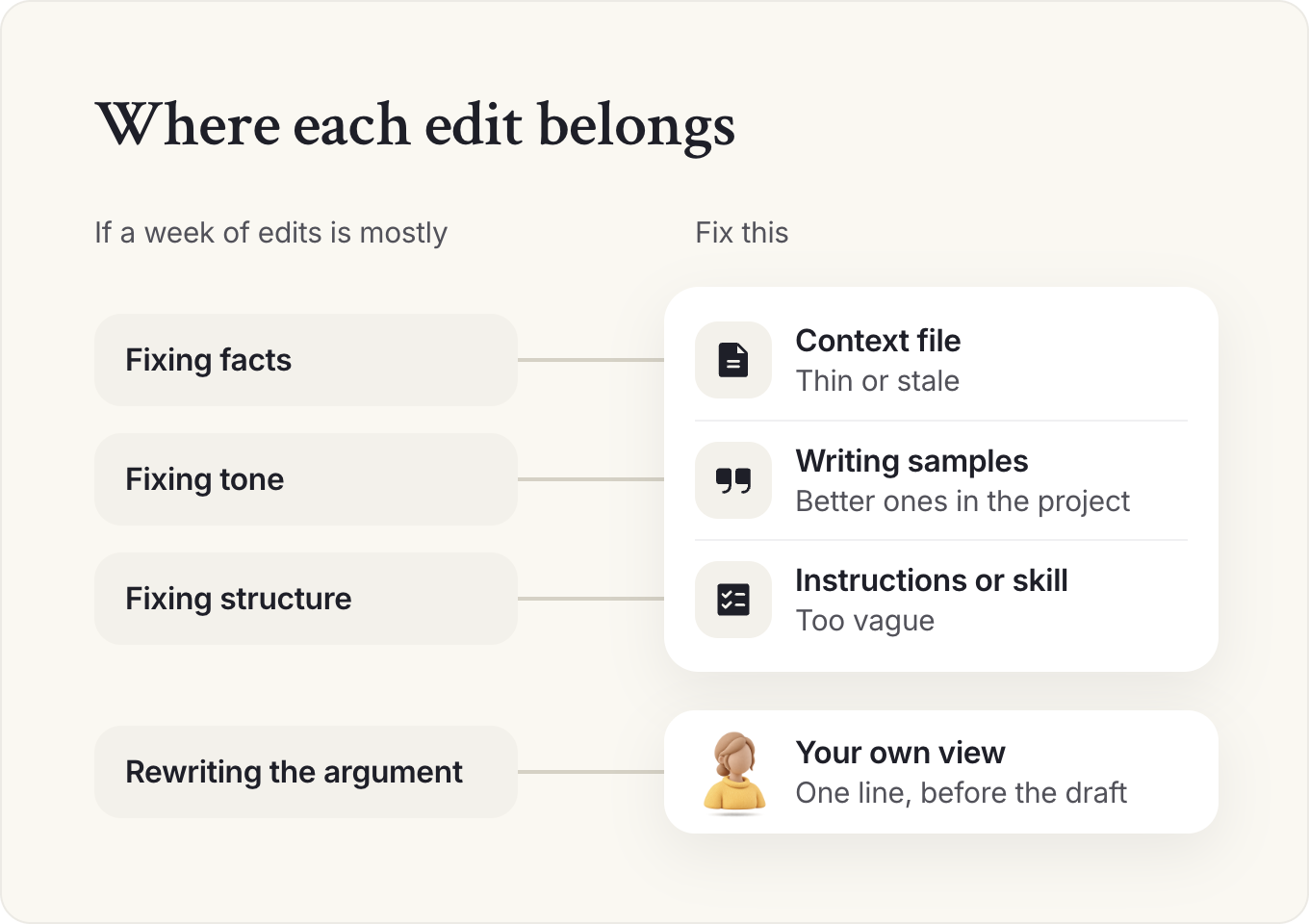
Sort a week of your edits before you change anything. Mostly fixing facts means the context file is thin or stale; mostly fixing tone means the project needs better samples; mostly fixing structure means the instructions or the skill are vague. If you're rewriting the argument itself, you handed over the thinking.
The first four mistakes get caught, and the fifth often doesn't, because the output looks finished: a memo with three balanced options and no view is easy to produce and useless to a leader who needed a recommendation. Claude can make a strong case for a recommendation you give it. It can't come up with the recommendation.
If every memo starts from a model's draft, your own arguments get rusty. Next week, write one recommendation from scratch before you open Claude, and send it to your principal as you wrote it.
Keep reading
 How to build an AI chief of staff: a setup guideAI and the CoS
 AI chief of staff: how AI is changing the role, and what it can't doAI and the CoS
- AI tools for Chiefs of Staff: what to use, buy or buildAI and the CoS
AI and the CoS
Take this guide with you
The full guide as a PDF: every section, template and chart, ready to print or share with your team.
Your PDF is ready.
Download the PDFFree. We may email you new guides; unsubscribe anytime.
Frequently asked questions
Is there a chief of staff skill for Claude?
Yes. The skill in this guide covers the weekly update, meeting briefs, decision memos, meeting summaries and leadership agendas. Copy it, replace the bracketed names, save it as SKILL.md in a folder, zip the folder and upload it under Skills.
Can Claude be my chief of staff?
Partly. Claude can do the prep: meeting briefs, summaries with owners and dates, first drafts of updates and memos, and a first sort of your inbox. You still make the recommendation. Claude can argue for one you give it, and it can't come up with one. You still decide anything about a person, because a saved procedure makes that too easy to run without thinking. You still approve what goes out, because it has your name on it. The start of this guide shows the changes an executive makes.
Does Claude train on my company's data?
On personal plans, you choose in your privacy settings whether chats can be used to train models. Team and Enterprise run under commercial terms, and Anthropic doesn't train on that content by default. Either way, use company data only on a plan your company has approved.
Can Claude send emails or book meetings for me?
With the Google Workspace connector, Claude can draft and send email and create calendar events, and outside Auto mode it asks for your approval first. On Team and Enterprise plans, an owner decides whether members can skip that approval. The Microsoft 365 connector can do the same once your admin turns on its write tools. I'd keep Claude on Manual for anything that goes out under your principal's name.
How long does it take to set up Claude for a Chief of Staff role?
About an hour for the project, instructions and skill, plus 30 minutes to start a context file. Give it a week of real tasks before you judge it, connect your calendar once IT approves, and wait two to four weeks before you connect email.
Is there a Claude chief of staff prompt?
The project instructions in this guide are the standing prompt: paste them into your principal's project once and every chat starts from them. For single jobs, such as a pre-mortem or a quarterly review pack, use our prompt library, and run each prompt inside the project so it reads your context file.
- AI Readiness Diagnostic, Chief of Staff Network, 2026 (1,200+ senior leaders).
- Chief of AI Report, Chief of Staff Network, 2025.
- Ashlea Holt with Tim Bristow, Chief of Staff Network podcast.
- Aria Finger, Chief of Staff Network podcast.
- Build Your Personal AI Workspace, Parts 1 to 3, Chief of Staff Network, 2026 (Parts 1 and 2 led by Tara Nouveau of Clarinet; Part 3 hosted by Clarinet).
- CEO Weekly Debrief and 1:1 Agenda, member playbook, Chief of Staff Network Exchange, 2026 (members only).
- Vendor help centers and pricing pages: Claude, Anthropic Privacy Center (checked November 2026).
Learn the job with people who do it
Membership gets you the Power Skills program, member events and a private community of working Chiefs of Staff.
Land your first Chief of Staff role
Launchpad helps you prepare, position yourself and interview for the role.
Starting out in the role?
The Fundamentals email course walks you through scoping the mandate, setting the cadence and earning trust.
Lead AI adoption from the Chief of Staff seat
The Chief of AI Fellowship is for operators turning AI into how the company runs.
Hiring a Chief of Staff?
Post the role on the Chief of Staff job board, or browse open roles.
Get your resume ready for the role
Get feedback on your Chief of Staff resume before you apply.
Let the right roles find you
Join the talent network and hear about Chief of Staff roles first.
The Chief of Staff newsletter
What Chiefs of Staff are reading, hiring for and building.
Get the full report
Every chart and cut from our latest salary research, sent to your inbox.
Using AI with sensitive data?
Learn the legal side of using AI at work.
Keep going in this series