

Tools and templates for Chiefs of Staff
The Chief of Staff toolkit: the templates, tools and weekly documents behind the job, mapped to what 1,800+ job postings ask for, with 40+ free templates.

Ask AI
 Share

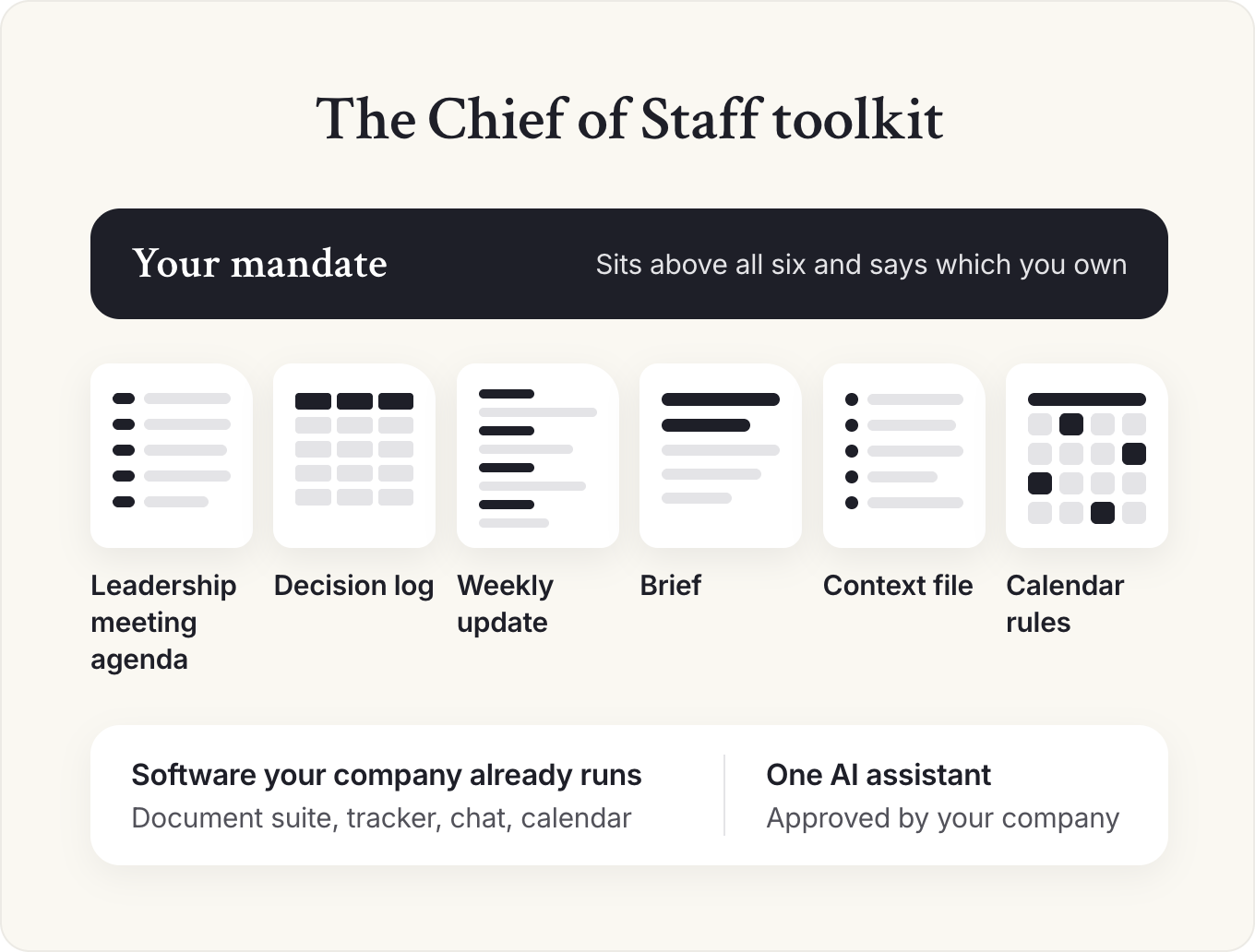
A Chief of Staff's toolkit is the documents they run every week and the software that holds them. Six do most of the work: the leadership meeting agenda, the decision log, the weekly update, the brief, the context file and the calendar rules. Keep them in software your company already runs, and add one approved AI assistant.
- Fix the documents before the tools. In your first month, run the leadership meeting agenda, the decision log and the weekly update, and agree your mandate. Draft the brief, the calendar rules and the context file by week 4.
- Keep each template in the software your leadership team already opens, in the same folder as the documents it produces.
- Add one AI assistant your company approves before any other AI tool, and give it your principal's context file and rules first.
- Pilot a new tool with one to five people who have the problem, for two to four weeks, before anyone announces it.
- Every Friday, find the document nobody opened when it was due, and fix it or drop it.
Most Chiefs of Staff inherit a mess of tools before they inherit a job: a project tracker nobody updates, three places where decisions might be written down, and a leadership meeting with no agenda. The temptation in month one is to fix the tools.
Fix the documents first. A tracker for work that happens once a quarter is overhead, while a one-page agenda for a meeting that happens every week pays you back fifty times a year.
What's in a Chief of Staff toolkit?
A Chief of Staff's toolkit is a handful of recurring documents, the rules that keep them current, and the software that holds them. Start with the documents; pick software last. Six carry most of the job:
- The leadership meeting agenda, with a cutoff for agenda requests.
- The decision log, one line per decision: what was decided, why, the options that lost, who decided and when to revisit it.
- The weekly update to your principal (the executive you work for), sent the day before your 1:1, in four parts: decisions I need from you (each with a recommendation and a date), what moved, what's coming (next 2 to 4 weeks, with risks), and one topic for our 1:1.
- The brief, a page your principal reads before a meeting, with the ask and your recommendation first.
- The context file: your principal's priorities in order, who owns what, the decisions that shape everything else and how your principal wants information, kept current for you, your principal and your AI tools.
- The calendar rules: what your principal's time goes to, and who can book it.
Your mandate sits above all six. Its decision rights come in three tiers, Decide, Recommend and Not own, and they tell you which of these documents you own and which belong to someone else. Review it at 90 days, then every six months.
The six map to what employers ask for. Here's how often each responsibility comes up in more than 1,800 Chief of Staff job postings.
Each of the four core responsibilities runs on a few documents, and each document has an owner and a fixed day. A common week: metrics review on Wednesday, agenda requests close on Thursday, your weekly update goes to your principal on Friday, your 1:1 is on Monday, and the leadership meeting is on Tuesday.
- Priorities and decisions: the brief with your recommendation first, the decision log and the calendar rules.
- Running the operating rhythm: the leadership meeting agenda, the decision log, the weekly business review scorecard and the rhythm on one page.
- Communication up and down: the weekly update, the brief and a voice file for writing in your principal's name.
- Cross-functional projects: one shared tracker with one owner per line, and the commitments list.
How to tell a working document from a folder of templates
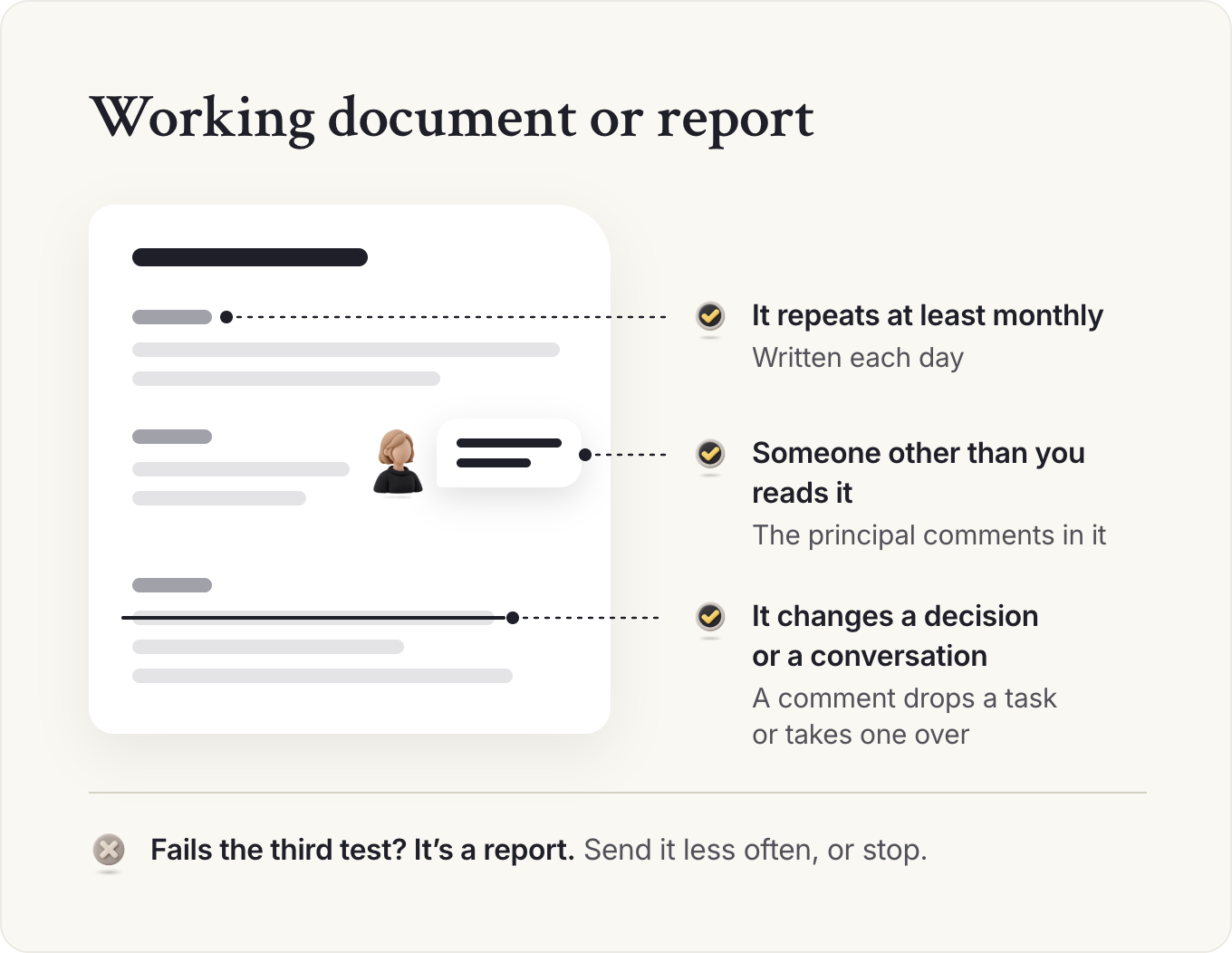
A Chief of Staff on a dinner panel we recorded for our podcast described the simplest version. They worked remotely, and neither they nor the person they supported could see what was getting done, so they started a shared Google Doc of priorities and wrote each day what they were working on. The principal commented in it to drop a task or to take one over. The Chief of Staff said the doc changed their productivity and gave them confidence they were working on the right things.
That document passed three tests, and I'd hold every document in your toolkit to them. It repeats at least monthly. Someone other than you reads it. And it changes a decision or a conversation, the way the principal's comment changed that day's work. A document that fails the third test is a report: send it less often, or stop.
In a company under 50 people, three documents usually cover it: a shared priority list, the decision log and the weekly update. In a large company you'll inherit a reporting stack, and most of your first quarter goes to merging and retiring documents. This week, write down the six documents above and, next to each, where it lives today and who updates it. The gaps are your first month's work.
If you're the principal, here's what to expect. In the first week, your Chief of Staff should ask which three documents you'd miss most. Have an answer ready. By the end of the first month, you should have agreed the mandate together. You should also be getting an agenda before each leadership meeting, the decisions, owners and dates within two hours of it, and a weekly update every Friday, before your Monday 1:1.
Which templates should a Chief of Staff have?
Have a template for every document you write more than once a month, and nothing else. A template saves you the blank page every week, and when the leadership team sees the same agenda shape at every meeting, they go straight to the content. Every template below is free to copy from the guide it lives in, with no email needed.
Chief of Staff templates library, by job
| Job | Template | Guide |
|---|---|---|
| Setting up the role | Mandate, one page | Mandate |
| Setting up the role | First 90 days plan; listening tour kit; day-30 memo; day-90 review | First 90 days |
| Running the week | Leadership meeting agenda with agenda requests; meeting notes and decisions; follow-up email | Meetings |
| Running the week | Weekly update; 1:1 agenda | Weekly update |
| Running the week | Weekly calendar for a Chief of Staff | Day in the life |
| Running the quarter | Operating rhythm on one page; weekly business review; QBR pre-read | Operating rhythm |
| Running the quarter | Board meeting work-back plan; board pre-read memo; follow-up after the board meeting; monthly investor update | Board |
| Briefing | Meeting brief; decision memo; pre-read; CEO daily briefing | Briefing |
| Briefing | Research scoping note; research memo | Research |
| Communicating | Voice file; all-hands run of show; hard announcement plan; cascade kit | Communications |
| Time and inbox | Calendar audit; time budget and booking rules; inbox triage rules; out-of-office handover | Calendar |
| Keeping context | Leadership context file; decision log; commitments list | Context |
| Working with AI | AI setup request to IT; rules for your assistant; week-one plan | AI setup |
| Working with AI | AI use policy for a leadership team | AI and the Chief of Staff |
| Working alongside others | Who owns what: EA and Chief of Staff; Chief of Staff and COO; promotion case from EA to Chief of Staff | vs EA, vs COO |
| Working alongside others | Stakeholder map; decision stakeholder plan | Stakeholder map |
| Hiring one | Job description template and three examples; interview scorecard; onboarding checklist | Job description, Hiring |
| Your career | Skills self-assessment; offer comparison checklist; counteroffer email; raise case | Skills, Salary |
Keep templates where the work happens. Put each template in the same folder as the documents it produces, named so a new hire could find it without asking you.
Adapt each template before you use it. Lindsey O'Sullivan, then Chief of Staff at Applecart, tries "never to have the Lindsey O'Sullivan way". She says you can't "take the standard OKR process and apply it blankly" to any growth-stage company, so she starts by assessing where the company is today. Treat our templates as a first draft.
Which tools do Chiefs of Staff use?
Use what your company already runs: the document suite, the project tracker, the chat tool and the calendar. Then add one AI assistant your company approves. Pick each tool by whether the leadership team will open it: a plain spreadsheet they check beats a better tracker they don't.
Chief of Staff tools by layer
| Layer | What it's for | What most teams use | The rule |
|---|---|---|---|
| Documents and wiki | Agendas, briefs, memos, the context file | The company's document suite or wiki | Keep it next to the work, where others can open it |
| Tracker | Priorities, projects, commitments | The tracker the company already uses, or a shared sheet | One list of priorities, readable in two minutes |
| Chat and email | Updates, follow-ups, announcements | Slack or Teams, and email | Decisions go in the log; threads are for discussion |
| Calendar | Your principal's time and yours | The company calendar, sometimes with a scheduling tool | Write the booking rules before adding a scheduling tool |
| Search | Finding past decisions and documents | Built-in search, or a company-wide search tool | Write things down where search can find them |
| AI assistant | Drafting, summarizing, briefing, analysis | One approved assistant, such as Claude or ChatGPT | One assistant, set up well, before any other AI tool |
The search layer is the one most teams skip. Lauren Stein, then Chief of Staff at GrowthLoop, said much of her day went to miscellaneous requests from her team. Her fix was a company-wide search tool connected to their documents, wiki and chat, so people could find answers without asking her.
For the AI layer, I'd start with Claude. Whichever assistant you pick needs your principal's context and clear rules before it's useful, and our AI setup guide walks through that setup. Apps sold as an "AI chief of staff" run inbox, calendar and follow-ups. Our guide to AI tools for Chiefs of Staff covers which to buy, and when.
If you use ChatGPT, one vendor change matters. OpenAI is retiring custom GPTs from December 11, 2026, so keep ChatGPT templates and rules in a project or a plugin (Plugins, in the sidebar). If your assistant can act for you, set every action that sends, shares or deletes to ask for your approval first. Our Claude guide shows how.
If you add an AI notetaker to meetings, agree the rules in our meetings guide first: one approved tool, consent, topics never recorded, who reads transcripts and when they're deleted.
When to add a tool, and when a sheet will do
Avoid a new tool in your first month, two places for the same thing, and any tool only you understand. Add one only on one of three signals: you answer the same question several times a week, work goes missing between two systems, or security, compliance or scale rules out what you have. A leader seeing a demo isn't a signal. Before you build a process on a tool, check that it's still sold. Clockwise, a calendar scheduling tool, shut down in March 2026.
Sometimes the right move is fewer tools. On the same dinner panel, a Chief of Staff whose company tracked OKRs in a performance-management system found that keeping it complete had become a task in itself. They moved the goals into a shared Google Sheet that needed no training, and visibility got better.
How the right stack changes with context
| Context | What changes | What I'd do |
|---|---|---|
| Startup, under 50 people | No IT team; tools appear when someone signs up | Docs, one shared sheet, chat and one AI assistant; write down which tool holds what |
| Scaling, 50 to 500 people | Teams pick their own trackers; information splits | Use the tracker most leaders already open; add company-wide search before another tracker |
| Enterprise | IT approves every tool; long security reviews | Work inside the approved list; request one tool a quarter, with the problem sentence written |
| Remote or distributed | Writing replaces hallway updates | Treat the weekly update and decision log as required; search matters more |
| Chief of Staff to a functional leader | The function has its own systems | Run the work in the function's tools; keep the update and context file for your principal |
Before Friday, list every place a decision got written down last month. If there's more than one, pick the one that stays and move the rest into it.
How do you roll out a new tool without annoying the leadership team?
Pilot it with one to five people before anyone announces it, then treat the company-wide rollout as change management.
Tim Bristow, then Chief of Staff at Edge, runs new tools as small pilots: anyone can bring a tool forward, it goes through a quick compliance check, and then one to five people use it before anything bigger happens. He also doesn't give everyone every tool, because that becomes overwhelming. Each role gets the tools it needs.
His co-guest Ashlea Holt said she had learned to be patient, because bringing in new tools is a whole change management process, and it takes a lot of time. The pilot tells you whether the tool solves a real problem before you spend anyone's goodwill, and it gives you the first few fans, who persuade colleagues better than any announcement.
Your own leadership team creates a second risk. Leaders try a tool once and ask why the whole company isn't using it, and if you roll out every tool your principal mentions, the team learns to wait out your launches. I'd say no to most and pilot the one or two that match a problem you already have.
Space the launches out, because a company can absorb one meaningful change at a time. An operating rhythm playbook in our members' resource library uses the same rule for meetings.
A five-step rollout
- Name the problem. Write one sentence on what's broken today and how you'll know it's fixed.
- Check it: security, data access and cost, with IT or whoever approves software, and in the UK and the EU with your data protection lead. Do this before anyone logs in.
- Pilot with one to five people for two to four weeks, chosen because they have the problem.
- Decide: keep, change or drop, using the sentence from step one. Write the decision in the log.
- Roll out through the pilot group. Let them show their teams. Your announcement comes after, and it's short.
A worked example: piloting company-wide search
Say you're Chief of Staff at a 200-person company (an illustration built on Lauren Stein's fix), and you spend about an hour a day answering "where's the doc for X?" in chat.
Your problem sentence reads: "People ask me where things are about 15 times a day; fixed means under five." IT confirms the search tool respects existing permissions, so nobody finds a document they couldn't open before. You pick four pilot users who ask the most questions: two new managers, a sales lead and the executive assistant. After three weeks, questions to you are down to about four a day. You keep it, log the decision, and ask the four to show it in their next team meetings before your three-line announcement.
Usage dips around week two once the novelty wears off, so check the numbers before you judge the tool. By month two, search shows you which documents are stale or duplicated.
What should you build first?
Build in the order your principal will feel it. Start with the leadership meeting and the decision log, then the weekly update, then the brief, then the calendar rules and the context file. The meeting comes first because it's where the most people see your work at once, and the weekly update next because it's your channel to your principal.
Draft your mandate in week 3 and agree it in week 4, so by the end of the month you know which of these documents are yours.
Template: Toolkit setup plan, first four weeks
Toolkit setup: first four weeks
Week 1: watch
- ☐ List every recurring meeting, document and report you've inherited
- ☐ Note where decisions get written down today (all the places)
- ☐ Ask your principal which three documents they'd miss most
Week 2: the meeting and the log
- ☐ Leadership meeting agenda with an agenda-request cutoff
- ☐ Decision log: what was decided, why, options that lost, who decided, when to revisit
- ☐ Commitments list: who promised what, to whom, by when
- ☐ Send decisions, owners and dates within two hours of the meeting
- ☐ Log each decision within 24 hours
- ☐ Start the weekly update to your principal
Week 3: briefs and time
- ☐ Meeting brief for your principal's two biggest meetings next week
- ☐ Draft calendar rules: what their time goes to, who can book it
- ☐ Draft your mandate
Week 4: context and agreement
- ☐ Context file: priorities, owners, decisions, how they want information
- ☐ Agree the mandate with your principal
- ☐ Retire one inherited document nobody reads
Every Friday after
- ☐ Which document did nobody open when it was due? Fix it or drop it.
# Toolkit setup: first four weeks

## Week 1: watch
- [ ] List every recurring meeting, document and report you've inherited
- [ ] Note where decisions get written down today (all the places)
- [ ] Ask your principal which three documents they'd miss most

## Week 2: the meeting and the log
- [ ] Leadership meeting agenda with an agenda-request cutoff
- [ ] Decision log: what was decided, why, options that lost, who decided, when to revisit
- [ ] Commitments list: who promised what, to whom, by when
- [ ] Send decisions, owners and dates within two hours of the meeting
- [ ] Log each decision within 24 hours
- [ ] Start the weekly update to your principal

## Week 3: briefs and time
- [ ] Meeting brief for your principal's two biggest meetings next week
- [ ] Draft calendar rules: what their time goes to, who can book it
- [ ] Draft your mandate

## Week 4: context and agreement
- [ ] Context file: priorities, owners, decisions, how they want information
- [ ] Agree the mandate with your principal
- [ ] Retire one inherited document nobody reads

## Every Friday after
- [ ] Which document did nobody open when it was due? Fix it or drop it.
The Friday line is the one people skip. A toolkit grows by default, because every new problem gets a new document, and pruning is what keeps it small enough that people read it.
Once a template is working, an assistant can help you tighten it. Paste in three real examples of the document, with names and sensitive numbers removed, and ask what they have in common. Use documents you wrote yourself, because inherited ones carry someone else's habits into the template.
Prompt: Turn three of my documents into a template
You are helping a Chief of Staff build a reusable template.

Below are three real examples of the same document I write every week: [paste examples, with names and sensitive numbers removed].

1. List the sections all three have in common, in the order a busy executive would want to read them.
2. Flag sections that appear in only one example and say whether they belong in the template.
3. Write the template with a one-line instruction under each heading.
4. Keep it to one page. Tell me what you cut and why.
If you read one more guide in this series, make it the one on leadership meetings, because that meeting is where most of the other documents get used.
This week, copy the leadership meeting agenda from that guide and the decision log from our context management guide into the folder your leadership team already opens, and use both at your next leadership meeting.
New to the role? Our Fundamentals email course has 15 short lessons on working with your principal, leading without authority and setting the operating rhythm.
Start the courseKeep reading
 How to brief your principal: briefing memos, decision memos and pre-readsToolkit
 Leadership team meeting agenda: how to run the meeting, take notes and follow upToolkit
- Executive calendar management: how a Chief of Staff runs the calendar and inboxToolkit
Toolkit
- The Chief of Staff toolkit: tools and templates for the daily work
- How to brief your principal: briefing memos, decision memos and pre-reads
- Executive communications for Chiefs of Staff: writing for the CEO and running internal comms
- Leadership team meeting agenda: how to run the meeting, take notes and follow up
- Executive calendar management: how a Chief of Staff runs the calendar and inbox
- Context management for Chiefs of Staff
- Stakeholder management for Chiefs of Staff: how to map and track the people your principal depends on
- How Chiefs of Staff research decisions, with and without AI
- How a Chief of Staff runs board meetings and investor relations
Take this guide with you
The full guide as a PDF: every section, template and chart, ready to print or share with your team.
Your PDF is ready.
Download the PDFFree. We may email you new guides; unsubscribe anytime.
Frequently asked questions
What tools does a Chief of Staff use?
Start with the tools your company already runs: the document suite or wiki, the project tracker, Slack or Teams, email and the calendar. Add one AI assistant your company approves, such as Claude or ChatGPT, for drafting, summarizing and briefing. Add any other tool only when the existing one is blocking real work.
Should a Chief of Staff use Notion or Google Docs?
Use whatever your leadership team already opens. A document in a tool nobody else uses becomes a private habit, however well it's built. If the company runs on Google Workspace or Microsoft 365, keep your templates there, next to the documents they produce.
Should I buy a Chief of Staff template pack?
I wouldn't. A template only works when it fits how your company already runs, and your company's own documents are the best starting point. Our templates are free to copy; adapt them to your team's language and drop any section your principal doesn't read.
How many tools is too many?
More than one place for the same kind of information. If decisions live in a log, a chat thread and a slide deck, nobody knows which is true. Keep one decision log, one priority list and one place for briefs, and retire anything nobody opened in the last month.
What's the most important document a Chief of Staff keeps?
The decision log. One line per decision records what was decided, why, the options that lost, who decided and when to revisit it, so the leadership team stops relitigating last week's calls. Log each decision within 24 hours, and send the decisions, owners and dates from the leadership meeting within two hours.
Which project management tool should a Chief of Staff use?
The one most of your leadership team already opens. If teams use different trackers, keep the company's priorities in one shared list with one owner per line, and link to each team's tracker instead of copying it. Add a new tracker only when work goes missing between systems.
What is an AI chief of staff, and do I need one?
An AI chief of staff is an app that runs inbox, calendar and follow-ups. It can't agree priorities with your principal or get a decision to stick. Start with one assistant your company approves, such as Claude or ChatGPT, and set it up with your principal's context file and rules before you buy one. Our guide to AI tools for Chiefs of Staff compares the options.
- Pathways Report 2026, Chief of Staff Network, 2026. 1,819 job postings, June to October 2026.
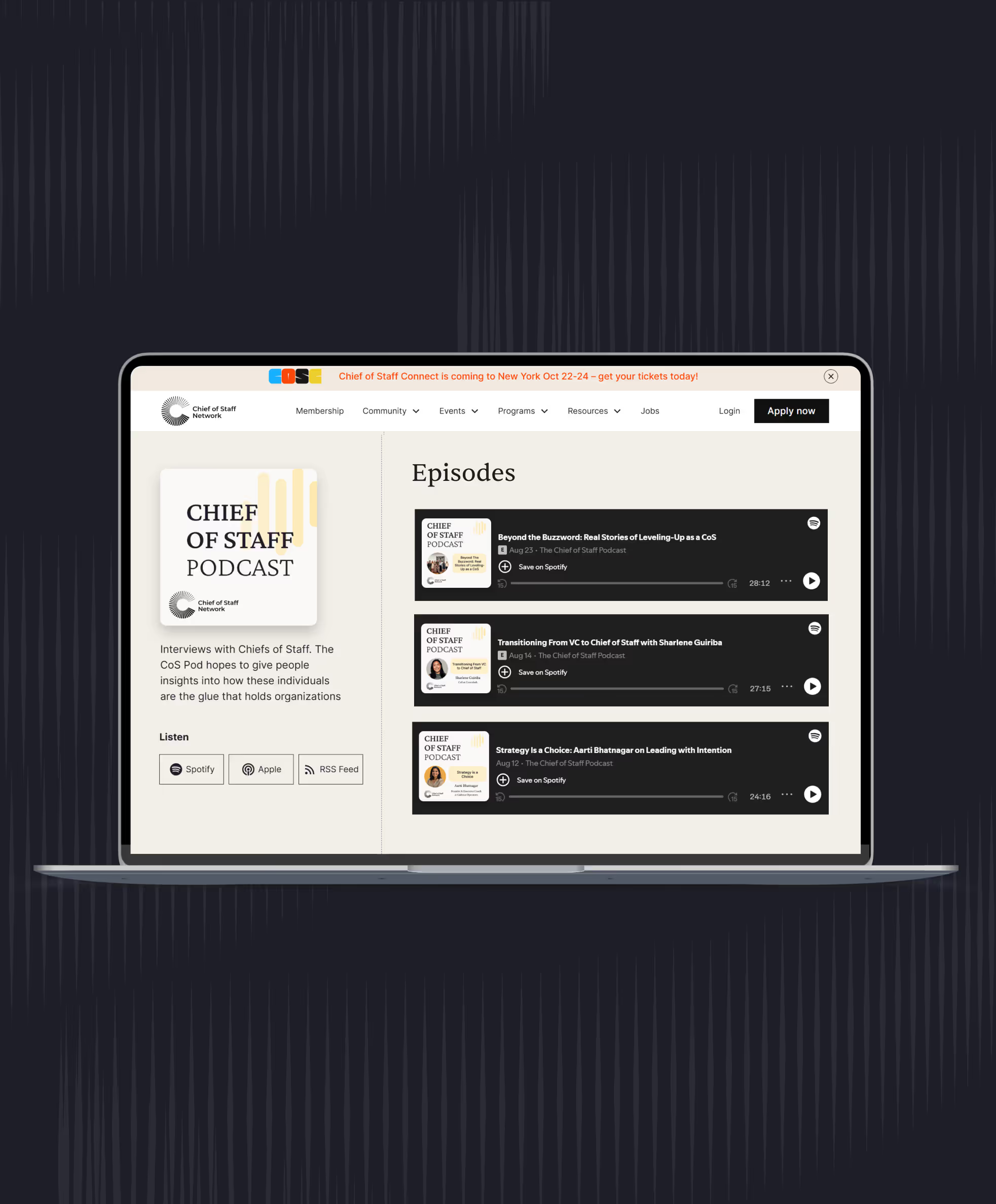
- Chief of Staff Network podcast episodes: Beyond the Buzzword: Real Stories of Leveling-Up as a CoS (live dinner panel), Tim Bristow and Ashlea Holt, Lauren Stein, Lindsey O'Sullivan.
- Operating rhythm playbook, Chief of Staff Network member resource library (members only).
- Vendor notices, checked November 2026: OpenAI Help Center (custom GPTs); Clockwise.
Learn the job with people who do it
Membership gets you the Power Skills program, member events and a private community of working Chiefs of Staff.
Land your first Chief of Staff role
Launchpad helps you prepare, position yourself and interview for the role.
Starting out in the role?
The Fundamentals email course walks you through scoping the mandate, setting the cadence and earning trust.
Lead AI adoption from the Chief of Staff seat
The Chief of AI Fellowship is for operators turning AI into how the company runs.
Hiring a Chief of Staff?
Post the role on the Chief of Staff job board, or browse open roles.
Get your resume ready for the role
Get feedback on your Chief of Staff resume before you apply.
Let the right roles find you
Join the talent network and hear about Chief of Staff roles first.
The Chief of Staff newsletter
What Chiefs of Staff are reading, hiring for and building.
Get the full report
Every chart and cut from our latest salary research, sent to your inbox.
Using AI with sensitive data?
Learn the legal side of using AI at work.
Keep going in this series