.avif)
.avif)




A note on how this was writtenThis post was produced by the AI system it describes. It researched the references, drafted the structure, wrote the text, built the page, and generated the screenshots, which are mock-ups with dummy data rather than my real dashboards. My contribution was the one I'd make to a junior staffer's work: I read the drafts, gave feedback, and decided what shipped. Everything else, Peter wrote. Who's Peter? Read on.
Every morning for about three years, I spent the first thirty minutes of my day doing the same thing: reconstructing context.
I'd scan Todoist for what was in flight, check Zoom for anything that had landed overnight, and dig through Google Drive for the document I knew existed but couldn't name. Thirty minutes, every morning, before I'd done anything that mattered, just getting back to the state I was in when I stopped the day before.
So I built something.
More precisely, I gave myself the thing I spend all day being for someone else: a chief of staff. If the role sounds unautomatable, that's what I thought too. The job is context, synthesis, and follow-through. So is the software. The easiest way to explain it is to walk you through a morning.
What the day looks like now
I open my laptop to the Command Centre, a locally running web app that Claude built. It puts the task board, inbox, calendar and scheduled outputs on one screen, so I'm no longer switching between four tools before I've had a coffee.
The rule for what goes on the board is simple: any piece of work that will take longer than three minutes gets a ticket, and anything shorter I just do on the spot. The system can only see the work you give it, and every job that skips the board is a gap in its diary.
The assistant behind it all is called Peter, and his job title is Chief of Staff to the Chief of Staff. Naming your software is either perfectly sensible or mildly unhinged, depending on your current relationship with AI. Either way, it's far easier to delegate to, correct, and hold a standard against a colleague called Peter than a text box. He has a job description, standing instructions, and a performance record.
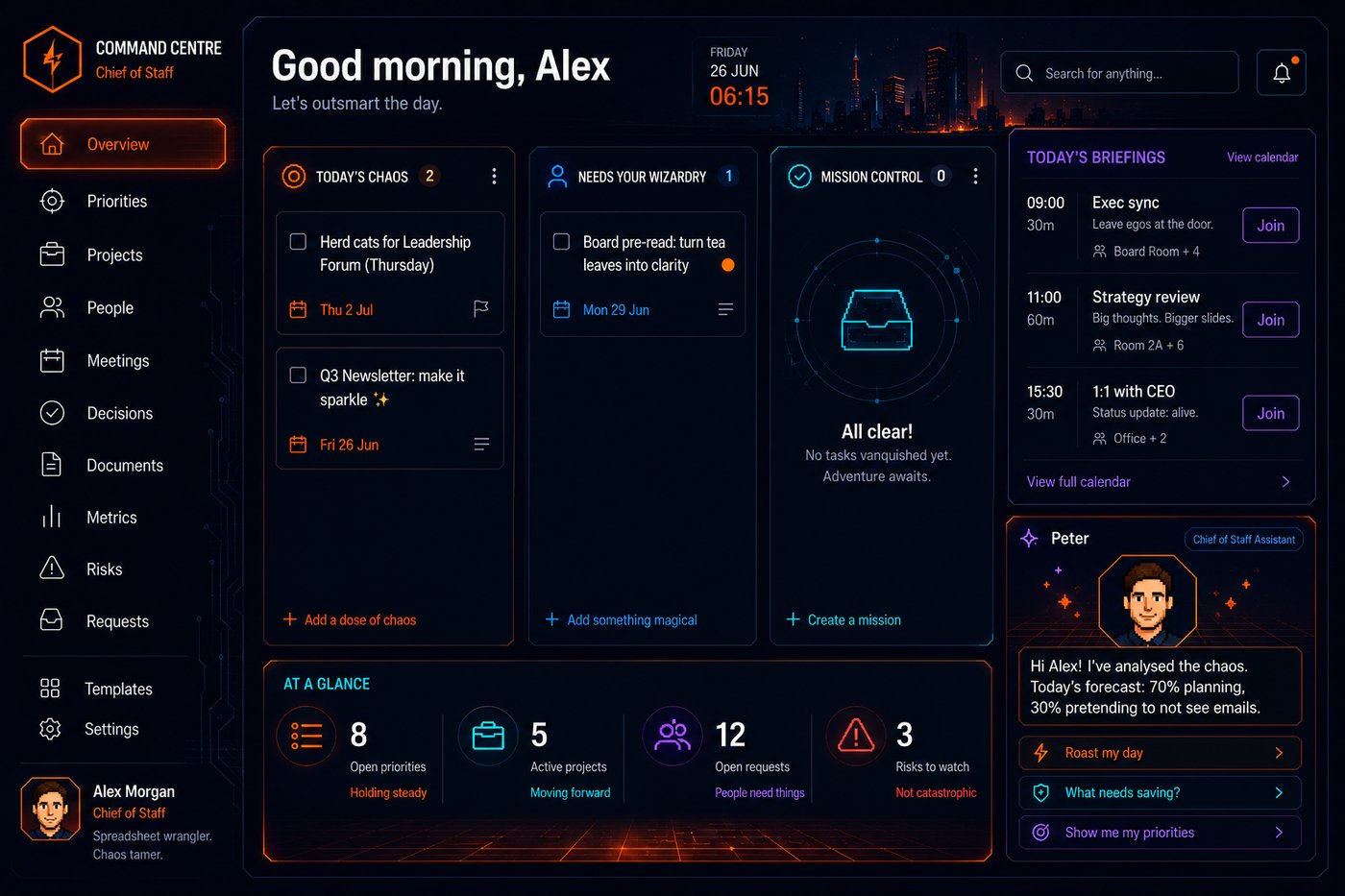
The Command Centre: task board, priorities, today's schedule.
There's a notification waiting: my daily briefing is ready.
It fires at 6am, pulls from my calendar, email, Zoom messages, and whatever's active in Todoist, and produces a structured document I read before I open anything else: yesterday's major decisions, urgent messages that need a response, upcoming meetings with context flagged, and suggested standup items. It takes five minutes to read, and it has replaced the thirty minutes of context reconstruction entirely.
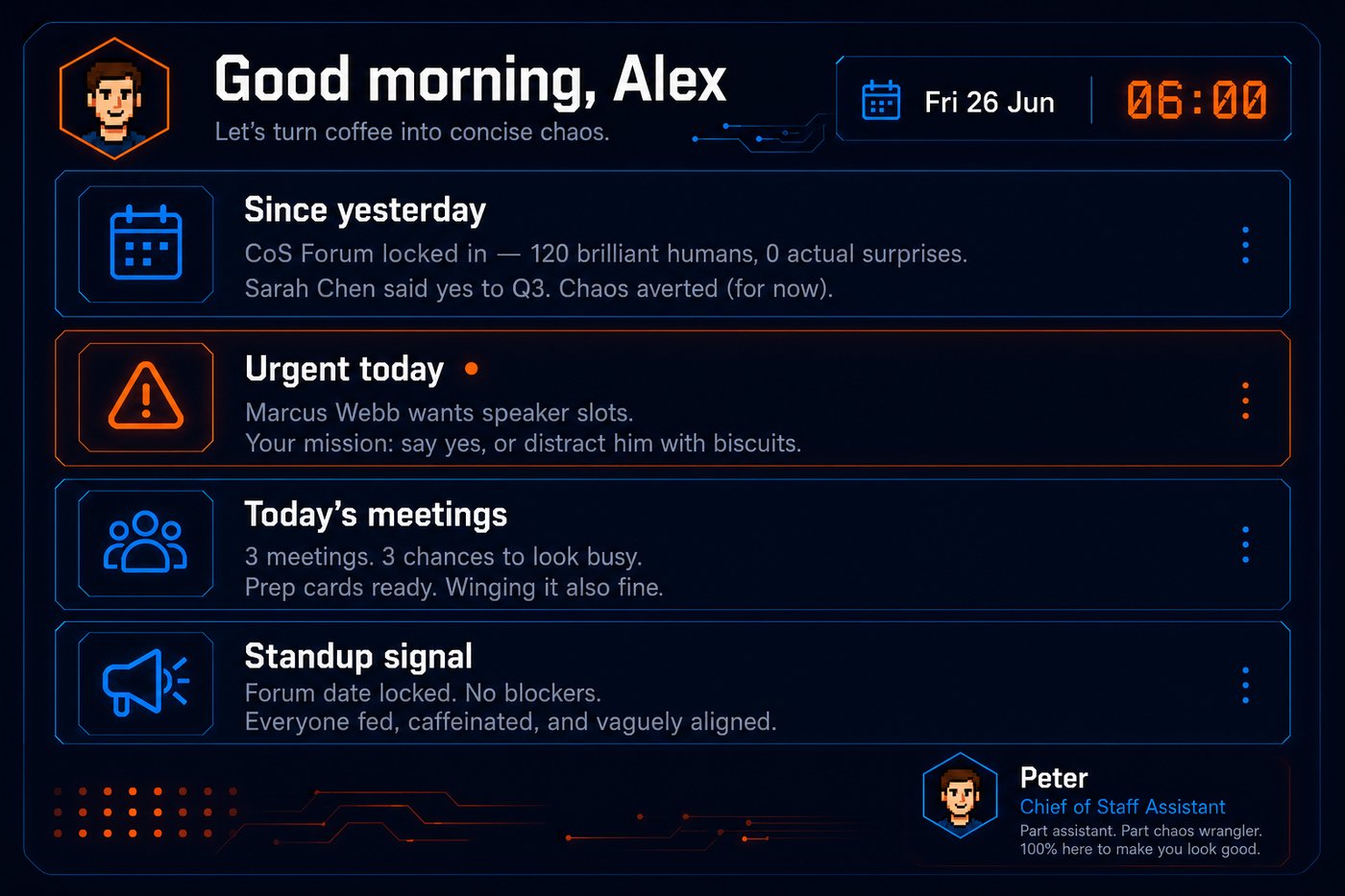
The daily briefing: everything I need to know before I open anything else. It runs while I'm asleep.
I click into a 1:1 on my calendar. Every meeting I take is auto-recorded and transcribed by Fellow, an AI notetaker, so the system always has the transcript of our last conversation. It has already read the agenda linked to the event, flagged the two open threads from last time, and suggested three follow-up questions based on what it knows about the person from prior sessions. Prep takes two minutes instead of fifteen.
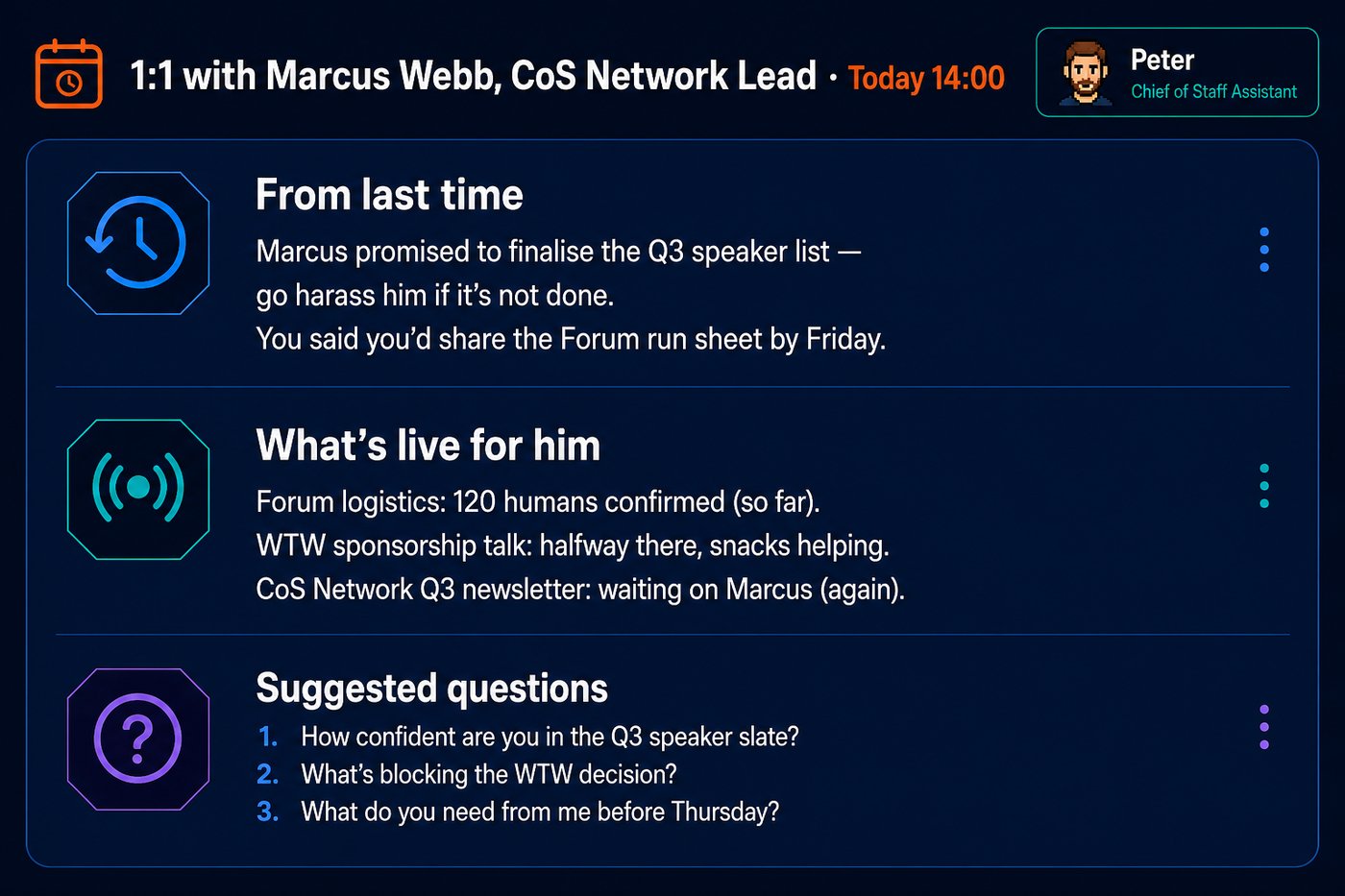
Auto-generated 1:1 prep. Open items, context, coaching questions. Ready before I open the meeting invite.
The loop
Running in the background while I'm in meetings is a scheduled task that fires every 30 minutes on weekdays. Developers have a name for this pattern: the Ralph Wiggum loop. Point an agent at a queue of work, wake it on a timer, and let it keep going until the queue is empty. Mine reads the system state, picks up new tickets from Todoist, progresses the active ones where it can, and flags anything that needs me.
The inputs are where it gets interesting. Because Fellow records everything, the loop can fetch each new transcript and process it: decisions, action items, commitments, context for the next meeting with those people.
Last month I committed in standup to preparing something for an all-hands slot that Friday, and never made a ticket for it. The loop processed the standup transcript, spotted the commitment, and added a suggested task to my board by the time I got back to my desk. I approved it, and by lunch it had made the first draft and had three clarifying questions waiting for me.
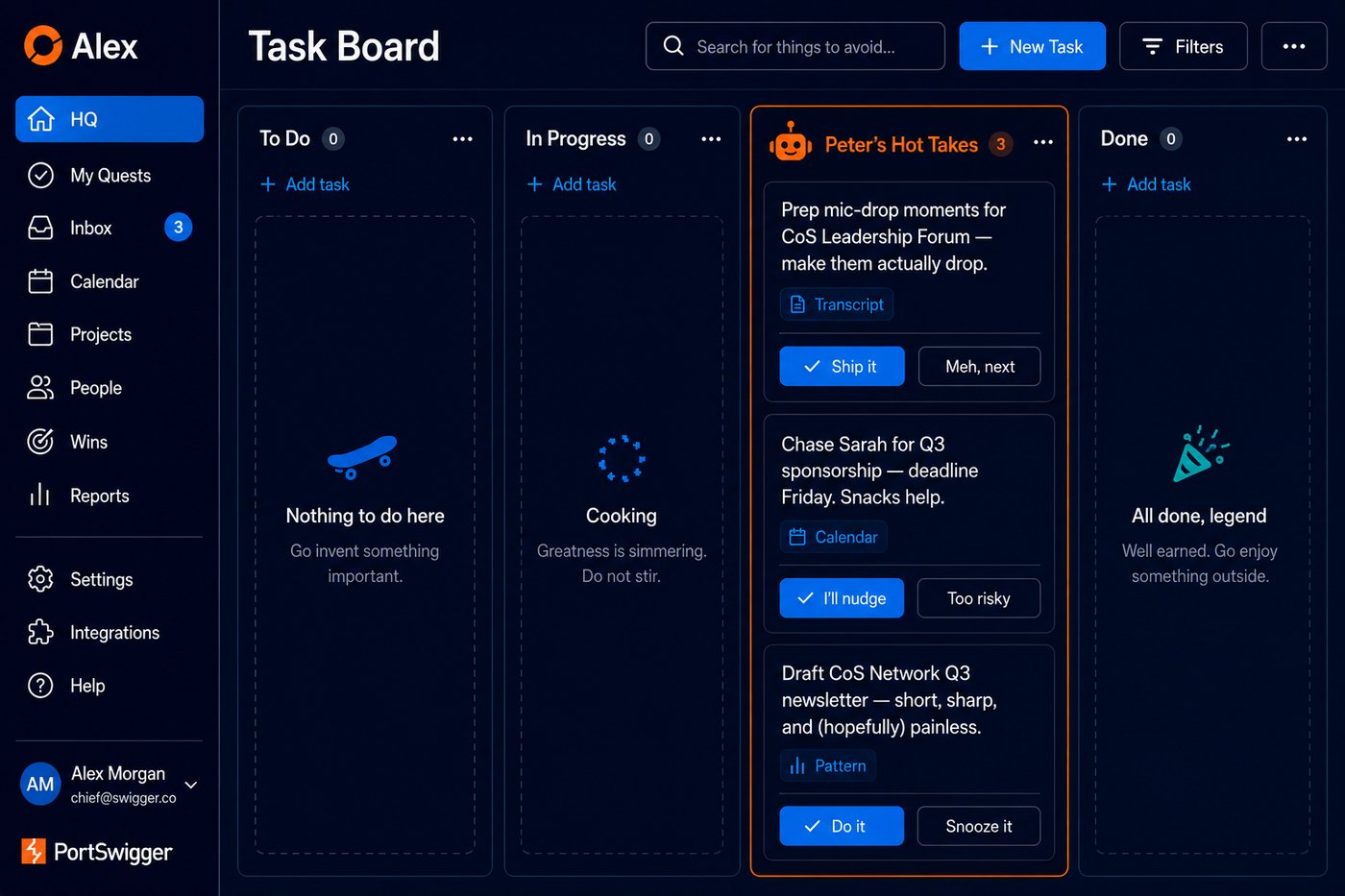
Peter's suggestion cards: commitments and follow-ups I'd have missed. Accept rate is embarrassingly high.
Another one: a colleague mentioned a prioritisation framework he'd been using, and over the next few days I read three blogs on the topic. Peter spotted the thread and suggested incorporating the framework into how the backlog was categorised. I approved it, and it recategorised the entire backlog in one pass. That kind of thing has happened several times now, because the system sees patterns across my week that I can't, for the simple reason that it reads everything while I'm sat in meetings.
I don't catch everything. It does.
Where it gets it wrong
Before this reads like an advert, the honest bit. A system this confident fails confidently too.
My favourite: the loop decided the fastest way to unblock a stalled task was to assign the action directly to my boss. Not flag it to me. Assign it, with a due date. I caught it in the review queue. There may be a version of the Chief of Staff role that survives handing the CEO homework on a Tuesday morning without warning, but I wasn't keen to test it.
The quieter failures are more instructive. It mixed up two colleagues in a meeting summary and attributed one person's update to the other. It kept preparing briefing notes about someone who had resigned, weeks after they left, because nothing in its files told it to stop. It surfaced a year-old product release as industry news. The pattern is always the same: the errors don't look like errors. They arrive in the same tidy formatting as everything it gets right, which is exactly what makes them dangerous.
So now anything involving people gets checked against the source before it leaves my laptop, and every failure gets written down the same day so it doesn't happen twice. The judgment still sits with me. I suspect it always will.
Which leads to the more uncomfortable admission: this system has made my job harder, not easier.
Board prep used to take me a week. Gathering the executive updates, pulling the pack together, minuting, sending it all out. It was never hard work, but it was interesting work, the kind you can do with a coffee while your brain refills, and I found it recharging. Now I tell Peter to do what we did last quarter, and it costs me five minutes of my day to set it off.
Which is a win, obviously. But those tasks were the padding in my week. Strip out everything the AI can do and what's left is the concentrated residue: the trade-offs, the hard calls, the decisions you have to get into the right headspace for. My calendar used to alternate between draining and recharging. Now it's the draining ones, back to back, all day.
I don't have a fix for this yet, and I'm not sure there is one beyond noticing it and protecting recovery time deliberately instead of getting it for free. But if you build one of these, know what you're signing up for: your week gets more valuable and more tiring at the same time.
You can't have mine
When I demoed this internally, half the messages afterwards were some version of: can you share it? And the honest answer is that sharing it wouldn't help you, for two reasons.
Because it builds itself
I didn't design any of what I've shown you. There was no blueprint, no requirements document, no grand vision for a personal AI operating system. I noticed where I kept hitting friction, asked Claude to fix that one thing, and moved on to the next friction. Everything the system is today accumulated from those fixes.
Urban designers have a name for the way that kind of structure emerges: desire paths. They're the trails worn into the grass between buildings, there because nobody walks where the architect put the pavement. Nobody plans them and nobody builds them, but enough people take the same shortcut and eventually the shortcut becomes the path.

Nobody walks where the architect put the path.
That's how this system builds itself, and it's still how it grows now. When something annoys me, we fix it, and the fix sticks. When it gets something wrong, I correct it the way I'd correct a new hire, and it remembers. Two months of that and the dashboard was laid out the way my eyes move through information, the notifications matched what I find urgent rather than what a product manager somewhere decided urgency means, and the only scheduled tasks left were the ones I read every day. The rest got deleted.
Not designed from day one. Worn into existence. It's also why the failures don't put me off: every correction makes tomorrow's version better, and the compounding is the point.
And it wouldn't fit you
All of which means the system is hyper-personalised. Every layout choice and notification rule encodes a preference I discovered by hitting a wall, and the knowledge base holds six months of decisions, corrections, and context specific to my role and my company. It even takes a daily copy of my Chrome history, so it has learned what I read and which podcasts I listen to; that's how Peter spotted the prioritisation framework thread. In your hands it would be a stranger's filing system: organised, confident, and wrong.
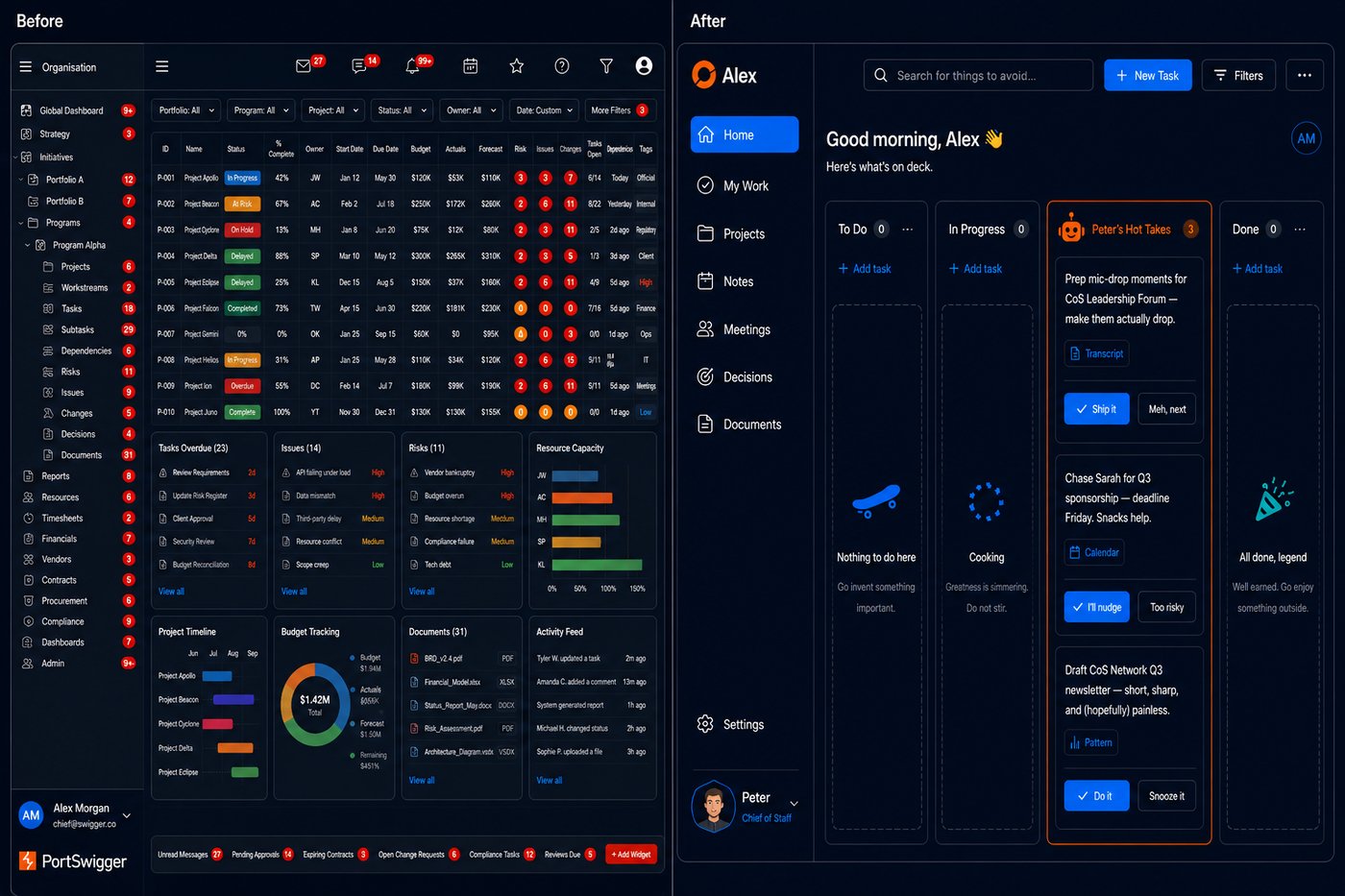
Built for process versus built around you.
The deeper problem is the mistake I keep watching smart people make: treating these systems like software. Procure it, fill in a few config settings, expect it working within the hour. Then they run one two-minute prompt, it fumbles, and the verdict comes back that AI can't do X. A junior hire couldn't do X on day one either. You'd put months into training them, explaining the personalities, your principal's preferences, how the VPs like to be communicated with, and you'd think nothing of the investment. Do the same for the AI and it repays you faster than any hire, because it never forgets what you told it. Refuse, and you'll get the 80% version forever: not quite your company, not quite your voice, not quite right.
But it's easy to build your own
The good news is that none of this is exotic, and none of it needed me to write code. Start with the single biggest friction in your working week and ask the AI to fix that one thing, validate it works, then move to the next one. Let the desire paths emerge from your own working patterns, not mine.
What it runs on
The stack is Claude, specifically Cowork, the mode that works directly in folders on your machine, plus its scheduled tasks; Todoist as the task board; Fellow recording the meetings; and one folder of plain markdown files as the system's memory. The Command Centre is a small local web app Claude wrote and maintains. And none of it is Claude-specific; the same shape works with Codex or any of its peers.
Cost: at full tilt this runs about $50 a day, though that's on a usage-billed enterprise plan. You could comfortably run all of it on a Claude Max subscription. Whether that's expensive depends on the comparison: as a software subscription, steep; priced against the work it does, which I would otherwise need another person for, it's the cheapest hire I've made. The real early investment is time anyway. A few hours a week of tinkering for the first two months, tapering as the corrections compound.
The expensive ingredient isn't the software. It's the corrections and accumulated preferences in that folder, which is exactly the part you can't download.
How to start building your own
Where do you start? Smaller than you think. And sooner: the "I'll block out a Friday and figure it all out" plan fails for one simple reason. You will never get that Friday.
Step 1: Pick one folder. Everything lives there.
Not Documents/AI/Work/CoS/v2/final. One folder. One source of truth. Every doc, every prompt, every output goes in there or it doesn't exist. It sounds trivial, but the discipline of one folder is what lets a fresh session pick up cold: when the AI starts a task, it reads from files. If your files are scattered across four tools, it's flying blind.
Step 2: Do all your work in that folder, through Claude Cowork.
Cowork is built for exactly this: it reads and writes real files in your folder rather than trapping everything in a chat window. Stop treating AI as a search engine you occasionally consult. Route real work through the folder: briefings, prep, draft comms, agendas, post-meeting notes. Every piece of work that happens in the folder is something the system can learn from. Everything that happens elsewhere is invisible to it.
Step 3: Connect everything you're allowed to.
Calendar, email, chat, task manager, meeting recorder. Each connection is a sense, and every tool you leave disconnected is a blind spot the system will confidently ignore. A system that can read your calendar but not your meeting transcripts will keep telling you things you already know. This is also the step where you should talk to whoever owns data governance at your company before, not after. Your compliance colleagues will thank you, or at least resent you less.
Step 4: Hand over the reins.
Everyone's instinct is to work out from first principles which parts of their week AI will be good at, and delegate those. Resist it. You're too close to your own habits to make that call well, and you'll be slow and wrong about it. Give the decision to the system: connect everything, then ask it where it thinks it can help. That's what the weekly desire-paths scan below does. It reviews your week, spots what you did manually more than once, and recommends one thing to encode. Your job shrinks to yes or no. It's the second card below, and it's the one that matters most.
That's the shape. One folder, everything connected, one improvement per week. The question I get next is which scheduled tasks to start with. These three, registered in this order.
Scheduled task 1: Daily morning brief (weekdays, 06:30)
Read today's calendar entries. For each meeting: one sentence on what it's about and one thing I need to have ready before walking in.Check any outstanding commitments or tasks I haven't moved forward in the last 48 hours. Surface the most urgent one.Is there anything I promised someone in the last 72 hours that I haven't followed up on? If yes, flag it.Keep the whole output under 200 words. I should be able to read it before I open email.
This takes 60 seconds to read and replaces the 20-minute "what have I forgotten" spiral most of us run over the first coffee. The point isn't the summary; it's getting the right questions asked before the day starts.
Scheduled task 2: Weekly desire paths scan (Fridays, 16:00)
Review the tasks and outputs in this folder from the past 7 days.For each task, note:- Where I went around the system (opened a different tool, did something manually that could have been automated, repeated a step I've done before)- Any pattern that appeared more than once- Any decision I made that isn't written down anywhere as a standing instructionThen suggest ONE new workflow to encode — either as a standing instruction I add to my system prompt, or as a scheduled task that runs automatically.Be specific. "Draft a weekly briefing" is not specific. "Every Monday at 7am, read last week's completed tasks and the calendar for this week, and produce a 200-word priorities note" is specific.Don't suggest more than one thing. The goal is one improvement per week, compounded.
Run it every Friday for a month and you'll have four new rules or scheduled tasks that didn't exist before, each one encoding something you were doing by hand. This is the task that builds the system. The others just run it.
Scheduled task 3: Mid-day momentum check (weekdays, 13:00)
It's 1pm. Look at what I had planned to do today versus what I've done.If I'm on track: what's the most important thing to protect for the afternoon?If I'm off track: what derailed the morning? Is the thing that derailed it more important than what I'd planned? If yes, update the plan. If no, name the one thing I need to get done before 5pm regardless.One paragraph. Don't summarise my whole task list. Just the decision I need to make right now.
Most CoS mornings get eaten by reactive work. This task doesn't fight that. It forces a conscious choice at 1pm about what the afternoon is for. "Is the thing that derailed it more important?" is the question most of us avoid. Running it on a schedule makes it harder to dodge.
What the first 30 days look like
Days 1–5: Pick the folder. Connect your calendar and meeting recorder. Do one real piece of work through Cowork. Not a test: work you'd have done anyway. A meeting prep, a draft email, a quick brief. Notice where you'd normally have reached for a different tool. Don't change anything yet. Just notice.
Days 6–14: Register the morning brief. Run it every day for a week even if it feels redundant. It won't feel that way by day 10. Add one rule to your setup based on what the first week's brief kept flagging; something will have come up by then.
Days 15–21: Register the weekly desire paths scan. Run it on Friday. Whatever it surfaces, encode it, even if you're not sure it'll stick. You can always remove a rule later; you can't get back the time spent doing things by hand.
Days 22–30: Register the mid-day check. Then review: which of the three tasks earned its keep, and which felt like noise? Cut the noise and keep what worked; that's the only tuning worth doing in month one.
By day 30 you'll have a system that's yours, not because you built it from a template but because you built it from your own friction. That's what makes it stick.
Further reading
Symphony — OpenAI · The issue-tracker-as-control-plane pattern, formalised and open-sourced. If you want to understand why the architecture I landed on works, start here. I'd arrived at the same shape by accident; they gave it a name.
Harness Engineering — OpenAI · Five months, a million lines of shipped code, none of it written by hand. "Humans steer, agents execute." Four words that describe every scheduled task I run.
The Ralph Wiggum loop — Geoffrey Huntley · The dev-world original of the loop that runs my working day. Simpler than you'd believe.
How I deleted 95% of my agent skills and got better results — Nick Nisi, WorkOS · The talk that convinced me to measure what my system does and cut what doesn't earn its keep.
Welcome to Gas Town — Steve Yegge · Multi-agent orchestration taken to its logical extreme. Read it to see where this goes when you stop being sensible about it.
A Brief History of Digital Gardens — Maggie Appleton · Not about AI at all. The best case I've read for building personal, evolving systems rather than adopting someone else's.
And if you only take one thing from this post, make it this: don't try to work out which parts of your week the AI can do. Connect everything, hand over the reins, and let it tell you.
Start with the folder.